- Samsung’s One UI 7 is coming around later this year with Android 15, but it could benefit from some improvements.
- These include one-hand-friendly quick settings, better Pro Mode, customizable icons, and a vertical app drawer.
- For privacy measures, Samsung should add an app sandbox to run suspicious apps in a separate instance.
Over the years, Samsung’s One UI has established itself as one of the best Android skins available out there. This is due to its tons of features and customizations, as well as the overall smoothness. One UI 6 brought several changes that everyone was not happy with, and long-requested features were still missing. Keeping that in mind, we’ve created a wishlist of all the improvements, enhancements, and features we hope to see in the One UI 7 release.
Since we know that One UI 7 will be based on Android 15 , we will be skipping features already available in Android 15 Beta like App Archive, Notification Cooldown, and Audio Sharing. This is just a list based on changes we would like to see and some much-awaited features.
Vertical App Drawer
Android devices have had a vertical scrolling app drawer since Android 6.0 Marshmallow yet for some odd reason, Samsung has stuck with a horizontal page-style drawer till now. At first, I used to find it as a novelty, but now I have grown tired of it. It is in need of a dire facelift.

Scrolling through pages upon pages to find the one app I’m looking for. So it would be quite refreshing to see Samsung include a vertical app drawer, or at least add an option to switch to one. However, rumors suggest that this feature is in the works for the One UI 7 update.
Multiple Lock And Home Screen Setups
Apple introduced the ability to create multiple lock screen and home screen setups that you can switch between, just like the watch faces on your smartwatch. Honestly, even as someone who prefers Android, this feature made me jealous of iPhone users.

Since we have seen Samsung carry over some features from the other side of the garden, I would love for Samsung to adapt this feature and bring it to One UI. It would be great to rotate through different setups depending on the occasion or the time of day. They should also include further customizations for the lock screen and add support for third-party widgets if possible.
Battery and Storage Health Data
With the launch of their latest flagship S24 series, Samsung has promised to offer 7 years of Android updates, similar to Google’s Pixel 8 series. Such promises of long-term updates are commendable, but then Samsung should include some sort of way for users to monitor their battery and storage health data.
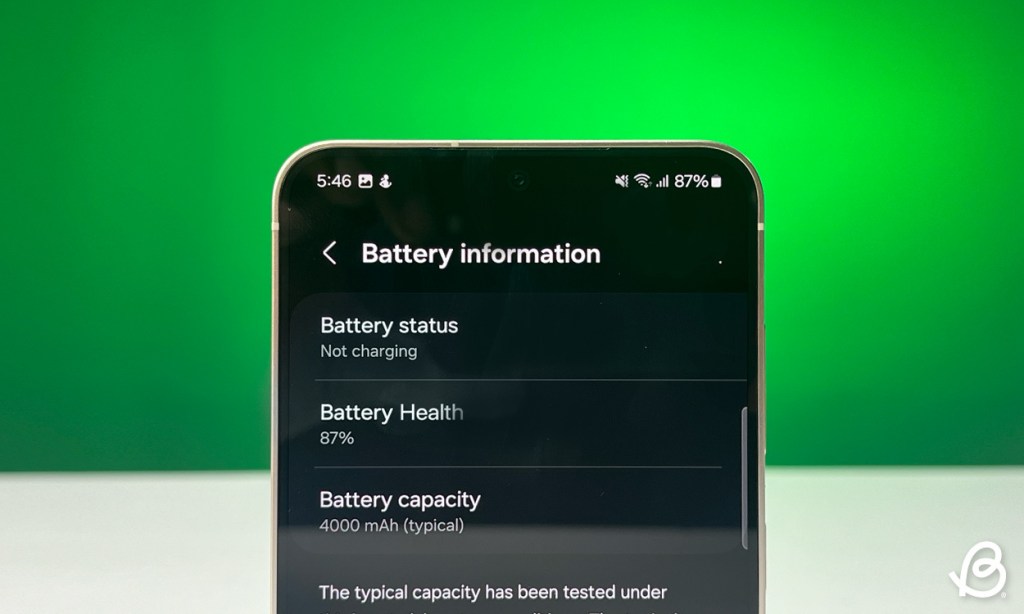
The battery is the first thing that wears out over long-term usage. That is why the option to check your device’s battery and storage health is necessary. It should allow users to check the charging cycles and battery health , like the iPhones and some OnePlus models. Android 15 might incorporate a feature to display storage health that will also degrade over time, so the brand should adopt it as well.
App Sandbox
The open nature of Android allows you to download and install apps from other sources. As someone writing about Android, I have to test multiple apps on my phone that I don’t trust completely. There should be an App Sandbox feature for such situations.
This will run apps in a separate instance with limited permissions so they don’t interfere with system and user data like media files or documents. It should automatically kick in when installing an app from an unknown source as a privacy measure. This will go a long way toward the security of user data.
Improved Pro Mode
I thoroughly enjoy the Pro Mode in One UI, as it lets me tweak a bunch of options to capture that perfect shot. But there are a couple of features that are absent from the viewfinder that I would like to see added in One UI 7.

First is turning on grid lines for the Pro mode viewfinder. Currently, you can enable it from Camera settings, but I don’t use grid lines outside of it. Turning on this feature applies grid lines throughout all camera modes, and I have to open settings again to turn it off.
Next is a toggle to switch between different image formats . S series of devices support shooting in the RAW format along with the usual JPEG. You can choose to shoot with either format in the Pro Mode, but like grid lines, these options are also buried in Camera settings. Xiaomi Mi 14’s Pro Mode lets you change it right from the viewfinder, so Samsung should consider adding it too.
Customizable Icons
There is no doubt that Samsung’s icons are… “icon-ic”. But like the app drawer, they haven’t seen major improvements throughout the years. In a skin as feature-rich as the One UI, asking for an option to customize app icons wouldn’t be too much.

You can currently change them to follow material theming, but I would love to have the option to change shape, size, and even colors if possible. There is a GoodLock module called Theme Park that allows you to do the same, but a native option within the OS will be much appreciated.
Redesigned Quick Settings
One UI is designed to be one-handed friendly, which is why the title of any app and settings take up the top one-third of the screen. This was also present in the quick settings panel. However, with the One UI 6 update, the entire panel changed to take up the whole screen , requiring you to use both hands to access the Wi-Fi and Bluetooth toggles positioned at the top.

This is a jarring shift from the design language followed by the rest of the interface. This is why I want to see a more one-hand-friendly redesign of the quick settings panel for better accessibility . I also couldn’t help but notice that there is no option to switch Wi-Fi and Bluetooth toggles with any other option. So there should also be an option to change that as well.
Other Features Coming to One UI 7
Besides what we have mentioned above, we know that Android 15 features like App Archive, Notification Cooldown, Per App Screen Recording, Default Wallet app and more will make their way to One UI. You can expect that Samsung might have their own twist on some of these features, which will be interesting to see.
These are some of the features that I wish to see in the coming version of One UI. Drafting this list was like creating a Christmas wishlist of all the gifts I wanted this year. Now that the list is complete, we have to wait for the beta to start which just like One UI 6 should be coming near Q3 of this year for the S24 series of devices first.

With over 4 year of experience under the belt, I cover all facets of consumer tech, from smartphones to other consumer electronics, our favorite social media apps, as well as the growing realm of AI and LLMs. As an Apps and AI writer app Beebom, I provide my expertise in all these areas, weaving stories that help you get familiar with the tech around you. But you will find me playing NYT daily puzzles in my free time.
Add new comment
Name
Email ID
Δ

- Samsung’s upcoming Galaxy S25 Ultra could have the same battery and charging speeds as the S24 Ultra.
- To compensate for this, Samsung is developing a “Battery AI” feature.
- The feature would boost the battery and make it last 5-10% longer by killing unwanted processes.
We’ve seen many smartphone components evolve over the years, but one quintessential component that has remained the same is the Battery. Samsung wants to fix that by using AI on its upcoming Galaxy S25 series as it expands its AI battalion . Here’s everything you need to know.
First reported by Wccftech , X (formerly Twitter) user Sawyer Galox posted that Samsung had plans to increase the Battery size and charging speeds on the S25 Ultra. The brand has now backtracked on the same to “keep the price down”. This means the Galaxy S25 Ultra will feature the same 5,000 mAh cell and 45W charging speed as the S24 Ultra.
However, another X tipster PandaFlashPro posted that Samsung is working on “Battery AI” which could make the phone last 5-10% longer. Battery AI will smartly “shut down unnecessary tasks” to save battery.
Android OEMs, including Samsung, already have their optimizations in place; hence, we’re not exactly sure how Battery AI will work. However, we do hope the AI doesn’t go overboard killing necessary apps.
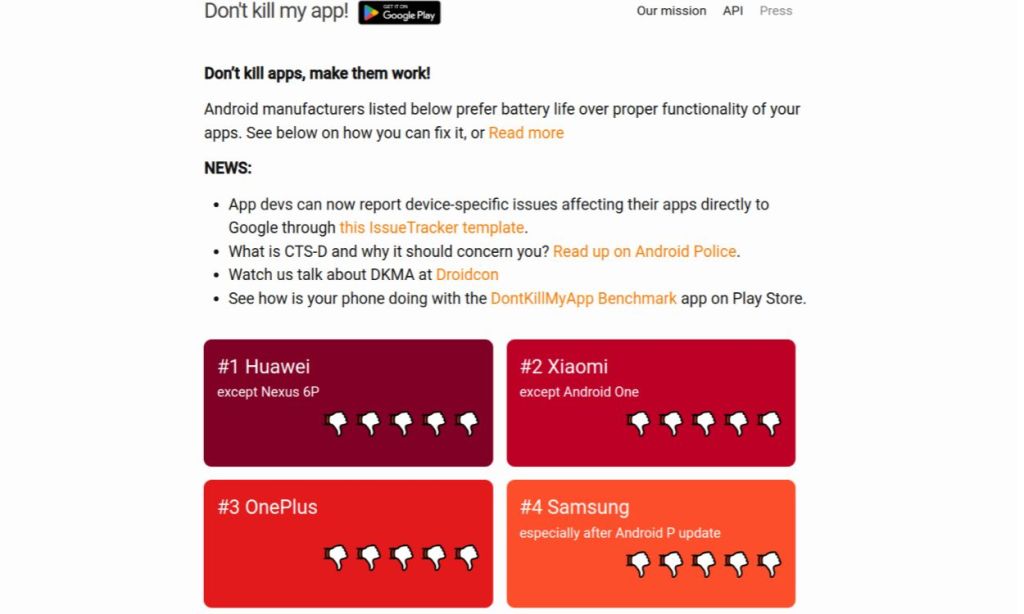
Samsung’s current background app optimizations make its Android skin One UI the fourth-worst OEM skin on Don’t Kill My App, the most popular benchmark that measures how efficiently Android skins handle background apps.
Abubakar covers Tech at Beebom, with his passion for technology tracing back to 2011 when he received a Dell Inspiron 5100 as a gift. He’s also a passionate advocate for the right-to-repair movement, believing in empowering users to maintain and extend the life of their devices. Outside the tech world, he enjoys watching anime and exploring his newfound enthusiasm for Japanese cars. In his free time, you’ll often find him immersed in Genshin Impact or researching his next gadget purchase. Before joining Beebom, he contributed to leading publications like Android Police, How-To Geek, and Fossbytes.
Add new comment
Name
Email ID
Δ
- Reports suggest Samsung’s mid-year Unpacked event could be held on July 10.
- The event will be held in Paris, a venue that coincides with the 2024 Summer Olympics, where Samsung is a major sponsor.
- Samsung is expected to launch the next generation of Galaxy Fold and Flip devices, Galaxy Watch 7 series, and a surprise addition - Galaxy Ring.
Samsung has been hard at work on its upcoming foldable and wearable devices coming in the next Galaxy Unpacked event. The company usually holds its mid-year Unpacked event in July or August, and we can expect the same this year.
SamMobile reports that its sources have confirmed Samsung’s next Unpacked event could be held on July 10 in Paris . The venue for the event coincides with the 2024 Summer Olympics, where Samsung is a major sponsor.
One of the highlights of the event will be the company’s next foldable devices. We could see the Galaxy Z Fold 6 and Z Flip 6, Galaxy Watch 7 series, and the Galaxy Ring .
Samsung could also announce a slew of AI features that might be coming to One UI later. There are rumors of an even stronger partnership with Google for more exclusive Android features like Circle to Search.
As per the rumors we’ve heard before, Samsung plans to launch the Z Flip 6 with only an Exynos 2400 variant instead of Qualcomm Snapdragon 8 Gen 3. The current-gen Exynos brings a lot of improvements from the previous gen, but it still isn’t as good as its Snapdragon counterpart.

Image Courtesy: OnLeaks x MySmartPrice
We haven’t seen much about the Z Fold 6, besides its renders which leaked almost a month ago, suggesting a few changes from the Galaxy Z Fold 5. The leaked renders suggest the specifications will mostly remain the same and the only change will be the SoC. The same might be true about the Z Fold 6.

The Galaxy Watch 7, on the other hand, could come in a rectangular dial option. The Galaxy Ring, which Samsung teased in the last Unpacked event, could also debut in the upcoming event.
Abubakar covers Tech at Beebom, with his passion for technology tracing back to 2011 when he received a Dell Inspiron 5100 as a gift. He’s also a passionate advocate for the right-to-repair movement, believing in empowering users to maintain and extend the life of their devices. Outside the tech world, he enjoys watching anime and exploring his newfound enthusiasm for Japanese cars. In his free time, you’ll often find him immersed in Genshin Impact or researching his next gadget purchase. Before joining Beebom, he contributed to leading publications like Android Police, How-To Geek, and Fossbytes.
Add new comment
Name
Email ID
Δ
