- You should update your Netflix Household to enjoy uninterrupted streaming on the platform.
- To update it, open Netflix on your smart TV, then go to Get Help > Manage Netflix Household > Update Netflix Household.
- You can also manage connected devices using the Manage access and devices option in the Netflix mobile app.
Netflix Household is the outcome of the platform’s password-sharing restrictions , which means, only individuals who live together can access the streaming service. However, your living situation could change over time. Maybe you get another TV, switch to a different Wi-Fi, or a family member joins or leaves. In such cases, you must update your Netflix Household to continue using the platform without interruption. That is what we’ll talk about in this read, so let’s get started.
Set Up or Update Netflix Household on TV
Updating your Netflix Household isn’t essential so you can enjoy content without any interruptions, but also necessary for security purposes. Let’s say you shared your Netflix account with a pesky neighbor, and now that you have shifted, you don’t want them to have access anymore. So changing these settings can help you out with that. It takes just a few minutes, and here is how you can do it.
- Launch the Netflix app on your smart TV.
- Press the left arrow button on your TV remote to open the app’s sidebar.
- Using the down arrow button on the remote, navigate and select Get Help .
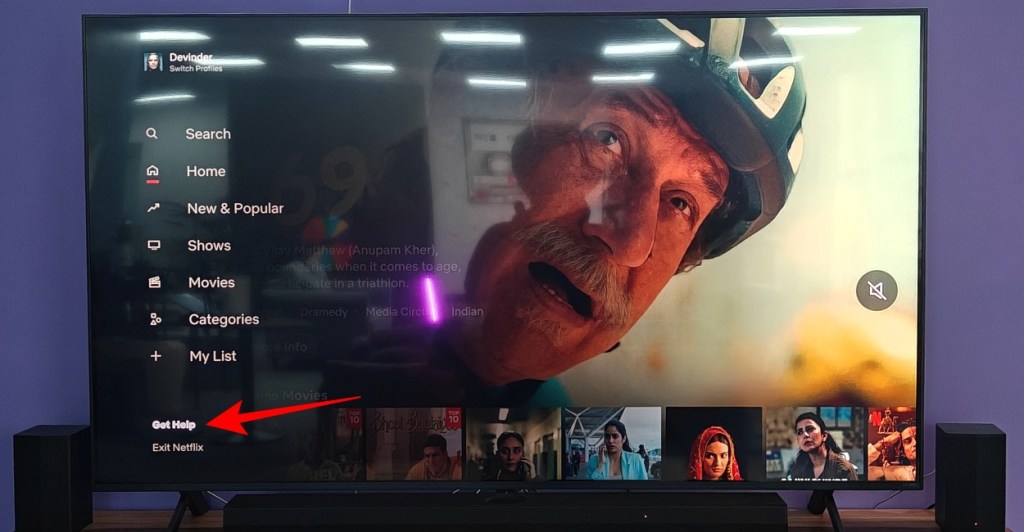
- On the Get Help screen, scroll down and select Manage Netflix Household .

- Now, press the Update Netflix Household button.

- The app will ask to send update instructions to the account owner’s email. On this screen, select Send Email .
- Open the email on your phone or PC, and tap on Confirm Update to update your Netflix Household.

This will not only your current device but also your Wi-Fi settings. Any device outside your updated household can’t access your Netflix account any further. Unless they connect with your home Wi-Fi within 30 days.
Manage Your Netflix Household Devices
Now that you have updated your household, you can check and manage which devices are connected to your account. Let’s say you don’t want your kids to have access to Netflix, then you can remove their devices so they cannot use the app. The same applies to other non-members of the family. Here is how you manage devices connected to Netflix. This can be done through the phone app.
- Open the Netflix app and select your primary profile.
- Then, select the My Netflix tab at the bottom right.
- Here, tap on the hamburger menu on the top right and select Account .

- Scroll down and select Manage access and devices under “Security & Privacy”.
- Here you will see a list of devices signed in to your Netflix account.
- To remove unwanted devices from your account, tap on the Sign Out button under those devices.

This is how you can check which devices are part of your Netflix Household and kick the ones that shouldn’t be.

With over 4 year of experience under the belt, I cover all facets of consumer tech, from smartphones to other consumer electronics, our favorite social media apps, as well as the growing realm of AI and LLMs. As an Apps and AI writer app Beebom, I provide my expertise in all these areas, weaving stories that help you get familiar with the tech around you. But you will find me playing NYT daily puzzles in my free time.
Add new comment
Name
Email ID
Δ


- A live-action Gundam movie will be released on Netflix.
- As of now, the cast includes Sydney Sweeney and Noah Centineo.
- The filming of the Gundam movie will begin sometime in March 2026.
Japan has had a massive impact on the world with its animes but one work of fiction that has created a generational fandom is the introduction of Gundam. Now being this popular, it goes unsaid that there have been multiple adpatations but now, the upcoming live-action Gundam movie is confirmed to be coming out on Netflix, and here, find out all you need to know about the upcoming project.
What Do We Know About the Upcoming Gundam Movie?

Image Credit: Tinseltown / Shutterstock
This new live-action adaptation of Gundam was announced all the way back in 2018, and Legendary Pictures was brought in as a co-producer. However, back then, details about the project were quite limited. Following this reveal, in 2021, Netflix confirmed that Jordan Vogt-Roberts will direct the movie. The filming was set to begin in 2023, but due to unforeseen circumstances, it never began, and later, we heard that the movie will not be made forward.
However, in 2025, it came to light that Sydney Sweeney and Noah Centineo were in talks with Legendary to star in the movie. Now, in 2026, a report by Deadline confirms that Sydney Sweeney and Noah Centineo will be starring in the live-action Gundam movie , and Netflix is on board to be the main distributor.
The filming of this project will begin in March 2026 and will be shot in multiple locations across Australia and the United Kingdom. So, let’s wait and see what Netflix and Legendary bring us with this live-action adaptation.

Shashank Shakya is an entertainment writer at Beebom. He has completed his Bachelors (Honors) in English Literature and is a published author. Shashank boasts incomparable knowledge about the Marvel and DC universe, along with other branches of entertainment with substantial experience in the field of writing.
Add new comment
Name
Email ID
Δ
