Unlike most common symbols that you can easily find on your Mac’s keyboard, the ° symbol doesn’t have a dedicated key for it. That means, whenever you want to type the degree symbol on your Mac, you probably search for it on Google and copy-paste it into the document you’re working on. However, there’s a much easier way to type the degree (°) symbol in macOS, and that’s exactly what we’re going to learn about in this article.
How to Insert a Degree Symbol on Mac
1. Use the Degree (°) Keyboard Shortcut on Mac
By far, the easiest way to type the degree symbol in macOS is by using the dedicated keyboard shortcuts . Here’s what these shortcuts are.
- Option+Shift+8: This is the actual keyboard shortcut for typing the degree symbol on Mac (°)
- Option+K: This is the keyboard shortcut to type the diacritic mark (˚), which looks similar to the degree symbol, but is smaller, and the usage is different. Though you can use it to imply degrees in your documents, we would recommend sticking with the option + shift + K shortcut.
- Option + 0 (zero): This is another mark, which, while similar in appearance to the degree symbol, is actually very different in usage. This is the masculine ordinal indicator (º) You can read more about it over here .
These shortcuts work across macOS, regardless of the app you’re typing in. So whether you’re writing an online article (as I am), or editing a document in Word, Libre Office, or any other text editor for Mac, you can use these shortcuts to type degree (°), diacritic (˚) or the masculine ordinal indicator (º).
2. Type Degree Symbol on Mac Using Emoji Keyboard
Alternatively, you can also use the Emoji and Symbols keyboard to insert degree temperature symbol on your macOS device. Here’s how to use it.
- Press ‘ control + command + space ‘ when editing text in any software on your Mac. This will open up the emoji keyboard.
Note: You can also open up the emoji keyboard by heading to “Edit -> Emoji & Symbols” in the menu bar.
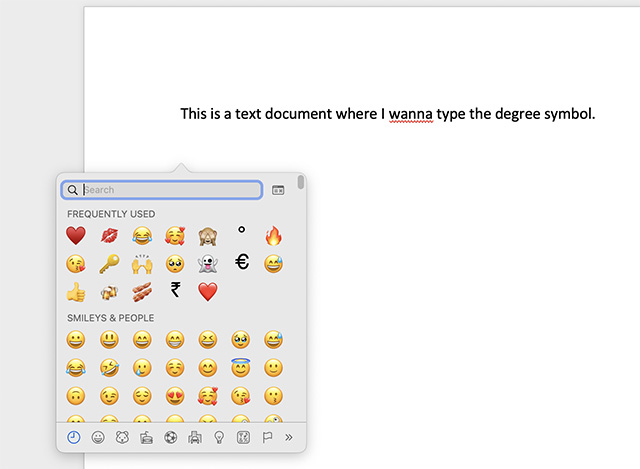
- Here, search for ‘degree’ in the search box, and choose the degree icon. You can also choose °F and °C directly from here if needed.

3. Type Degree Symbol on New MacBooks with Globe Key
New MacBooks, as well as new Apple keyboards have a Globe key along with the Fn (function) key. You can use this to quickly open up the Emoji & Symbols keyboard and type the degree symbol.
- When typing, just press the globe key on your keyboard and the emoji keyboard will pop-up. Now, you can search for ‘degree’ and type the degree symbol (°) easily.
4. Use Text Replacement to Type Degree Symbol on macOS
Even though the keyboard shortcut shift + option + 8 is quite an easy way to type the degree symbol on a Mac, if you’re looking for an even more seamless method to do the same, you can use text replacement to achieve this. Here’s how to use text replacement to type degree symbol on Mac.
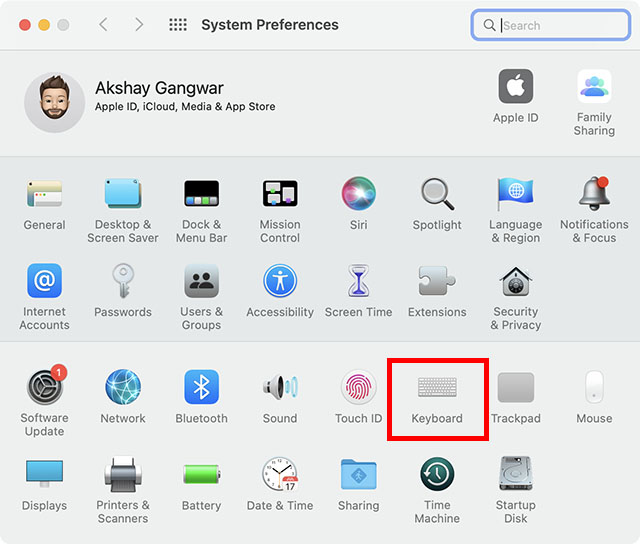
- Open System Preferences and go to ‘Keyboard’.
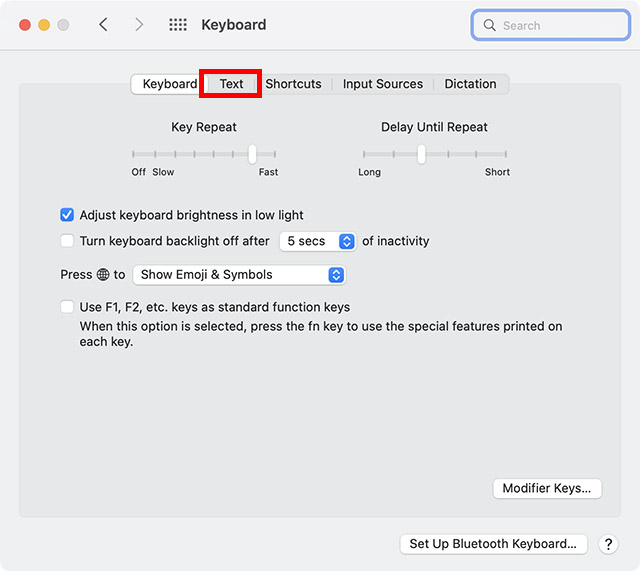
- On the top navigation bar, click on ‘Text’.
- Here, you can create custom text replacements. Click on the ‘+’ icon.
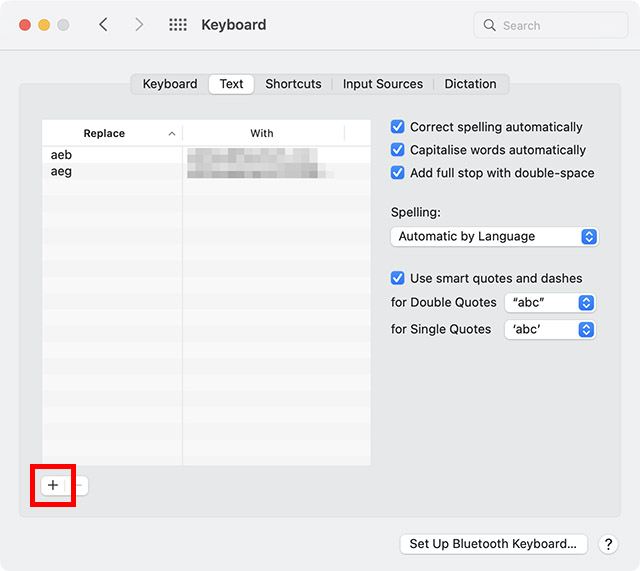
- Type the custom text you want to use. For example, I want to use “:deg” to type the ° symbol, so I’m typing “:deg” in the ‘Replace’ column.
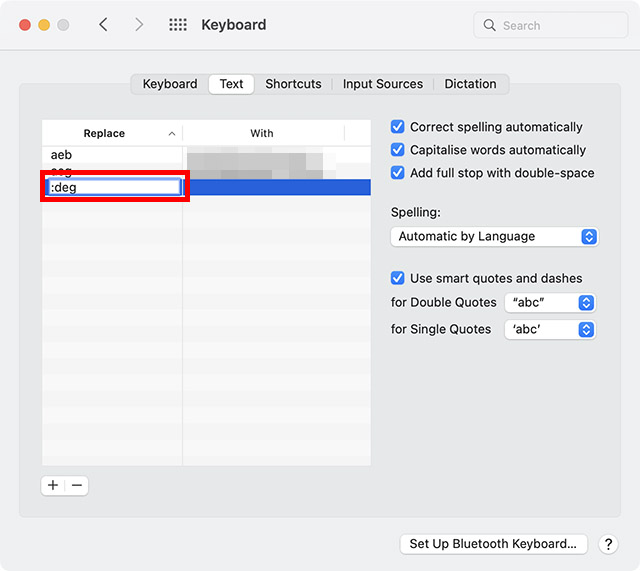
- In the ‘With’ column, type the degree symbol using the shift + command + 8 keyboard shortcut.
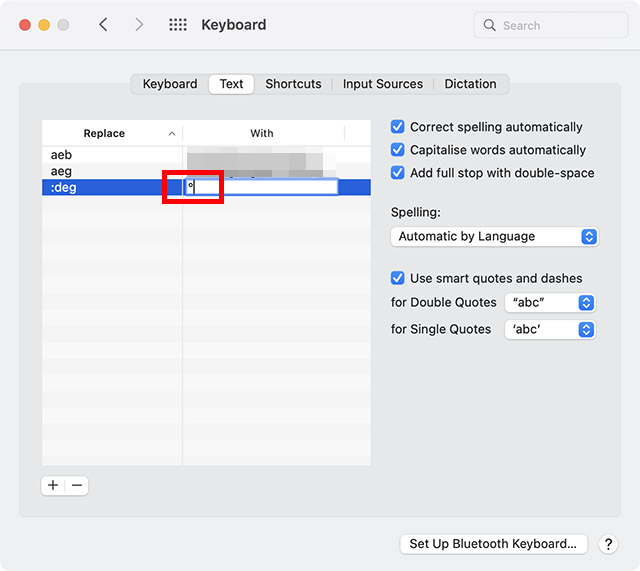
That’s it, now whenever you type “:deg” and hit the space bar, macOS will replace it with the degree (°) symbol automatically.
Type Degree Sign With Ease on Your macOS Device
An old school bibliophile who turned a tech nerd out of obsession. When he is not digging into hacks and tracking down stories that are breaking the internet, you may find him reciting poems.
Add new comment
Name
Email ID
Δ


- Apple and Google have officially confirmed their team-up for the next-gen Siri AI.
- The Cupertino Giant will be using Google’s Gemini for a more personalized Siri model as well as Apple Intelligence features.
- We can expect the next-gen Siri to come out with iOS 26.4, sometime in March or April.
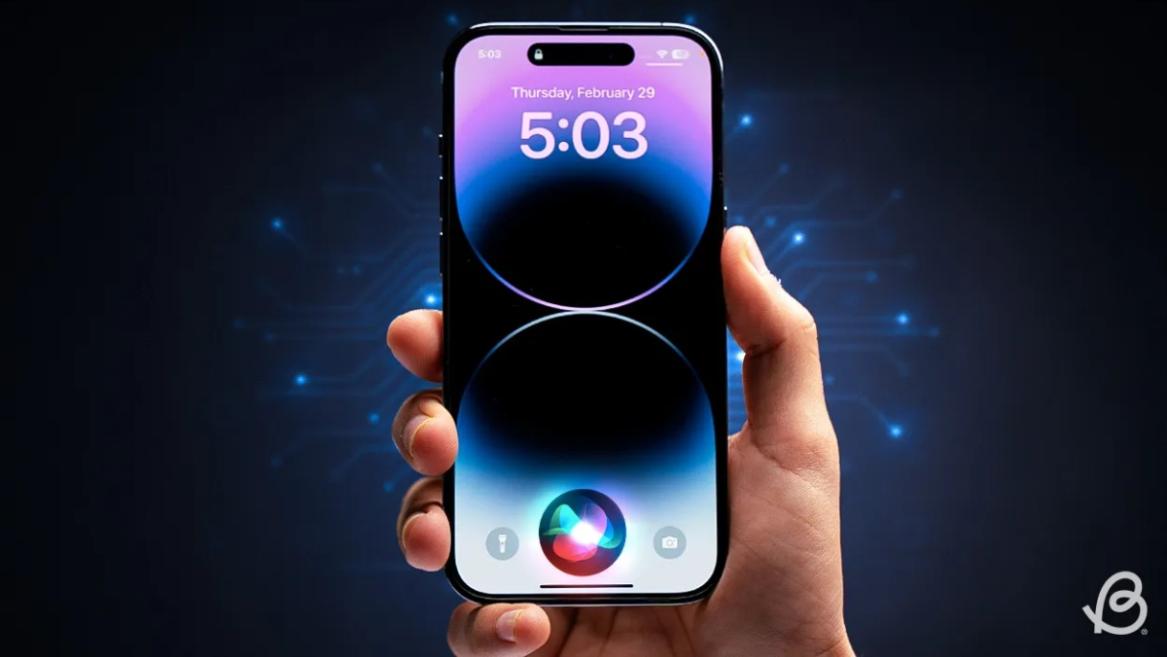
Apple has officially confirmed joining forces with Google to use its Gemini AI model to power the next-generation Siri. It will offer a more personalized experience and will be coming out with the iOS 26.4 update. Apple also plans to leverage Gemini’s capabilities for other Apple Intelligence features as well, later down the line.
The Next-Gen Siri will be powered by Google’s Gemini AI
Apple officially confirmed that it will be partnering with Google in a statement to CNBC . Here’s what it stated, “After careful evaluation, we determined that Google’s technology provides the most capable foundation for Apple Foundation Models, and we’re excited about the innovative new experiences it will unlock for our users.”
Later, Google also shared a post on X confirming the tie-up, “Apple and Google have entered into a multi-year collaboration under which the next generation of Apple Foundation Models will be based on Google’s Gemini models and cloud technology. These models will help power future Apple Intelligence features, including a more personalized Siri coming this year.”
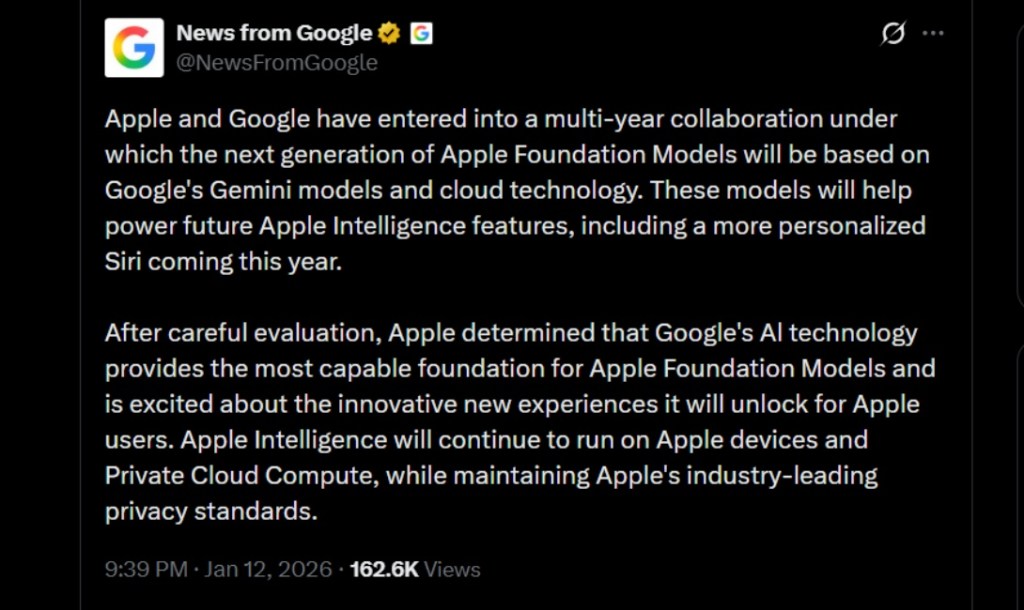
Image Credit: X/@NewsFromGoogle
Both statements clearly mention that the Cupertino Giant will be using Gemini to power its assistant Siri. This was already rumored, as Apple’s attempts to acquire Perplexity went nowhere. With Gemini, Siri will get a major AI update . It will be able to handle more nuanced conversations and provide better results. Something long-time Apple users have been asking for years.
The next-gen Siri will arrive with the iOS 26.4 update, which will launch sometime in March or April. And it is only going to be available for Apple Intelligence-supported devices .
Something else worth noting is how Google’s statement mentions that Gemini will power Apple Intelligence features. This leads us to believe that Apple could use Gemini’s multi-modal capabilities for its Writings tools , Image Playground , and Message summaries, too.
Elon Musk Not Happy With Apple and Google Tie Up
xAI CEO Elon Musk also responded to Google’s announcement post on X, sharing his thoughts on the matter by saying, “This seems like an unreasonable concentration of power for Google, given that they also have Android and Chrome.” Though we don’t expect either Apple or Google to respond to Elon, we will update the situation as it progresses.
It is worth noting that xAI is the company behind Grok, which is in hot water currently due to its inappropriate image generation fiasco , and has been getting backlash from multiple news outlets, X users, and even government authorities.
With over 4 year of experience under the belt, I cover all facets of consumer tech, from smartphones to other consumer electronics, our favorite social media apps, as well as the growing realm of AI and LLMs. As an Apps and AI writer app Beebom, I provide my expertise in all these areas, weaving stories that help you get familiar with the tech around you. But you will find me playing NYT daily puzzles in my free time.
Add new comment
Name
Email ID
Δ
