- You don’t need to turn off Siri altogether to get rid of Siri’s suggestions.
- On your iPhone, go to Settings > Siri & Search and turn off each option under Suggestions from Apple.
- To turn off Siri suggestions in Spotlight search, go to Settings > Siri & Search and turn off Show Suggestions and Show Recents.
Siri suggestions offer a great way to access apps and common actions for a personalized experience. You would see suggestions in Safari, share sheet, apps, Look Up, and more. That said, sometimes these suggestions might not fit your needs. Besides, some users might find the continuous suggestions irritating and distracting. If things are getting overwhelming, you can get rid of Siri suggestions so they no longer bother you. In this article, we’ll show you how to turn off Siri suggestions on your iPhone. Let’s begin.
How to Disable Siri Suggestions on an iPhone
Siri can offer app & content suggestions based on your frequently used apps and other habits. For instance, Siri can suggest contacts when trying to share a photo/document. While these suggestions are certainly helpful and speed up your experience, some people may find it distracting. If you also prefer not to see them, you can turn off Siri suggestions on your iPhone. Here’s how to do it:
- Open Settings and go to the Siri & Search section.
- Here, scroll down to the Suggestions From Apple section.
- Now, turn off all of these toggles – Allow Notifications , Show in App Library , Show When Sharing , and Show When Listening .
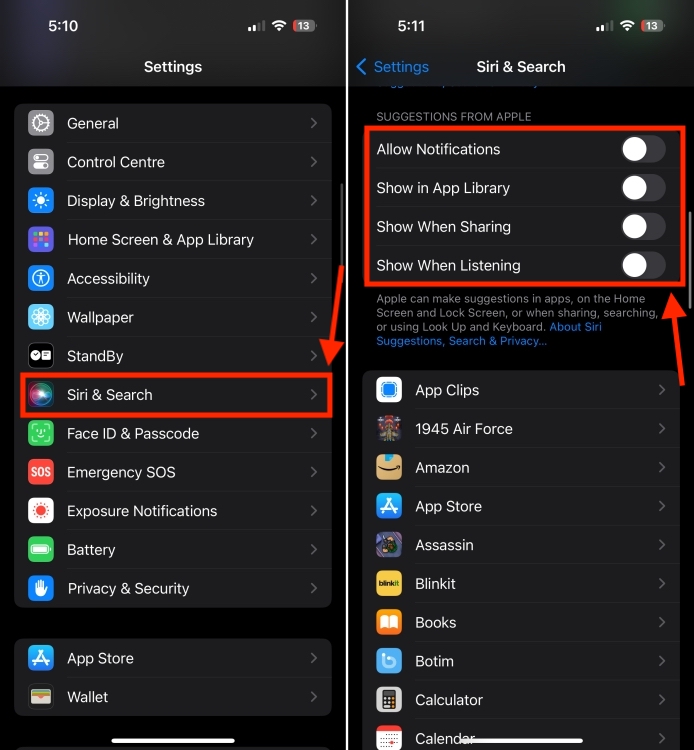
Of course, you can leave one or two options enabled, if you find them useful.
How To Disable Siri Suggestions in Spotlight Search
Siri also shows recommendations when you search for an app or a keyword in the Spotlight. Besides, it shows your recent or most used apps in the Spotlight search. While these Siri-powered suggestions are useful, they might also expose private data accidentally. To avoid this, you can remove Siri suggestions in Spotlight search.
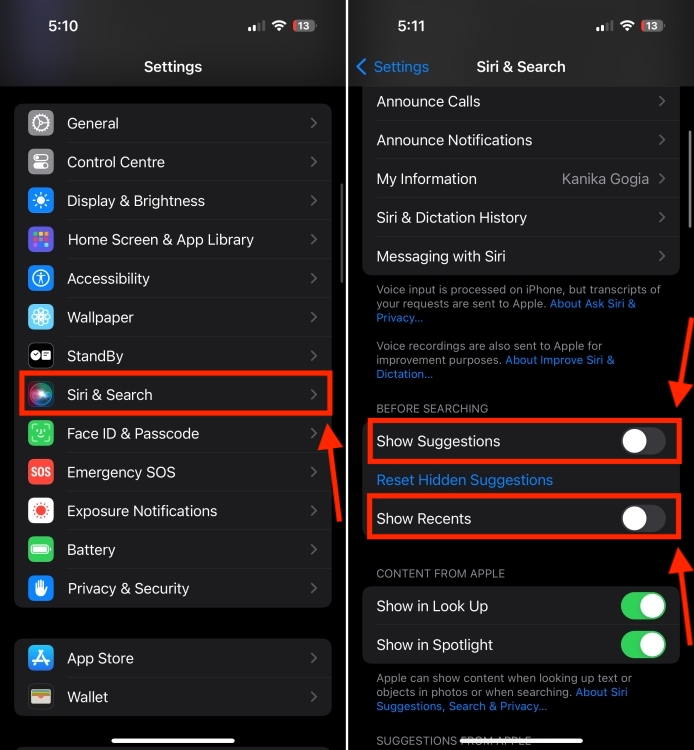
- On your iPhone or iPad, open Settings > Siri & Search .
- Here, turn off the Show Suggestions toggle under “Before Searching”. This will stop Siri from showing recommendations in Spotlight search.
- To get rid of recent searches on Siri suggestions, make sure to turn off the Show Recents toggle.
How To Turn Off Siri Suggestions for a Specific App
You can also customize which suggestions your iPhone can show, rather than turning off all the suggestions completely. This means you can turn off suggestions for specific apps on your iPhone. When you do this, that particular app won’t show Siri suggestions. Here’s what you need to do:
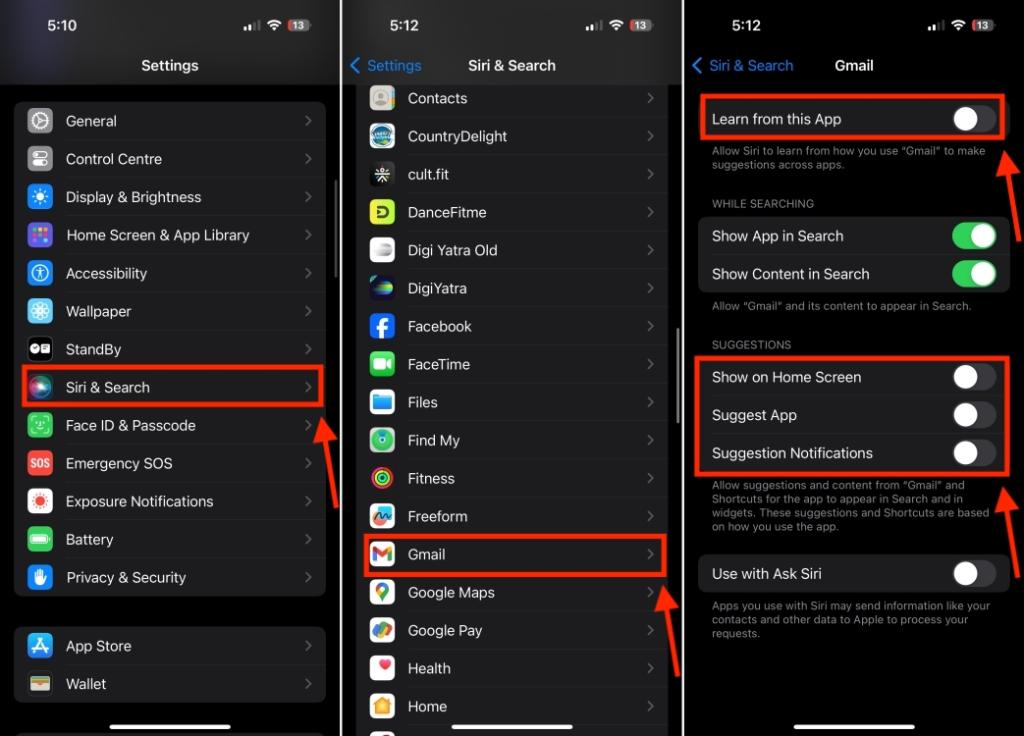
- Go to Settings > Siri & Search and scroll down to the list of apps.
- Now, select the app where you wish to turn off suggestions.
- To prevent Siri from using the app to learn our behavior, turn off the Learn from this App toggle.
- To stop suggestions from appearing on the Home Screen, turn off the Show on Home Screen toggle.
- To disable notifications from app suggestions, turn off the Suggestions Notifications toggle.
- Finally, if you completely wish to disable suggestions for that app, disable the Suggest App toggle.
How to Disable Siri Suggestions on Safari
Siri offers quite a lot of suggestions every time you open Safari. If you wish to stop Siri from suggesting on Safari, you can do that as well. Here’s how:
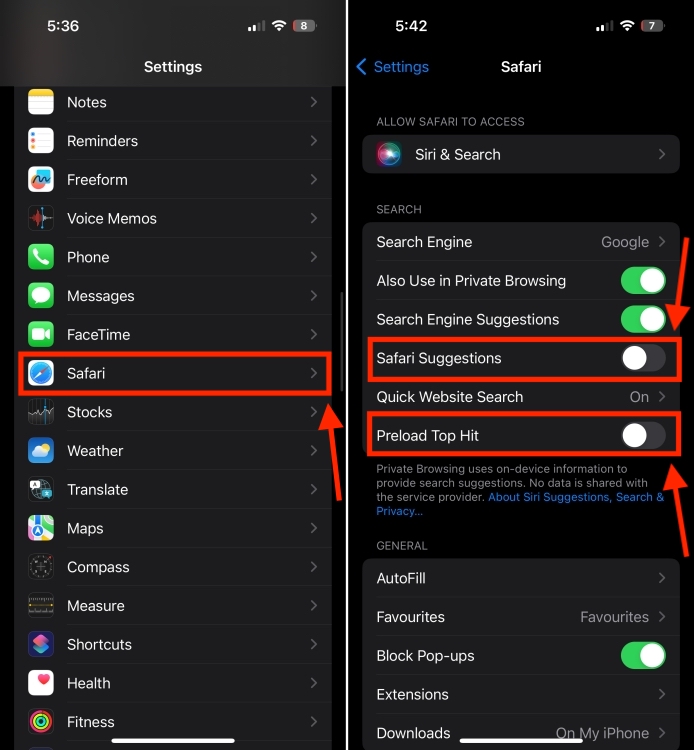
- On your iPhone, go to Settings and scroll down to Safari .
- Now, turn off the Safari Suggestions toggle.
- While searching, Safari preloads the result based on your browsing history. To prevent this, turn off the Preload Top Hit toggle.
Kanika has been a loyal iPhone user since 2014 and loves everything Apple. With a Master’s in Computer Applications, passion for technology, and over five years of experience in writing, she landed at Beebom as an Apple Ecosystem Writer. She specializes in writing How To’s, troubleshooting guides, App features, and roundups for Apple users to help them make the best use of their gadgets. When not writing, she loves to try out new recipes and enjoy some family time.
Add new comment
Name
Email ID
Δ



- Apple is developing its own large language model (LLM) to bring AI features to iPhones.
- Apple’s AI features will run on-device and not cloud services like the existing AI services.
- On-device models offer faster responses than sending requests through a cloud service. Also, they are less capable when it comes to complex tasks.
Mark Gurman said “All indications” apparently suggest that it will be entirely on-device. Therefore, the AI features will run on-device and not cloud services like the existing AI services. That means, the technology is tuned to the Apple processors inside its devices. When it comes to on-device models, they offer faster responses than sending requests through a cloud service. Additionally, they offer the advantage of functioning offline in areas with limited or no connectivity.

Image Courtesy: Mohit Singh/Beebom
Despite some advantages, we cannot ignore the fact that Apple’s on-device AI tools may be less capable or less powerful in doing complex tasks than its direct cloud-based rivals. However, Gurman suggested that Apple could “fill in the gaps” by leveraging technology from Google and other existing AI service providers.
Last month, there were reports that Apple is in discussions with Google to build a Gemini Artificial Intelligence engine into an iPhone.
The on-device AI features will provide users with quicker response times and complete privacy , as compared to cloud-based solutions. This AI technology strategy seems to be based on how it can help users in their daily lives, rather than complex capabilities and power. For instance, an on-device LLM could help users generate auto-replies to Messages or deliver better responses for many common Siri requests.
We’ll get all the details about Apple AI goals at its annual Worldwide Developers Conferences which is scheduled for June 10 to June 14. During the event, the giant is expected to give a first look at iOS 18 and AI features which will give us a clear picture of what to expect from the iPhone 16 series.
Kanika has been a loyal iPhone user since 2014 and loves everything Apple. With a Master’s in Computer Applications, passion for technology, and over five years of experience in writing, she landed at Beebom as an Apple Ecosystem Writer. She specializes in writing How To’s, troubleshooting guides, App features, and roundups for Apple users to help them make the best use of their gadgets. When not writing, she loves to try out new recipes and enjoy some family time.
Add new comment
Name
Email ID
Δ
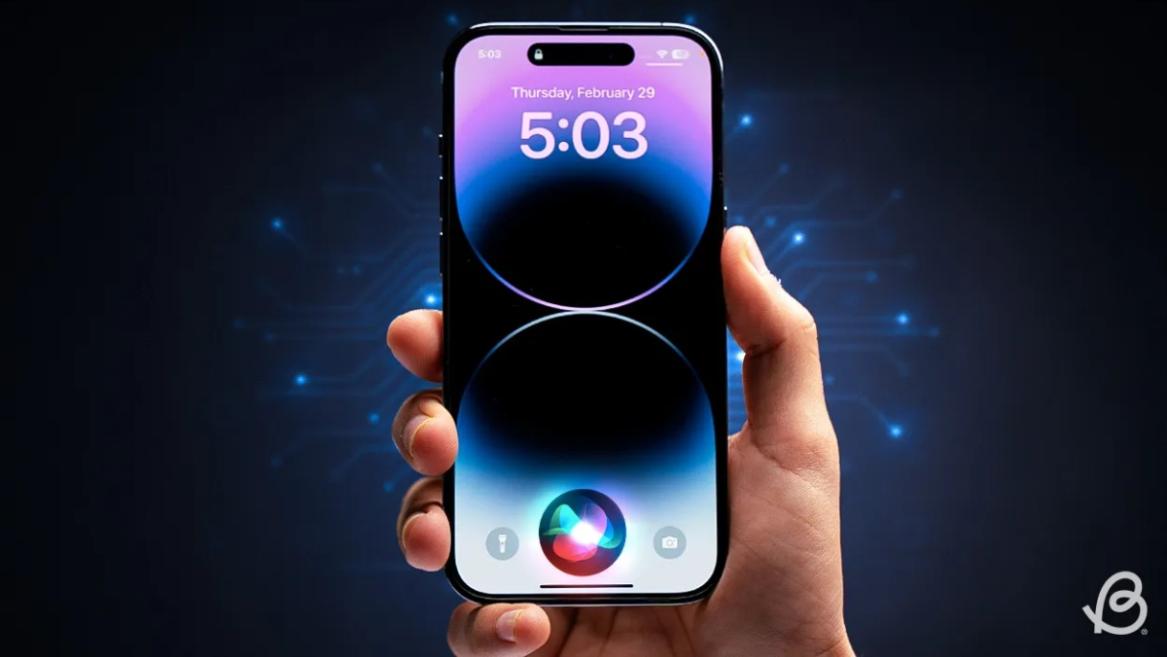
- Apple and Google have officially confirmed their team-up for the next-gen Siri AI.
- The Cupertino Giant will be using Google’s Gemini for a more personalized Siri model as well as Apple Intelligence features.
- We can expect the next-gen Siri to come out with iOS 26.4, sometime in March or April.
Apple has officially confirmed joining forces with Google to use its Gemini AI model to power the next-generation Siri. It will offer a more personalized experience and will be coming out with the iOS 26.4 update. Apple also plans to leverage Gemini’s capabilities for other Apple Intelligence features as well, later down the line.
The Next-Gen Siri will be powered by Google’s Gemini AI
Apple officially confirmed that it will be partnering with Google in a statement to CNBC . Here’s what it stated, “After careful evaluation, we determined that Google’s technology provides the most capable foundation for Apple Foundation Models, and we’re excited about the innovative new experiences it will unlock for our users.”
Later, Google also shared a post on X confirming the tie-up, “Apple and Google have entered into a multi-year collaboration under which the next generation of Apple Foundation Models will be based on Google’s Gemini models and cloud technology. These models will help power future Apple Intelligence features, including a more personalized Siri coming this year.”
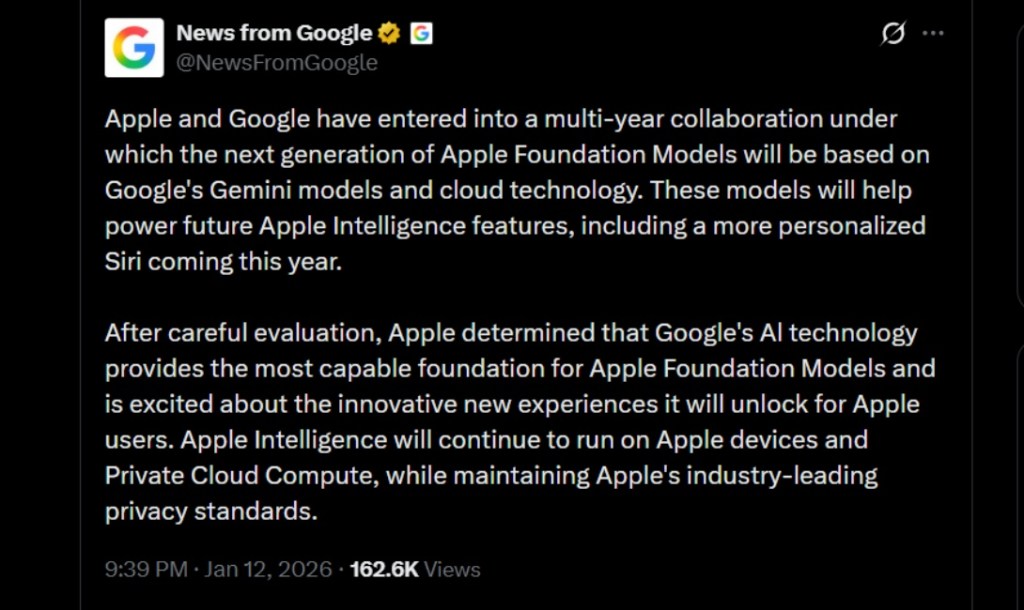
Image Credit: X/@NewsFromGoogle
Both statements clearly mention that the Cupertino Giant will be using Gemini to power its assistant Siri. This was already rumored, as Apple’s attempts to acquire Perplexity went nowhere. With Gemini, Siri will get a major AI update . It will be able to handle more nuanced conversations and provide better results. Something long-time Apple users have been asking for years.
The next-gen Siri will arrive with the iOS 26.4 update, which will launch sometime in March or April. And it is only going to be available for Apple Intelligence-supported devices .
Something else worth noting is how Google’s statement mentions that Gemini will power Apple Intelligence features. This leads us to believe that Apple could use Gemini’s multi-modal capabilities for its Writings tools , Image Playground , and Message summaries, too.
Elon Musk Not Happy With Apple and Google Tie Up
xAI CEO Elon Musk also responded to Google’s announcement post on X, sharing his thoughts on the matter by saying, “This seems like an unreasonable concentration of power for Google, given that they also have Android and Chrome.” Though we don’t expect either Apple or Google to respond to Elon, we will update the situation as it progresses.
It is worth noting that xAI is the company behind Grok, which is in hot water currently due to its inappropriate image generation fiasco , and has been getting backlash from multiple news outlets, X users, and even government authorities.
With over 4 year of experience under the belt, I cover all facets of consumer tech, from smartphones to other consumer electronics, our favorite social media apps, as well as the growing realm of AI and LLMs. As an Apps and AI writer app Beebom, I provide my expertise in all these areas, weaving stories that help you get familiar with the tech around you. But you will find me playing NYT daily puzzles in my free time.
Add new comment
Name
Email ID
Δ
