- Instagram lets you quickly change your account type to personal from business or professional via the settings menu.
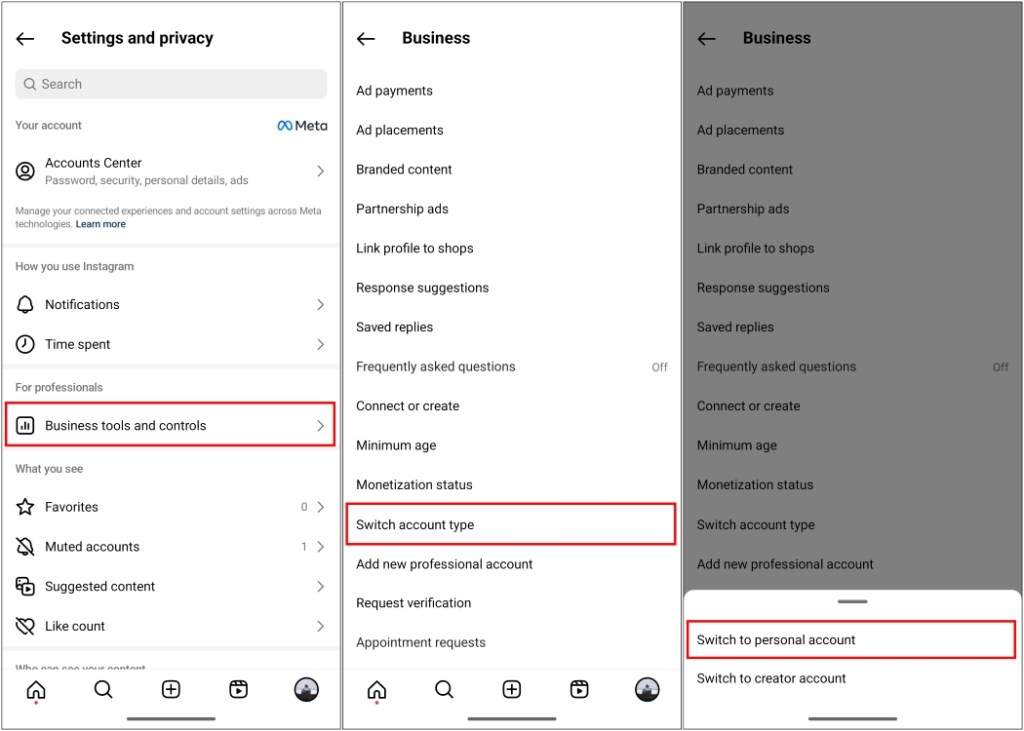
- On mobile, go to profile -> hamburger menu -> Settings and privacy -> Business tools and controls -> switch account type -> switch to personal account.
- On Instagram web, click on More -> Settings -> Business tools and controls -> switch account type -> switch to personal account -> Switch back.
A business or professional Instagram account can help you maintain a professional brand image while providing insightful data on user engagement. However, it can be overwhelming for someone who is new to the platform and has mistakenly switched to a business or professional account. Also, some influencers believe that a personal account helps them better engage with followers. Whatever the case may be if you are here to learn how to switch back to a personal account from a professional or business account, let me walk you through the process.
Switch to a Personal Account on Instagram App
The process to change the account type is fairly simple, and your Instagram account will be switched back to a personal one in no time. All your content will stay intact in the process so you don’t have to worry about that. Let’s see how you can switch to a personal account via the Instagram Android and iOS mobile apps:
- On the Instagram app, tap the profile icon in the bottom navbar.
- Tap the hamburger menu in the top right corner of your profile page.
- Go to Settings and privacy from the pop-up menu that opens.
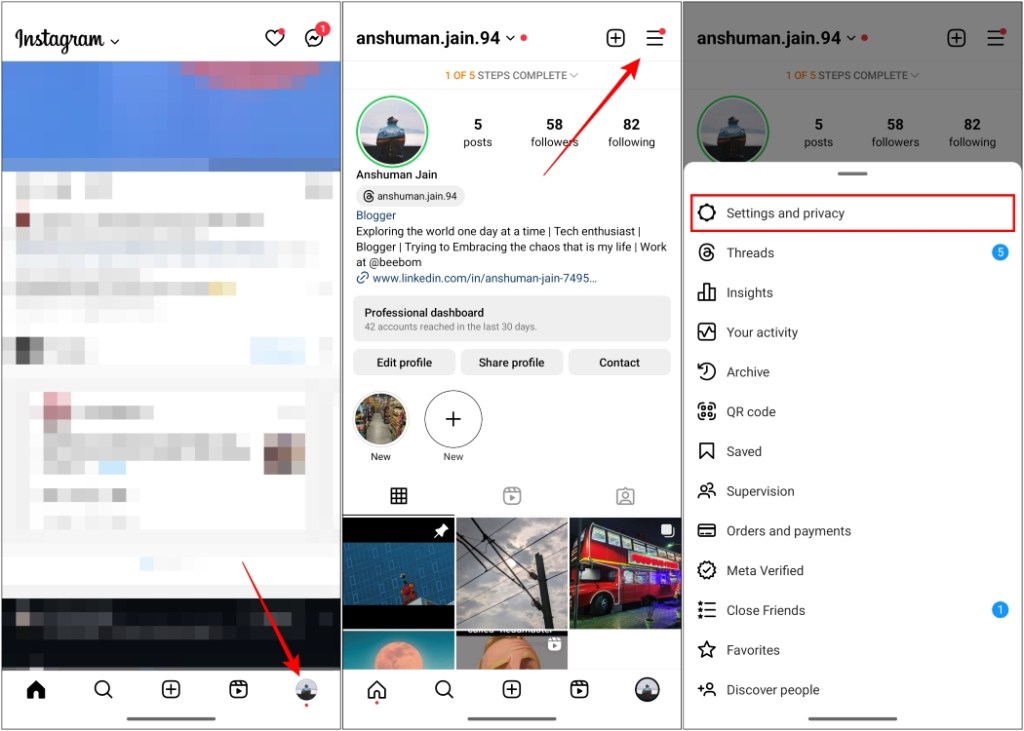
- Next, scroll down to Business tools and controls or Creator tools and controls.
- Here, look for the Switch account type option and tap on it.
- Now, tap on Switch to personal account , and in the confirmation pop-up, tap on Switch to personal again.
Switch to a Personal Account on Instagram Web
The steps to change the account type on the desktop website are similar to the mobile app, with the only difference being the initial access point. Here’s how it goes:
- Open Instagram on your desktop browser and log in to your account.
- Click on the More option in the bottom left corner and go to Settings .
- Using the sidebar, scroll down to select the Business tools and controls or Creator tools and controls option.
- Here, select Switch to personal Account and click on Switch Back in the confirmation pop-up.
What Happens When Switching from Professional to Personal Account
Changing your account type might not feel like a drastic change at first sight. However, there are a plethora of changes that you will notice as you continue to use the app. Let us take a look at them.
- User insights will be removed for you and all the insight data will be deleted.
- You won’t be able to boost your post to increase their reach and engagement.
- If you added your contact information in the profile section then it will be removed as personal accounts do not have that option.
- You might also lose your verified badge when you switch accounts as the verification process is different for business and personal accounts.
- You can’t use third-party apps to schedule and auto-post on Instagram.
Besides these, your general user experience should stay the same. Although it might affect your user engagement in the long run.
Should You Switch from a Professional to a Personal Account?
A personal account feels easier to use and gives you more freedom to express your thoughts . It provides more creative tools that are limited to the professional type. You can also opt for more privacy by switching to a private account if you are getting some unwanted attention.
This is how you can change your account type on Instagram. Both account types have their own set of perks, depending on your use case. Instagram has done a good job keeping the experience almost similar no matter which account type you go with.
Yes. Instagram does not apply a limit on changing account types. So you can switch from your business to a personal account anytime you want to.
When you change your account type from professional to personal, all the insights along with other analytical metrics will be deleted.
No. Changing your account type will not have any effect on your follower count. Your current followers will stay the same even if you change back to a business account type.
Instagram lets you operate up to 5 professional accounts, whether it be a creator or a business account at a time.
No. Professional accounts cannot be set to private. To do that, you will first have to change your account to personal and then toggle on private account from settings.

With over 4 year of experience under the belt, I cover all facets of consumer tech, from smartphones to other consumer electronics, our favorite social media apps, as well as the growing realm of AI and LLMs. As an Apps and AI writer app Beebom, I provide my expertise in all these areas, weaving stories that help you get familiar with the tech around you. But you will find me playing NYT daily puzzles in my free time.
Add new comment
Name
Email ID
Δ

