- It’s easy and simple to replace the AirTag battery at your home.
- Apple recommends using a CR2032 lithium CV coin battery with a bitterant coating, widely available at electronics and drug stores.
- Once you’ve got a compatible battery, remove the AirTag from its case or accessory to replace the battery.
An AirTag is packed with a user-replaceable battery that’s designed to last for around a year. When the AirTag battery is low, your iPhone will throw a notification. You can also check AirTag’s battery life manually. A dead battery will disable your AirTag, but replacing it is a quick and simple process that you can do at home. In this article, we’ll walk you through all the steps to replace the AirTag battery and secure a new battery in place to get your AirTag back up and running in no time. Let’s begin!
What Batteries Does an AirTag Use?
Apple’s AirTag uses a CR2032 lithium CV coin battery that’s commonly used in remote controls and handy electronic devices. These batteries are popularly known as coin cell batteries or watch batteries. Apple recommends using a bitterant-coated CR2032 battery to discourage accidental ingestion among small children . You can also use a Duracell 2032 Lithium Coin Battery with Bitter Coating.
Before you buy a battery replacement, make sure to check its compatibility. Some packages explicitly state that they are “Compatible with AirTag”. If you don’t find that, just make sure it’s a CR2032 battery with a bitterant-coating. It’s worth mentioning that some CR2032 batteries may not work with AirTags. In such a case, you can slightly scratch off the coating with a sandpaper sheet.
CR2032 lithium CV coin batteries are available at most electronic and drug stores.
How to Replace AirTag Battery?
Before you change the battery of an AirTag, make sure to remove the tracker from its case or accessory . Also, ensure that you’ve got the correct battery type. Once you’re ready, follow the steps below:
Note: An AirTag, its back cover, and the battery are choking hazards. So, make sure to keep your children away during the replacement process.
- First off, flip your AirTag so the white side faces down , and the stainless steel side is up (towards you).
- Now, use two fingers to push in and twist counter-clockwise on the steel side.
- After that, remove the old CR2032 battery and replace it with a new battery with the “+” sign facing up . Here’s a GIF showing the whole replacement process:
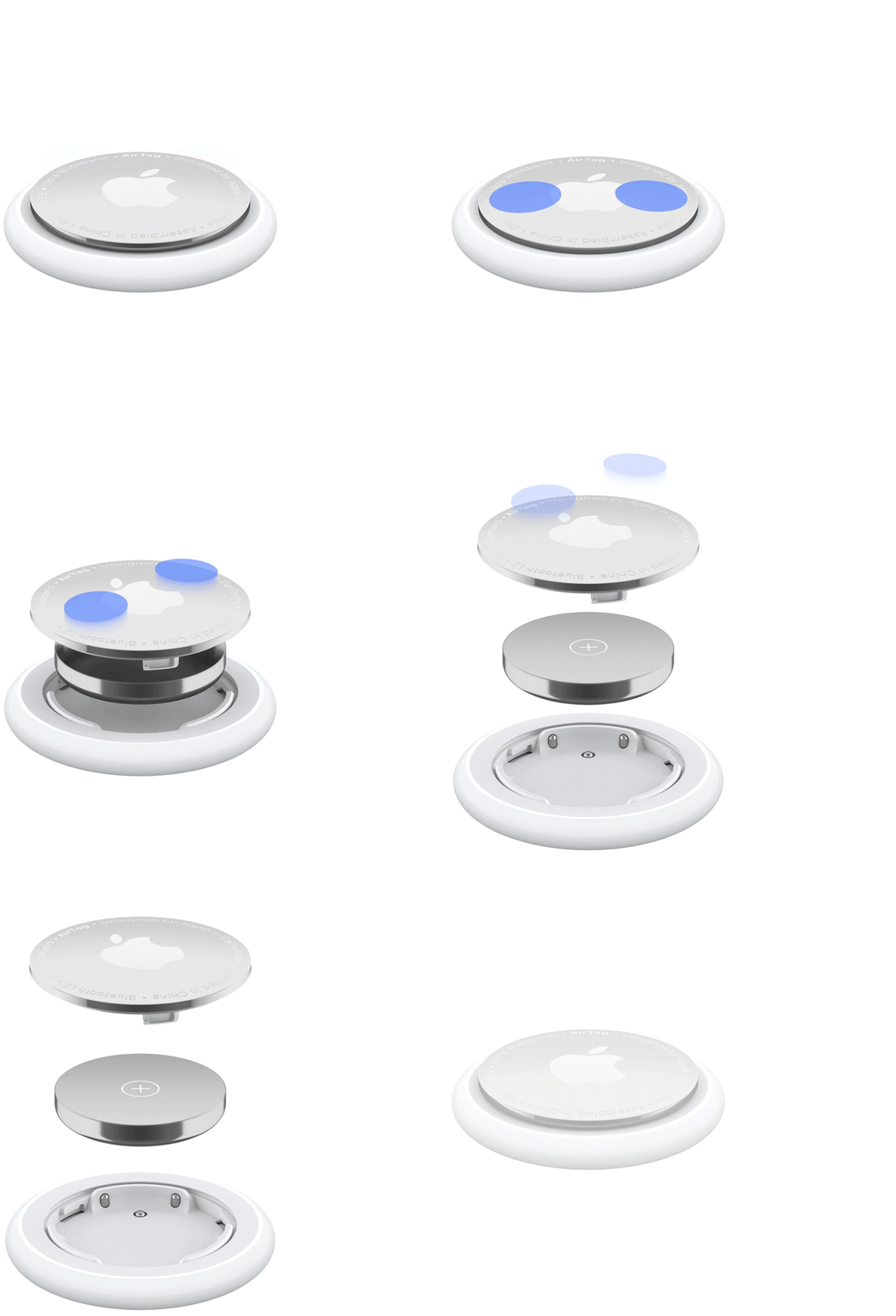
Image Courtesy: Apple
- If the battery is connected properly, you’ll hear a beep sound.
- Next up, place the stainless steel cover back on by twisting it clockwise .
That’s all it takes to replace the battery when it runs out of juice after close to a year’s worth of use. Now, head to the Find My app to check if there is a low-battery icon or a similar notification. Once you’ve replaced the battery, it should work just fine for another year or so.
Generally, an AirTag battery should last you more than a year before you need to replace it. Your iPhone will send out a notification to let you know when it’s time to replace the AirTag battery. This ensures you never have to deal with a dead AirTag.
Apple’s AirTags won’t work once the battery dies. In such a case, you will have to change the battery to use the AirTag again.
When your AirTag’s battery is very low, you’ll see a notification on your iPhone. You can also always head to the Find My app to check the AirTag’s battery life.
An AirTag is a simple and easy-to-use device. In case it’s not pairing, there might be something wrong with the battery. If AirTag won’t pair with your iPhone, you must first take out the battery and then put it back in. If that doesn’t work, you must replace the battery.
Kanika has been a loyal iPhone user since 2014 and loves everything Apple. With a Master’s in Computer Applications, passion for technology, and over five years of experience in writing, she landed at Beebom as an Apple Ecosystem Writer. She specializes in writing How To’s, troubleshooting guides, App features, and roundups for Apple users to help them make the best use of their gadgets. When not writing, she loves to try out new recipes and enjoy some family time.
Add new comment
Name
Email ID
Δ


- Apple and Google have officially confirmed their team-up for the next-gen Siri AI.
- The Cupertino Giant will be using Google’s Gemini for a more personalized Siri model as well as Apple Intelligence features.
- We can expect the next-gen Siri to come out with iOS 26.4, sometime in March or April.
Apple has officially confirmed joining forces with Google to use its Gemini AI model to power the next-generation Siri. It will offer a more personalized experience and will be coming out with the iOS 26.4 update. Apple also plans to leverage Gemini’s capabilities for other Apple Intelligence features as well, later down the line.
The Next-Gen Siri will be powered by Google’s Gemini AI
Apple officially confirmed that it will be partnering with Google in a statement to CNBC . Here’s what it stated, “After careful evaluation, we determined that Google’s technology provides the most capable foundation for Apple Foundation Models, and we’re excited about the innovative new experiences it will unlock for our users.”
Later, Google also shared a post on X confirming the tie-up, “Apple and Google have entered into a multi-year collaboration under which the next generation of Apple Foundation Models will be based on Google’s Gemini models and cloud technology. These models will help power future Apple Intelligence features, including a more personalized Siri coming this year.”
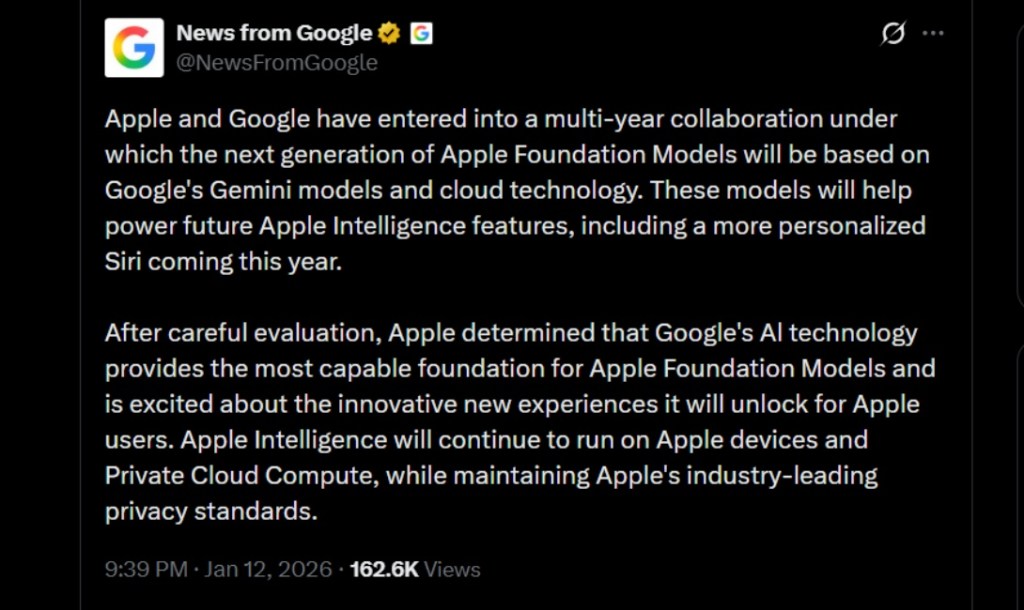
Image Credit: X/@NewsFromGoogle
Both statements clearly mention that the Cupertino Giant will be using Gemini to power its assistant Siri. This was already rumored, as Apple’s attempts to acquire Perplexity went nowhere. With Gemini, Siri will get a major AI update . It will be able to handle more nuanced conversations and provide better results. Something long-time Apple users have been asking for years.
The next-gen Siri will arrive with the iOS 26.4 update, which will launch sometime in March or April. And it is only going to be available for Apple Intelligence-supported devices .
Something else worth noting is how Google’s statement mentions that Gemini will power Apple Intelligence features. This leads us to believe that Apple could use Gemini’s multi-modal capabilities for its Writings tools , Image Playground , and Message summaries, too.
Elon Musk Not Happy With Apple and Google Tie Up
xAI CEO Elon Musk also responded to Google’s announcement post on X, sharing his thoughts on the matter by saying, “This seems like an unreasonable concentration of power for Google, given that they also have Android and Chrome.” Though we don’t expect either Apple or Google to respond to Elon, we will update the situation as it progresses.
It is worth noting that xAI is the company behind Grok, which is in hot water currently due to its inappropriate image generation fiasco , and has been getting backlash from multiple news outlets, X users, and even government authorities.
With over 4 year of experience under the belt, I cover all facets of consumer tech, from smartphones to other consumer electronics, our favorite social media apps, as well as the growing realm of AI and LLMs. As an Apps and AI writer app Beebom, I provide my expertise in all these areas, weaving stories that help you get familiar with the tech around you. But you will find me playing NYT daily puzzles in my free time.
Add new comment
Name
Email ID
Δ
