- If an app is not responding, you might need to force quit it on Windows.
- The easiest ways to do it is by using the task manager or the ALT + F4 keyboard shortcut.
- You can also use terminal commands and Windows settings to force quit apps on Windows.
From automatic updates to blue screen of deaths, we’ve all had our fair share of annoyances when using Windows. Another major issue many Windows users face is programs hanging up on them and in a state where they’re still taking up system resources but are stuck and not responding. Thankfully, Windows has a few ways to take care of non-responsive programs by letting you force-quit them. In this guide, let’s look at how to force quit on Windows.
Method 1: Force Quit on Windows Using Task Manager
The easiest way to force quit an app on Windows is by using the task manager. Here’s how to do it.
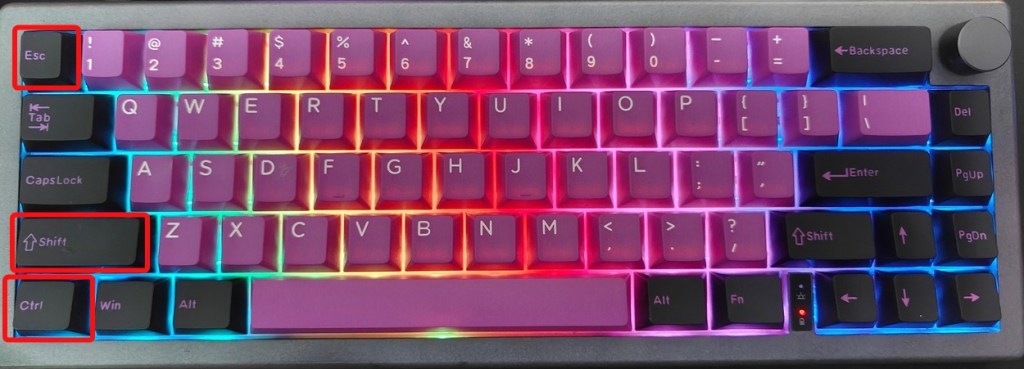
- Use the Ctrl + Shift + ESC keyboard shortcut to open the task manager.
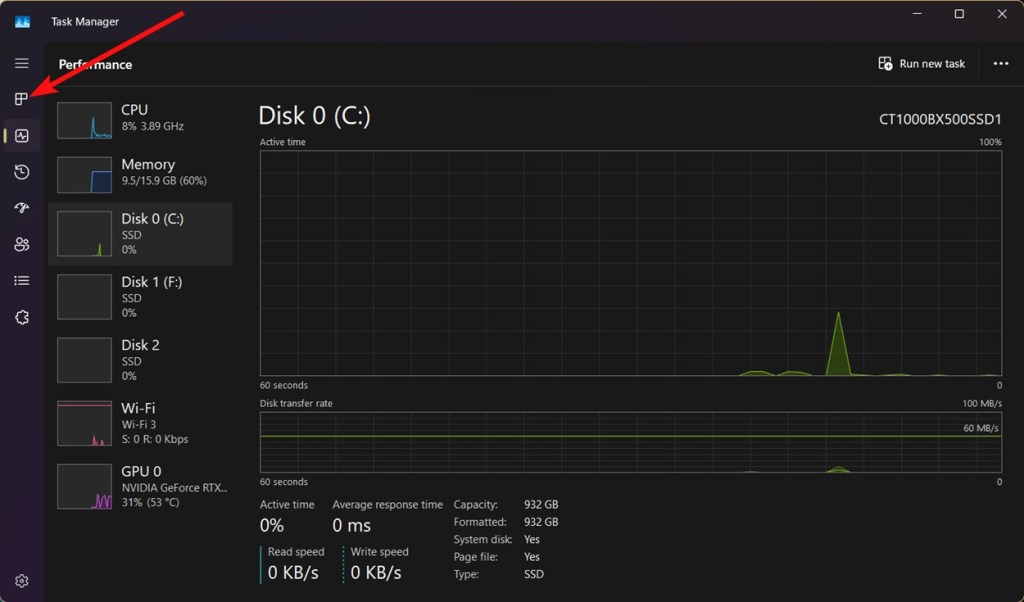
- Go to the Processes section from the left sidebar.
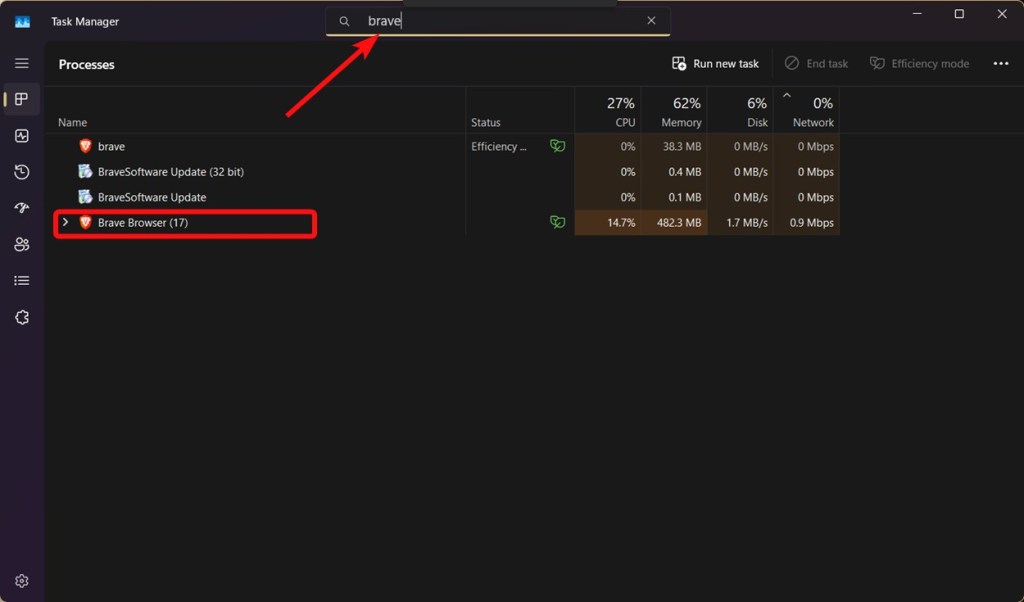
- Locate the app you want to force-quit, or search for it using the search bar at the top.
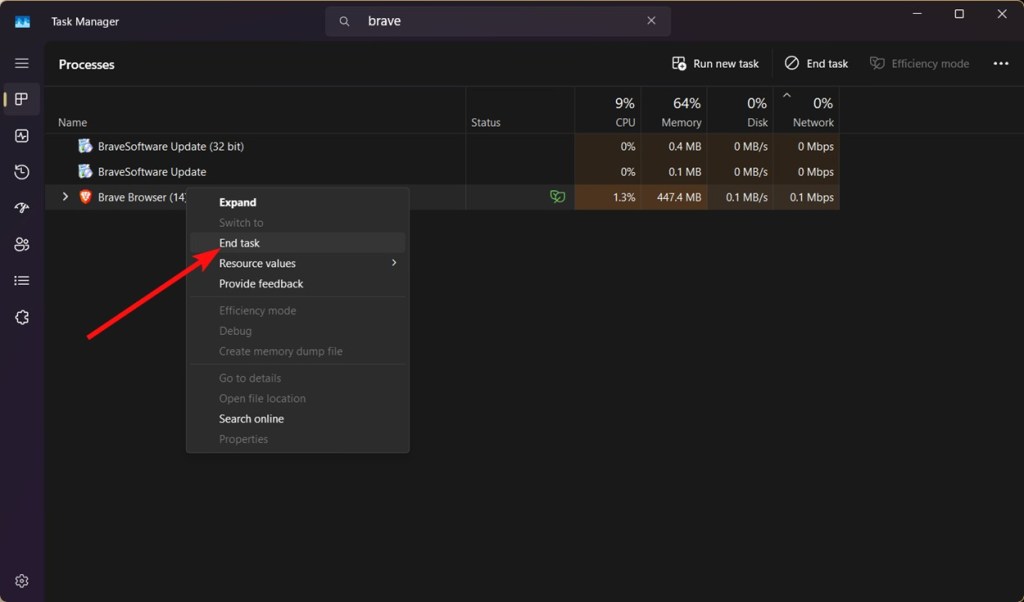
- Right-click on the app and select End task to force quit the app on Windows.
Method 2: Force Quit on Windows Using Keyboard Shortcut
The other way to quit an application is by using the Alt + F4 keyboard shortcut. However, we aren’t technically force quitting here, but it’s an equivalent to clicking the cross button on the Window. If a program is half responsive, force quitting using a keyboard shortcut might still work.
- Click on the app you want to close to make it the currently active window.
- Use the Alt + F4 key combination to quit the app. On keyboards with no F4 key, press Alt + Fn + 4 .
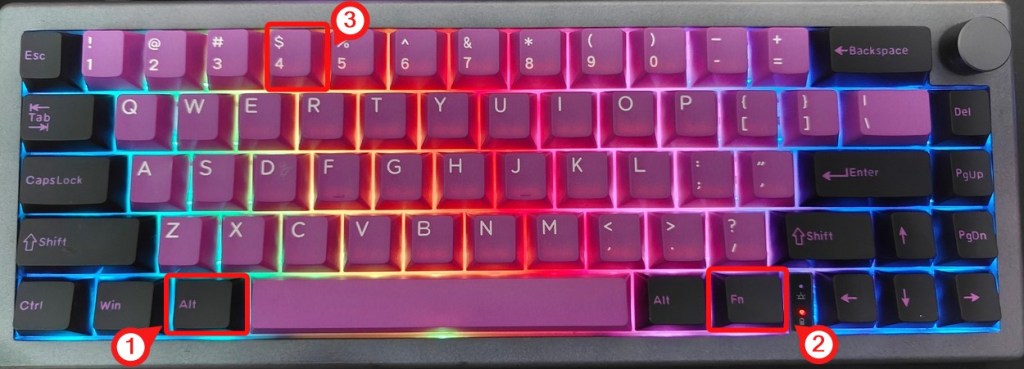
- If the program doesn’t quit immediately, give it some time and it should close automatically.
When you try to click on the close button in frustration when the app won’t close, the program goes into a “Not responding” state. Windows then automatically gives you a “This program is not responding” prompt with options — Wait for the process to respond or click on End Process .
Method 3: Force Quit an App on Windows From Settings
The Settings app on Windows allows you to terminate running apps, and it’s a great option to force quit on Windows. Here’s how to do it.
- Go to Settings > Apps > Installed apps .
- Find the application you want to force quit. You can also search it using the search bar.
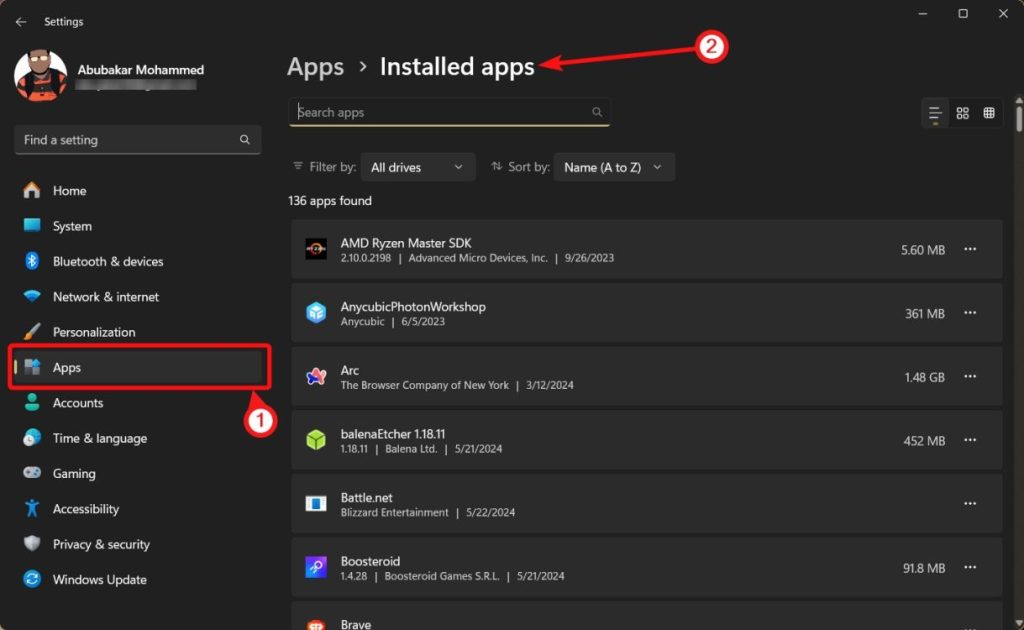
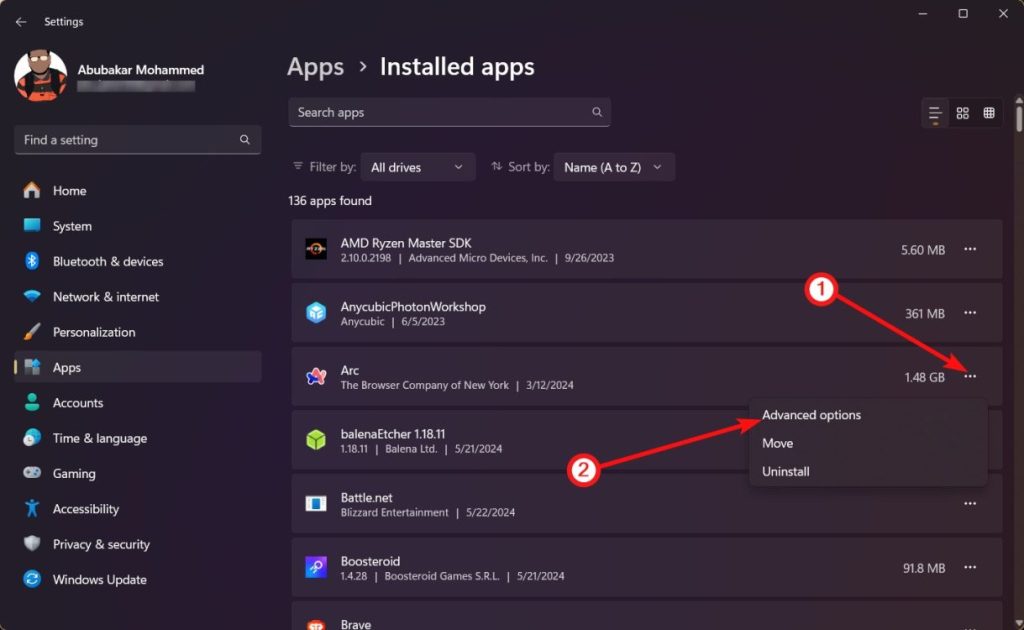
- Once found, click on the 3-dots icon and select Advanced options .
- Scroll down and click on the Terminate button.
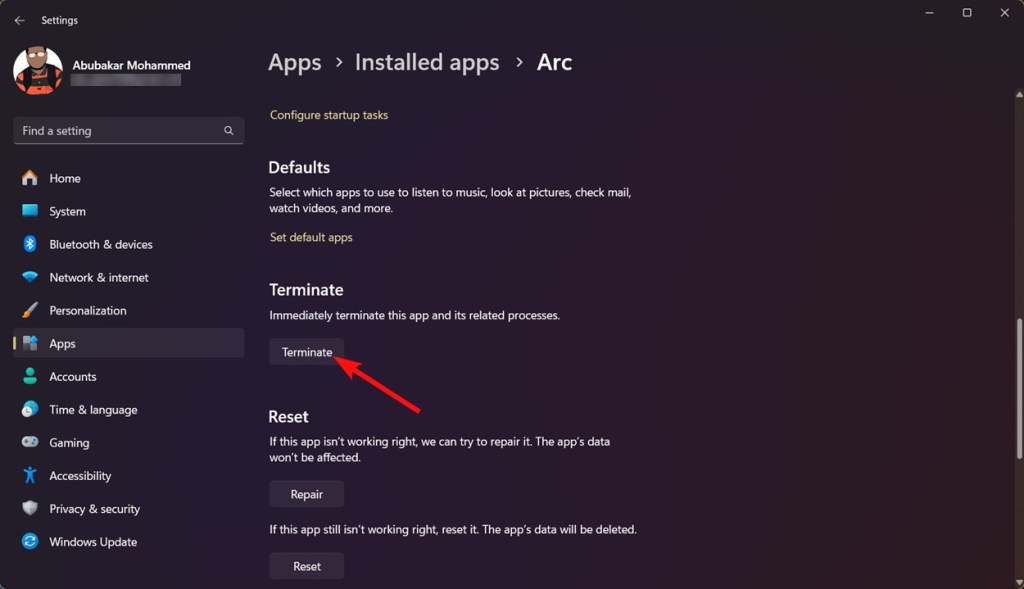
The app should now be terminated on your Windows PC.
Method 4: Force Quit Using Command Prompt
The Command Prompt is usually always the last line of defense against the nastiest of complications on Windows, and the same goes to when you want to force quit on Windows.
- Open the command prompt or Windows Terminal .
- Type the following command to list all the ongoing processes on Windows.
tasklist
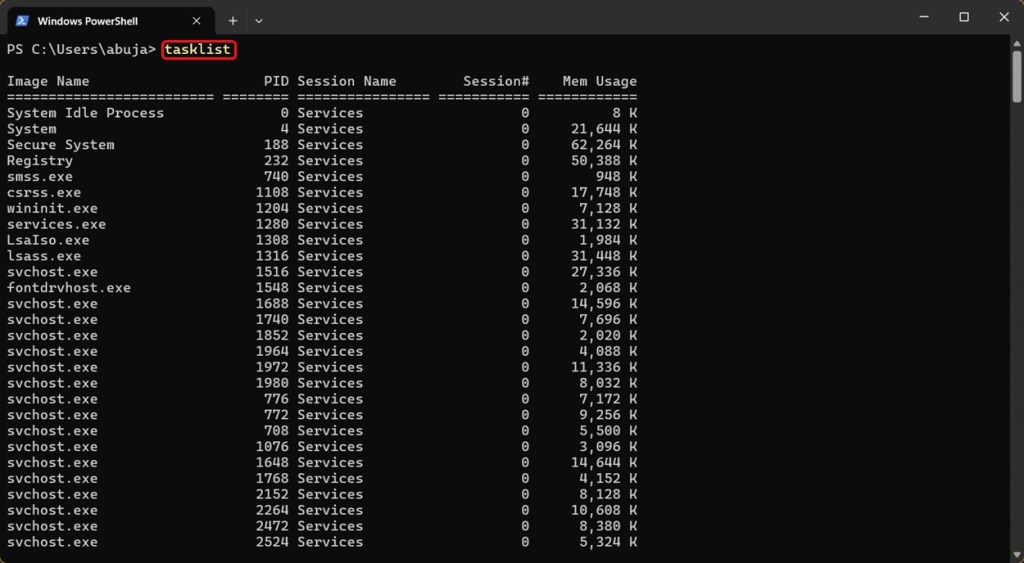
- Note down the name of the process and program you want to force-quit, which in our case is Brave.exe. Type the following command to force quit the app.
taskkill /F /IM brave.exe
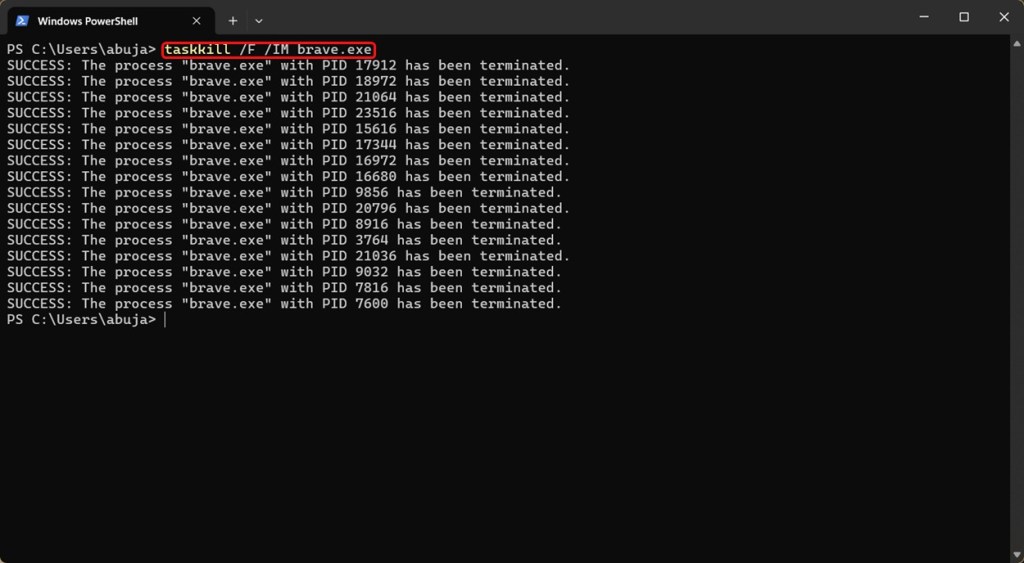
Here “/F” is a force parameter while “/IM” denotes image, i.e., the app executable you want to kill. Once executed, the app will be force quit instantly.
Method 5: Force Quit App By Force Shut Down
Consider this. If all your efforts thus far have gone in vain and the app still refuses to force quit on Windows, you need another way. The only way if your entire Windows installation isn’t responding is to force shut down Windows and restart it .
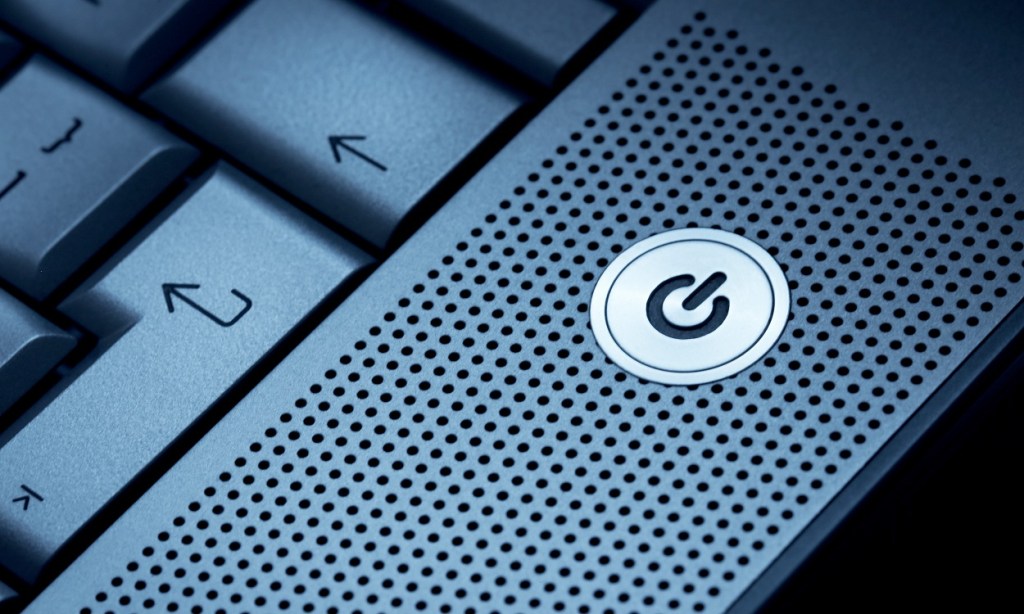
Image Courtesy: Shutterstock
You can initiate a force shut down by pressing and holding the Power button of your Windows PC or Laptop. You will need to typically hold it for 7–10 seconds before your PC shuts down. Once it does, give a five-second interval and start it again.
Abubakar covers Tech at Beebom, with his passion for technology tracing back to 2011 when he received a Dell Inspiron 5100 as a gift. He’s also a passionate advocate for the right-to-repair movement, believing in empowering users to maintain and extend the life of their devices. Outside the tech world, he enjoys watching anime and exploring his newfound enthusiasm for Japanese cars. In his free time, you’ll often find him immersed in Genshin Impact or researching his next gadget purchase. Before joining Beebom, he contributed to leading publications like Android Police, How-To Geek, and Fossbytes.
Add new comment
Name
Email ID
Δ


Microsoft is celebrating its 50th anniversary at a time when technology is about to reshape the world. Founded by Bill Gates and Paul Allen in a small rented office in Albuquerque, Microsoft is now the world’s second most valuable company. Over the past 50 years, the software giant has faced many challenges, antitrust lawsuits, and fierce competition, but can it stay ahead in the next five decades? To understand what the next 50 years hold for Microsoft, read on.
What Microsoft’s History Tells Us About the Next 50 Years
Microsoft started as a small company in 1975, developing software for the Altair 8800 — an early personal computer. By 1980, Microsoft needed an operating system to power the IBM PC. So, it acquired 86-DOS and modified it to MS-DOS. MS-DOS became massively popular and by 1985, Microsoft launched its first graphical operating system called Windows 1.0.

Paul Allen and Bill Gates in 1981 | Image Credit: Microsoft
10 years later, in 1995, Microsoft released Windows 95 which was a huge commercial success. For the first time, Microsoft introduced the Start menu, Taskbar, and Windows Explorer. They are still part of the latest Windows 11 OS, even after 30 years.
Following that, Microsoft launched Windows XP, Xbox, and the Office suite, which expanded its footprint in the PC space. Now, 50 years later, Windows has a desktop market share of over 70% , maintaining its position as the dominant OS. In these last 50 years, Microsoft has diversified its business to cloud computing (Azure), gaming (Xbox), productivity (Microsoft 365), and its next big thing – Copilot AI.
Beyond being a consumer-centric company, Microsoft has become a massive corporation that provides its services to enterprise customers as well. In fact, today, Microsoft’s revenue mostly comes from Azure’s cloud infrastructure and AI services. Meanwhile, the remaining revenue comes from Microsoft 365, Windows, and Xbox.
The only major space where Microsoft doesn’t have a footprint is mobile. Windows Phone exited the smartphone OS market in 2020. Bill Gates recently admitted that losing the phone market to Android was his “greatest mistake”. Besides that, Microsoft in 2025 announced that it’s quitting the HoloLens hardware business completely, ending its Mixed Reality vision.
Microsoft’s Role in AGI Development
When Satya Nadella took over Microsoft as the CEO in 2014, the Redmond giant was not in good shape. Nadella ended several struggling projects like the Windows Phone. And focused on its server businesses like Azure cloud, AI, enterprise solutions, and developer relations. As a result, Microsoft has become the world’s second most valuable company by market cap, joining the $3 trillion club in market valuation recently.
The credit largely goes to Satya Nadella for transforming Microsoft in the last decade. Many credit Nadella’s leadership for striking a deal with OpenAI back in 2019. Microsoft invested $1 billion in OpenAI to support the development of AGI (Artificial General Intelligence) — an AI system capable of matching human capabilities.

Image Credit: OpenAI via YouTube
So far, Microsoft has invested close to $14 billion in OpenAI and has a 49% ownership stake in the company. This has put Microsoft at the forefront of AI development. The partnership allows Microsoft to exclusively access OpenAI’s latest breakthroughs and AI models. It can also commercialize OpenAI’s models. Thus, allowing the company to integrate the latest AI models into its products. Like Copilot, Microsoft 365, and Azure AI for enterprise offerings.
Not only that, the terms of the partnership say that OpenAI must use Microsoft Azure for all cloud infrastructure needs. Only recently, Microsoft relented and allowed OpenAI to purchase cloud resources from Oracle. Some reports also say that OpenAI has to share 75% of its revenue with Microsoft until the investment is recovered.

Image Credit: Beebom
It means that Microsoft has a huge financial influence over OpenAI’s operations. And in the future, Microsoft will gradually recover its investment while having access to the latest AI technologies. Having said that, the partnership also says that once OpenAI achieves AGI internally, Microsoft will lose access to OpenAI’s technologies.
To keep its lead in the AI race, Microsoft is putting its AI division in order. Microsoft is reportedly developing internal reasoning models to reduce its over-reliance on OpenAI. The company has already trained smaller models such as Phi for everyday use and Muse AI for generating gaming visuals.
Microsoft is also focusing on open-source models including China’s DeepSeek which shocked the world with its efficient training methods. Overall, Microsoft is currently a key player in AI development, leveraging its partnership with OpenAI and developing in-house AI models as well. Until AGI is achieved, expect Microsoft to continue its lead in the AI race.
Microsoft’s Next 50 Years: Future of Windows
While Windows doesn’t directly contribute major revenue for Microsoft through licensing, the platform serves as the foundational bedrock, powering its software, cloud, and enterprise services. On the consumer side, Windows 11 is the latest desktop OS by Microsoft, and it’s evolving into a great operating system. Microsoft is slowly but gradually improving the design language of Windows 11 to offer a consistent PC experience.

Image Credit: Microsoft
Microsoft is putting effort into making Windows 11 a more modular OS . We have already seen that Windows 11’s various elements such as the desktop shell, Taskbar, Notification Center, etc. are being decoupled from explorer.exe to make each component modular and updatable. Microsoft has already showcased Windows 10X (now canceled) which was based on a highly-modular Windows Core OS .
In the future, we might see different flavors of Windows running on various form factors such as foldable devices, tablets, and more. It’s being said that Windows 12 should come with a floating Taskbar and a new modular desktop interface, optimized for touchscreen devices.
Apart from UI/UX improvements, Microsoft is also adding a lot of AI features to Windows 11. Besides current AI features on Windows 11 such as Recall, Semantic Search, Cocreator, etc., the future of Windows lies in Agentic AI -driven integration. Copilot on Windows will be able to perform actions in real-time using the vision capability. Users will be able to voice chat with Copilot and ask it to perform actions on their Windows PCs.
To enable this, Microsoft is already preparing agentic frameworks for Windows like OmniParser, Magentic-One, AutoGen, and Windows Agent Arena to handle complex tasks. While some companies are bringing AI agents to the web browser, Microsoft is taking it to the OS level so that it can perform both system-level and web-based actions . Basically, in the future, you can expect that Windows will become an AI-driven operating system.
To leverage AI for gaming, Microsoft has already showcased its Muse AI model that can generate game visuals and controller actions. It’s quite possible that Generative AI will be tightly integrated into Xbox to enable features such as AI-assisted gameplay, environment generation, personalized experiences, and more.
Microsoft’s In-house Chips and Quantum Computing
Besides software, on the hardware side too, Microsoft is preparing for the future and reducing its reliance on Nvidia . In 2023, Microsoft announced its custom Azure Maia 100 chip for AI workloads. While Google has its own TPU for AI workloads, and Nvidia continues to sell GPUs for AI training and inference, Microsoft needed an in-house chip , hence, Maia 100 was born. It’s an AI accelerator that can run large-scale AI workloads on Azure’s cloud.
The company also announced an Arm-based Azure Cobalt CPU for general-purpose compute workloads, just like Google’s Axion CPU. Since Microsoft has a major cloud business, the chip is going to reduce datacenter costs for Microsoft and cut down dependency on external vendors like Nvidia and Intel.

Majorana 1 | Image Credit: Microsoft
Finally, in February 2025, Microsoft announced its first breakthrough in quantum computing . The company unveiled Majorana 1, a quantum computing chip for quantum computers. Unlike traditional qubits, Majorana 1 uses topological qubits which are said to be more stable and less prone to errors.
For this, Microsoft invented a new class of materials called “topoconductors”. Microsoft claims that Majorana 1 can scale up to 1 million qubits on a single chip. Overall, Microsoft is doing pioneering work in the field of quantum computing while also developing in-house chips to reduce reliance on external vendors.
And as a software-first company, Microsoft is entering the AI era with high expectations, which has the potential to transform its entire ecosystem including Windows, Xbox, Azure, and Microsoft 365. In the next 50 years, we expect Microsoft to lead the industry with fresh innovations, but can it outpace Google and Apple? Only time will tell.
Passionate about Windows, ChromeOS, Android, security and privacy issues. Have a penchant to solve everyday computing problems.
Add new comment
Name
Email ID
Δ
