- Valorant error code Val 46 is a server error that is shown to players when the servers are down for scheduled maintenance.
- To fix the Val 46 error, check the Valorant server status for your region and learn when the downtime is going to end.
- Also, you can restart the game to fix the error. Or, switch your Valorant account or region in case the other methods do not work.
Valorant is consistent with its regular updates and weekly content rollouts. However, with a massive player base, some critical errors and bugs are sure to find their way into the game. One such issue is the “Val 46” error in Valorant. Several players encounter this issue when new patches or updates are rolling out. So, if you are wondering what error code val 46 means and how to fix it in Valorant, keep reading.
What is the Val 46 Error in Valorant
Val 46 error is also known as ‘platform downtime’ in Valorant. This is a planned downtime allotted for the server engineers to work on the Riot systems. You will see the Val 46 error if the servers are down for maintenance, either for a new patch rollout or to fix latency or lag issues.

The error usually occurs when you try to enter the game. In some other instances, you will receive a message saying “VALORANT is currently offline for scheduled maintenance. Please come back later once service resumes.” This error usually has nothing to do with your internet connection, but it’s a good practice to check your connectivity before proceeding further.
How to Fix Valorant Error Code Val 46
Instead of being an error that occurs at specific instances, some players receive it during matches or at random times. To fix this, we have shared the best possible fixes for the Val 46 error in Valorant here:
1. Check Valorant Server Status
Once you see the error screen, you should check the Valorant server status for your region. To do so:
- First, go to the Valorant server status website .
- Now, click the server dropdown and select the region you are playing from.
- Once done, check the current message section below. If it says “ No recent issues or events to report ,” you are good to go.

However, if you see messages such as “Login Issues” or “Patch Notification,” then know that the developer team is either working on a fix or the servers are facing downtime due to scheduled maintenance before a new update rolls out.
2. Restart Game & Change Account
After checking the server status for your region, if you see there are no server issues, the first thing we recommend is restarting your game. Also, restart your Riot client before starting Valorant again. Restarting Valorant after the server maintenance should fix the error code 46.
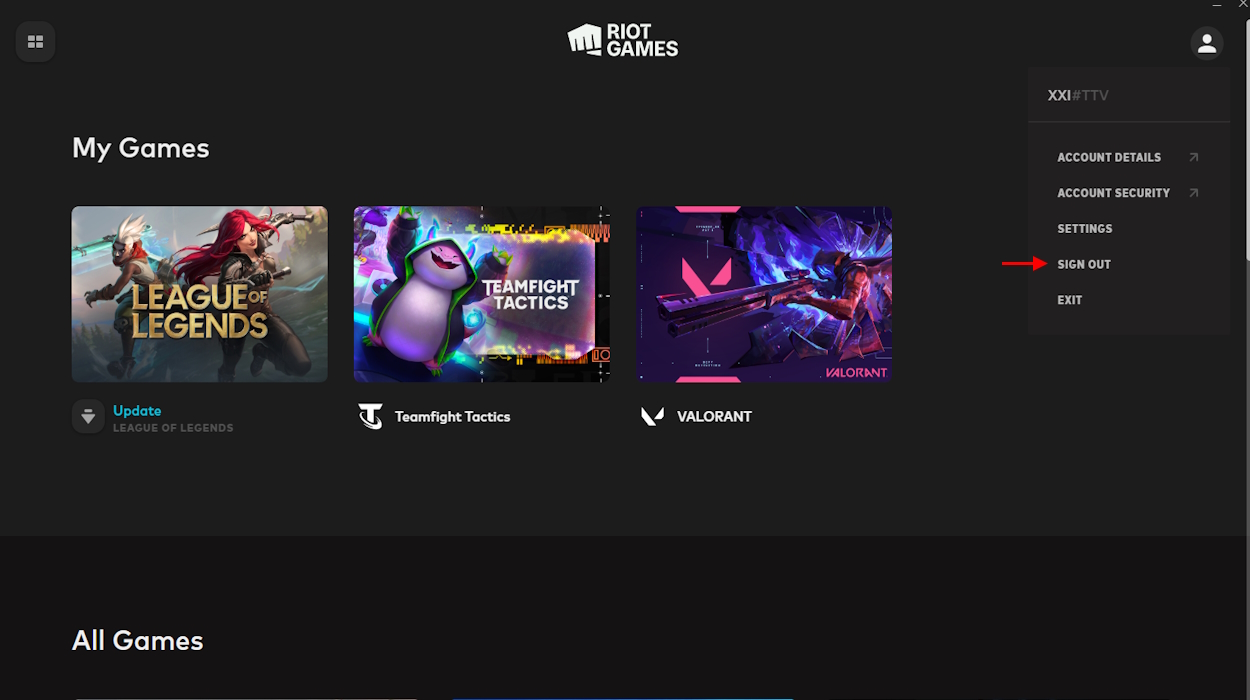
Additionally, on some occasions, changing the account fixes the issue. Here’s how you can do that:
- To change your account first, close your game and open the Riot Client.
- Now, click on your avatar in the right top corner and click on Sign Out .
- Next, enter your credentials for a different account and click the arrow to sign in.

3. Change Riot Account Region
In case the server is facing no issues and restarting or changing the account did not fix the error, you might be in the wrong region altogether. Yes, that happens sometimes. Due to some random bugs, a lot of the time, Riot unintentionally changes your region for the game. This impacts your Valorant matchmaking and currency. To fix this issue, follow these steps:
- Go to the Riot Games region change support web page .
- Now, click on the red Log In button.
- Next, click the C heck button to see if you are eligible for a region change.
- If Riot lets you change the region, select your original region to fix the error.
A gaming nerd who covers all things video games. Spending time playing games and writing about them was always a dream. Thanks to Beebom, I live it. Once I am done gaming, I write. Once I am done writing, I game. You feel me.
Add new comment
Name
Email ID
Δ



- Valorant Night Market for the Season 2026, Act 1 will start on February 5, 2026.
- The new skins added to the Market were the Combat Crafts, Aperture, and Wonderstallion weapon skin bundles.
- To purchase the skins, go to Night Market -> Click the Cards -> Reveal Skins -> Purchase your desired skin.
The Valorant Night Market is one of the most anticipated events each season. During this limited-time event, players have six cards, each containing different weapon skins from previous Valorant skin bundles. The best part is that these skins come at a discounted price. The discounts can go up to 50%, which is worth it. So, for those wondering when the next Valorant Night Market is, we’ve compiled the Season 2026 event details and what skins will be included here.
When is the Next Valorant Night Market (Confirmed Date)
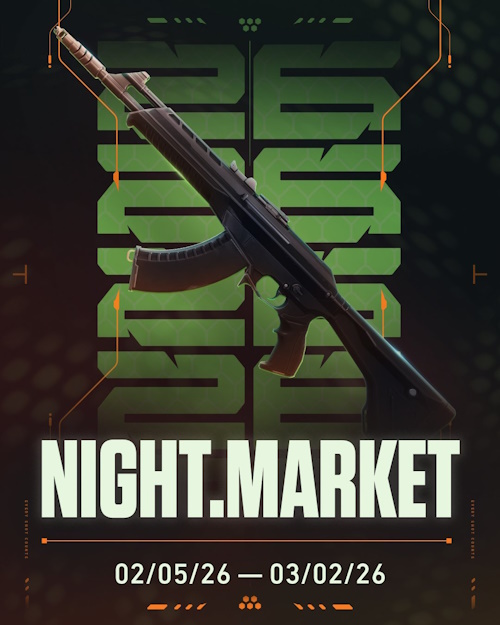
After the end of the February Night Market, Riot Games has finally revealed the official dates for the next night market. As per the official social media post, Valorant’s next Night Market will start on February 5, 2026, and end on March 2, 2026. The previous Night Market ended on January 6th, 2026, with the beginning of Valorant Season 2026 Act 1.
We have included the official release date and time for Valorant’s next Night Market for certain regions in the list below:
- Los Angeles – 5:00 PM PDT (February 5, 2026)
- New York – 8:00 PM EST (February 5, 2026)
- Frankfurt – 1:00 AM CET (February 6, 2026)
- Mumbai – 5:30 AM IST (February 6, 2026)
- Seoul, Tokyo – 9:00 AM KST / JST (February 6, 2026)
- Sydney – 11:00 AM AEDT (February 6, 2026)
The night market usually runs for around 20+ days, while the December 2024 market was live for three weeks. As you might know, the cards will not refresh during this duration. You can get the revealed skins until the Night Market ends at a discounted price. As per the official dates, the next Night Market will end on March, 2025. This will be right before Season 2026 begins.
New Night Market Skins in February 2026

The February Night Market will have new skins from the Convex, Daydreams, Endeavour, Fortune’s Hand, Galleria, Infantry, Intergrade, Luxe, Prism II, Reverie, Rush, Sensation, Smite (1.0), Switchback, Wonderstallion, and more bundles. This was added to an already large pool of Valorant weapon skin bundles on offer. However, it doesn’t include any weapon skin priced over 1,775VP.
At least two premium-tier skins are guaranteed on the reveal for every player. Moreover, note that any melee weapon priced at 4,350VP and above is not included in the Night Market.
Upcoming New Skins
- Combat Crafts
- Aperture
- Wonderstallion
How to Access Valorant Night Market
I may have never been lucky in the skins department of the Valorant store, but the night market always thrills me for one reason. Yes, we’re talking about the Night Market skins reveal ceremony we have all seen our favorite streamers hype and enjoy. I am sure someone who never got a good night market also loves this part.
Well, it is not a ceremony-like thing but follow the steps below to know how to reveal your skin in the Night Market:
First of all, make sure you check the dates above for the Night Market as they have a limited time.
Now, when Night Market is live, open Valorant. On the home screen, look for the card icon on the top right of your screen.
Once you click the icon, there will be six mystery cards on your screen.
The colors on the cards define the rarity of skins you will get. Click each card to reveal your Night Market skins.
Got to Nightmarket
Click on the Cards
Reveal the Skins
That’s how you can reveal the skin in Night Market. Now, choose the skin you want to buy for a special discount by clicking on the skin.
Can I Reroll Night Market Skins in Valorant?
No. Unfortunately, you must be fortunate to have good skins in the Night Market. Once you reveal these skins, you cannot reroll them in the current period of the Night Market in Valorant. There is also no refresh or reset for the market.
So, you will have to choose from these skins only if you want to purchase anything from the market. Well, you can also wait for two more months to see your next Night Market skins.
Previous Valorant Night Market Dates
This list below compiles all Night Market appearances since its debut in December 2020 (Episode 1, Act 3):
- December 11, 2025 – January 6, 2026 (Season 2025, Act 6)
- September 25, 2025 – October 9, 2025 (Season 2025, Act 5)
- July 10, 2025 – July 24, 2025 (Season 2025, Act 4)
- June 5, 2025 – June 24, 2025 (Season 2025, Act 3)
- April 9, 2025 – April 29, 2025 (Season 2025, Act 2)
- February 13, 2025 – March 4, 2025 (Season 2025, Act 1)
- December 16, 2024 – January 7, 2025 (Episode 9, Act 3)
- September 26, 2024 – October 22, 2024 (Episode 9, Act 2)
- August 15 – August 28, 2024 (Episode 9, Act 1)
- May 22 – June 12, 2024 (Episode 8, Act 3)
- April 10 – April 29, 2024 (Episode 8, Act 2)
- January 31, 2024 – February 28, 2024 (Episode 8, Act 1)
- December 13, 2023 – January 8, 2024 (Episode 7, Act 3)
- October 11, 2023 – October 30, 2023 (Episode 7, Act 2)
- August 9, 2023 – August 28, 2023 (Episode 7, Act 1)
- June 14, 2023 – June 27, 2023 (Episode 6, Act 3)
- April 5, 2023 – April 25, 2023 (Episode 6, Act 2)
- February 15, 2023 – February 27, 2023 (Episode 6, Act 1)
- December 7, 2022 – January 4, 2023 (Episode 5, Act 3)
- September 28, 2022 – October 11, 2022 (Episode 5, Act 2)
- July 20, 2022 – August 2, 2022 (Episode 5, Act 1)
- May 18, 2022 – May 31, 2022 (Episode 4, Act 3)
- April 6, 2022 – April 19, 2022 (Episode 4, Act 2)
- February 9, 2022 – February 22, 2022 (Episode 4, Act 1)
- December 9, 2021 – December 21, 2021 (Episode 3, Act 3)
- September 29, 2021 – October 12, 2021 (Episode 3, Act 2)
- July 28, 2021 – August 10, 2021 (Episode 3, Act 1)
- June 2, 2021 – June 15, 2021 (Episode 2, Act 3)
- April 8, 2021 – April 20, 2021 (Episode 2, Act 2)
- February 11, 2021 – February 23, 2021 (Episode 2, Act 1)
- December 10, 2020 – January 11, 2021 (Episode 1, Act 3)
No, the Night Market stays there for 20+ days. You can only purchase skins at a discounted price during that. Once the market expires, the skins will go away from the market and prices will be basic in the store.
Yes and No, Both. You can refund only if the skin comes under the Valorant refund policy . If the skin does not come under the policy then you cannot ask for a refund.
A gaming nerd who covers all things video games. Spending time playing games and writing about them was always a dream. Thanks to Beebom, I live it. Once I am done gaming, I write. Once I am done writing, I game. You feel me.
Add new comment
Name
Email ID
Δ
