- Palworld’s " Failed to EOS Login" error is a common issue that prevents players from joining the game.
- To fix the error, begin by checking the official Palworld server status, restarting your router, and changing the DNS address.
- Also, check for pending Steam client updates and verify the file integrity on Steam and Xbox for possible fixes.
If you have been playing Palworld and captured Pals such as Anubis or Shadowbeak , you must be enjoying the game a lot. However, seeing that Palworld is an online multiplayer game, it is naturally prone to running into its fair share of errors. While some errors can be fixed easily, the “Failed to EOS Login” error in Palworld can be a struggle to deal with.
As noted by many Palworld gamers, this error prevents you from getting into the game. We faced this error as well and decided to investigate. Given below are the best methods to fix the “Failed to EOS Login” error in Palworld.
Palworld ‘Failed to EOS Login’ Error: Possible Reasons
The Failed to EOS Login error in Palworld prevents players from getting into the game. There are multiple reasons as to why this error would occur. However, the most common reason behind the EOS Login error is Palworld server downtime or overload . We have listed the other reasons that might cause this error:
- Local Network Instability : A lot of times, an online game can struggle to run due to a bad local network. This leads you to login or other connectivity issues in Palworld.
- Corrupt Game Files : Palworld receives patches and updates frequently. These updates can sometimes corrupt some game files, causing such errors to occur.
- Outdated Steam : Steam servers must stay online while you play any game, and an outdated Steam can cause a lot of trouble.
How to Fix the ‘Failed to EOS Login’ Error in Palworld
Now that we know all the possible reasons, here are the fixes that will help resolve the “Failed to EOS Login” error.
1. Check Server Status
As mentioned above, the issue is usually caused due to Palworld’s server being overloaded or in maintenance mode. It’s easy to check Palworld’s server status.
To do that, head over to the Palworld server status website . Now, look for a possible “Red” notice at the top, which denotes a server outage. If you do see one, the best thing to do is just wait. However, if all is in the green, keep reading for more fixes.
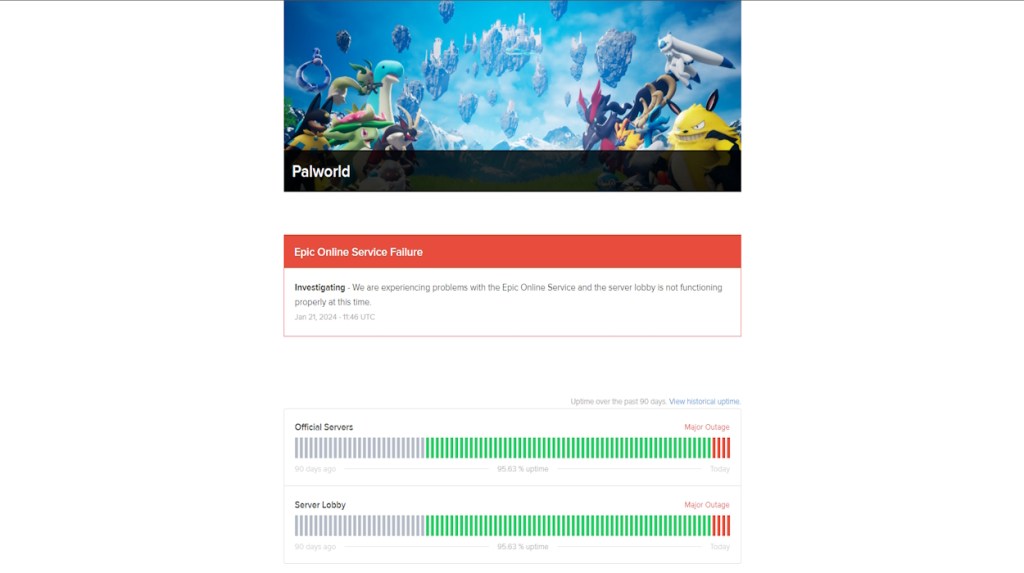
Image Courtesy: palworld.statuspage.io
2. Check Local Network and Change DNS
Once you notice zero issues with the Palworld server, check if your local network is doing well. You can restart your router and wait for 10 minutes to check if it solved the issue. You can also check if your antivirus or firewall is blocking any connection to Palworld.
Additionally, there is no harm in trying a different DNS address. To change your DNS address on Windows 11, follow the steps below:
First, right-click on the internet icon on the bottom right and click on Network and Internet settings .
Next, select Ethernet or Wi-Fi settings and click on Edit next to the DNS server assignment option.
Finally, switch it to Manual, toggle on the IPv4/ IPv6 options , and enter the Preferred DNS. (You can use 1.1.1.1. or 8.8.8.8 as preferred DNS)
Network and Internet Settings
Ethernet Settings
DNS Edit
Change DNS
3. Check for File Integrity
In case the server status is normal, and you have checked your local network, there might be an issue with corrupt files. The files corrupt during new patches or updates put in by the developers. You can easily fix corrupt files through a file integrity check. Follow the steps below to learn how to do so:
Verify File Integrity on Steam
Go to your Steam library and locate Palworld, then right-click on it.
Now, select Properties from the context menu and select the Installed Files option in the left sidebar.
Finally, click the Verify integrity of game files option to eliminate corrupt files or other errors.
Go to Palworld Properties
Verify file integrity
Verify Files on the Xbox App
Go to the Xbox listing for Palworld and select the Manage option from the ellipsis menu.
Now, move to the FILES tab and click on CHECK FOR UPDATES .
Once done, click on VERIFY AND REPAIR to eliminate any installation errors.
Go to Manage
Check for Updates
Verify & Repair
4. Update Steam
Luckily, to update the Steam launcher, you will have to restart it. Once the restart is done, you will get an update prompt. Alternatively, you can uninstall the client and then head to the official Steam website to download the latest client and install it.
5. Wait for Official Fix or Contact Palworld
If all the methods fail, the best option is to go straight to the developers. You can contact Palworld support and share your issue to let them know about existing errors too. Make sure to describe your problem in detail and attach error screenshots.
A gaming nerd who covers all things video games. Spending time playing games and writing about them was always a dream. Thanks to Beebom, I live it. Once I am done gaming, I write. Once I am done writing, I game. You feel me.
Add new comment
Name
Email ID
Δ




- Pocketpair has announced a new major update for Palworld, set to release this December.
- This expansion will introduce a massive new island, six times larger than Sakurajima, filled with challenges and mysteries.
- This update will lay the foundation for the massive Terraria x Palworld collaboration for 2025.
Right after announcing a massive collaboration with Terraria , Pocketpair has shared more about its upcoming expansion update. Palworld’s next major update coming this December will bring a big island, new pals, and lots of new challenges.
In a post on X, Palworld’s official account says, “The size of the new island is about six times more than Sakurajima!!!.” With that, they also suggest that the island will be the largest, harshest, and most mysterious one so far. After the massive Sakurajima update ( review ) , this will be Palworld’s major content expansion. The game is also going through a 25% discount for players who want to get the game and prepare for the upcoming update.
🚨 Major update coming in December!🚨 Survive on the largest, harshest, and most mysterious new island in Palworld! The size of the new island is about six times more than Sakurajima!!! Palworld is also currently 25% off! A perfect time to prepare for the upcoming update! Don’t… pic.twitter.com/f2AwDjNGXt — Palworld (@Palworld_EN) November 28, 2024
With Sakurajima, we got a lot of new pals , a unique island, and some fresh exploration content. However, the island itself was small and did not meet the expectations of many players. Pocketpair is promising a better island update with the upcoming expansion which means players can expect more challenges.
Ever since Pocketpair unveiled Palworld, it has been carrying the tag of ‘Pokemon with guns’. However, from the first day of early access, we all have witnessed the differences and fun of Palworld as an individual game. The game did massive in terms of sales and player numbers; beating games like CS2 and Dota 2.
A gaming nerd who covers all things video games. Spending time playing games and writing about them was always a dream. Thanks to Beebom, I live it. Once I am done gaming, I write. Once I am done writing, I game. You feel me.
Add new comment
Name
Email ID
Δ
