- Snapchat’s Friend Solar System offers a unique way to identify your closest friends on the app, based on which planet is closest to the sun.
- The feature is now disabled by default due to concerns about its impact on friendships but can be re-enabled for those who enjoy it.
- To enable it, tap on your profile picture inside Snapchat > Snapchat+ section > turn on the Solar System toggle.
Snapchat’s Friend Solar System shows your closest friend on the app based on the planets nearest to the sun. The feature can be an interesting way to find out how good your friendship is with someone on the app. But it can also cause some unwanted misunderstandings and harm good friendships, so Snapchat has decided to disable the feature by default. But if you and your friends enjoy the Friend solar system and wish to keep using it, then here is a guide to enable it again on Snapchat.
How to Enable Friend Solar System on Snapchat
If you are also unable to use the Solar System feature on Snapchat, then it might be disabled for you as well. Just follow this simple step-by-step process to enable it on the app.
- Open Snapchat and tap on your profile icon at the top left corner.
- This will take you to your profile page. Here, tap on the Snapchat+ section.

- On this page, scroll down and turn on the toggle for Solar System as shown in the image below.
- Select Okay in the confirmation pop-up.
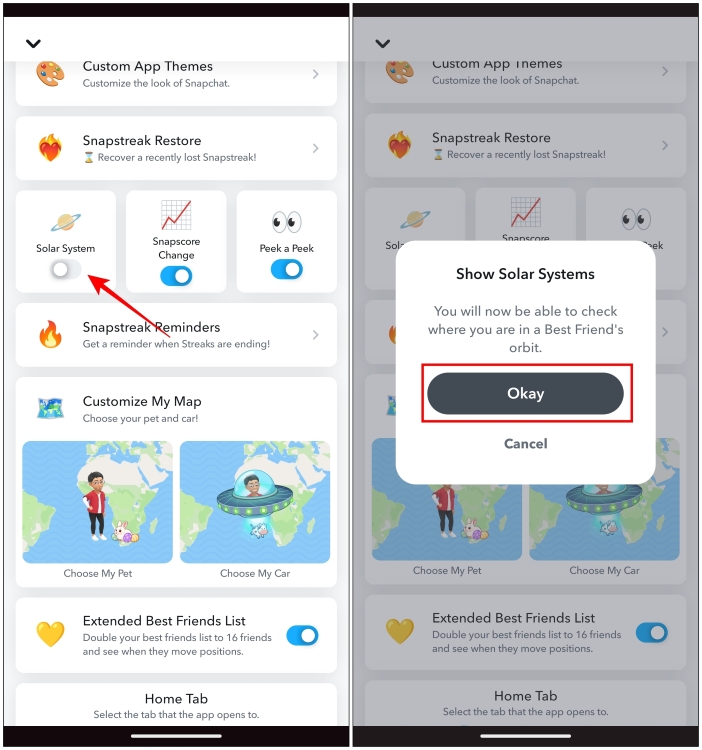
This will re-enable the Solar System on your Snapchat account.
How to Check Your Planet on Friend Solar System
Now that you have enabled this feature, you can find out which planet you are in your Friend’s Solar System. Here is how you can check this.
- Open your friend’s chat from Snapchat’s Chat screen.
- Tap on their name on the top of the chat.

- Now tap on the Best Friends badge as shown below.
- This will let you see which planet you are in your friend’s Solar System orbit.

You will be represented by your Snapchat avatar sitting on the planet that you represent. While your friend’s avatar will be watching you from the sun.
How to Disable Friend Solar System on Snapchat
If you think that this Solar System feature is negatively affecting your friendship with your friends then it is best to turn it off. Use this guide to disable the feature on the app.
- On the app, tap on the profile icon at the top left corner.
- Now go to the Snapchat+ section as shown in the screenshot.
- Then scroll down and turn off the toggle for the Solar System option.
- In the confirmation pop-up, tap on Okay .

After you have disabled this feature, you won’t be able to check your status in your friend’s Solar System anymore.
Snapchat features a bunch of fun ways to tell you about your bond with your friends on the app like Sun Sign Compatibility, heart emoji next to the profile icon, and of course, Snap streaks. Solar System is one of the features that was added to help you learn whom you interacted with most, but the hierarchy of planets did leave a bad impact on users.

With over 4 year of experience under the belt, I cover all facets of consumer tech, from smartphones to other consumer electronics, our favorite social media apps, as well as the growing realm of AI and LLMs. As an Apps and AI writer app Beebom, I provide my expertise in all these areas, weaving stories that help you get familiar with the tech around you. But you will find me playing NYT daily puzzles in my free time.
Add new comment
Name
Email ID
Δ

