- Netflix automatically deletes your account 10 months after canceling your subscription.
- To manually delete your Netflix account, go to My Netflix > Account > Delete account.
- If you want to delete your account before billing cycle, then email them at: privacy@netflix.com
With rising membership costs, lackluster originals, and limited screens, I have little reason to keep my account rather than explore Netflix alternatives . But canceling your Netflix subscription isn’t the solution. So if you want to be done with your Netflix account for good, then keep reading to learn how to delete your Netflix account permanently.
How to Delete Your Netflix Account
Previously, you were required to send an email to Netflix to get your account removed. However, the streaming service now offers dedicated options to delete your account right from the app or web version. So if you have made up your mind about deleting your Netflix account, here is how to do it:
Method 1: Delete Netflix Account on Android or iPhone
Whether you are using the Netflix app on your Android device or an iPhone, the steps to delete an account on both will be the same, which is why we will discuss it as one.
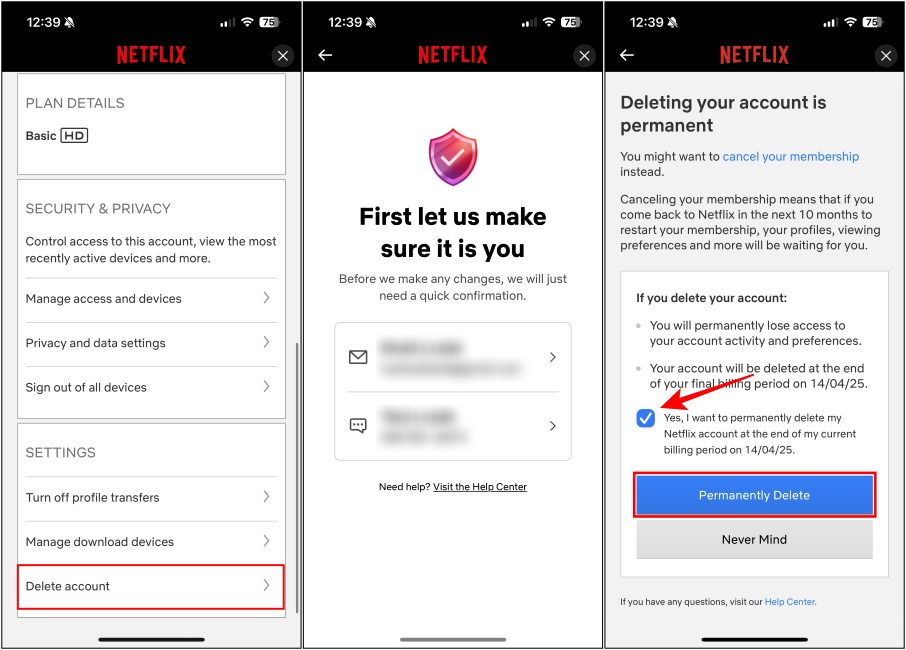
- On the Netflix app, tap on the My Netflix tab at the bottom right.
- Here, press the hamburger menu at the top right.
- Then select Account . This will redirect you to your Netflix accounts page.

- Scroll all the way down to the “Settings” section and then select Delete account .
- You will need to confirm it’s you by entering a code. This will be sent to your email or registered phone number.
- Once submitted, now check the Yes, I want to permanently delete my Netflix account at the end of my current billing period box.
- Finally, hit the Permanently Delete button to confirm deletion.
Method 2: Delete Netflix Account on Desktop or Web
Like the smartphone app version, the desktop app and web version of Netflix share the same layout. Hence, the steps to delete your account will also remain pretty much similar. Let us take a look at them.
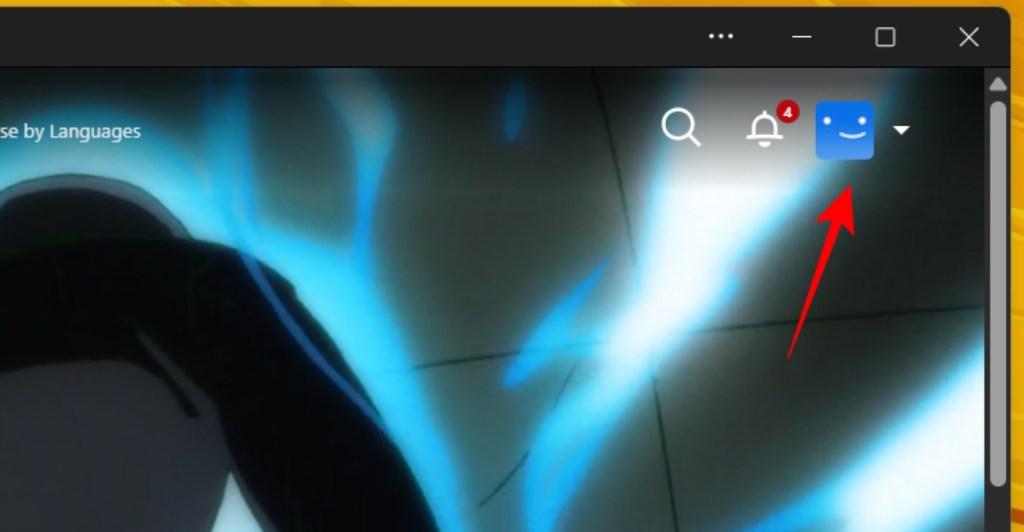
- On the Netflix home page, click on the profile icon on the top right.
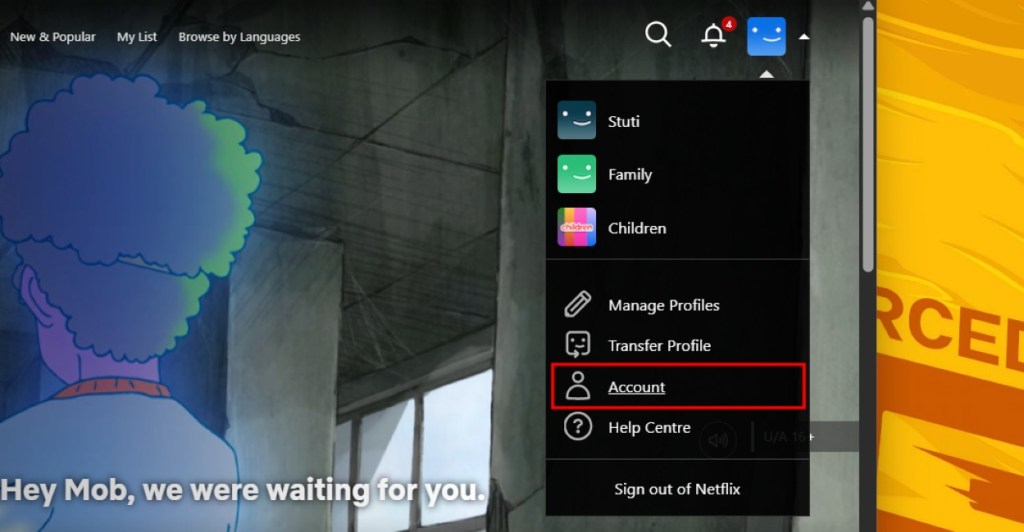
- From the drop-down menu, select Account .
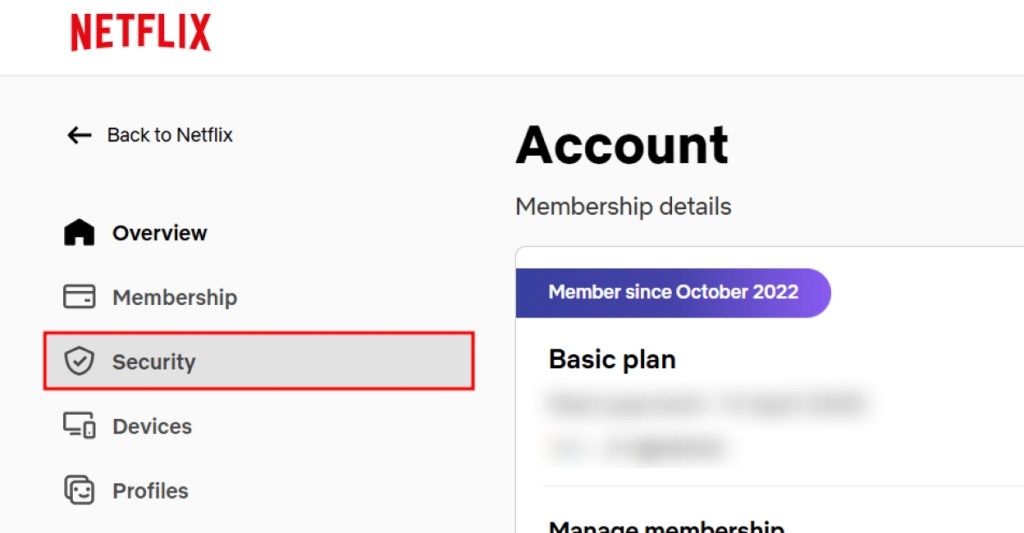
- From the left sidebar, click on Security .
- Now scroll down to the bottom of the page, and click on Delete account .
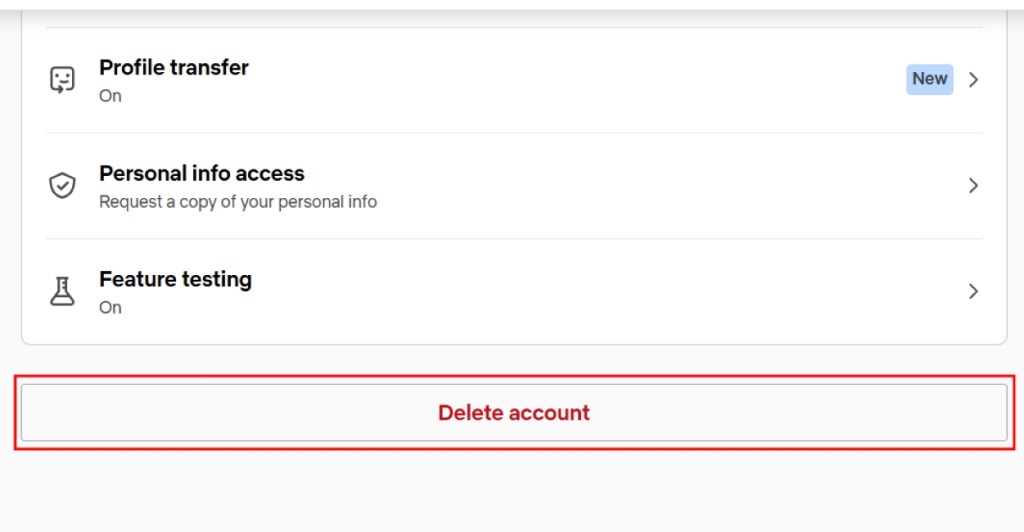
- Confirm the account is yours by entering a code sent to your registered email or phone number.
- Now, check the confirmation box highlighted below and then click on Permanently Delete .
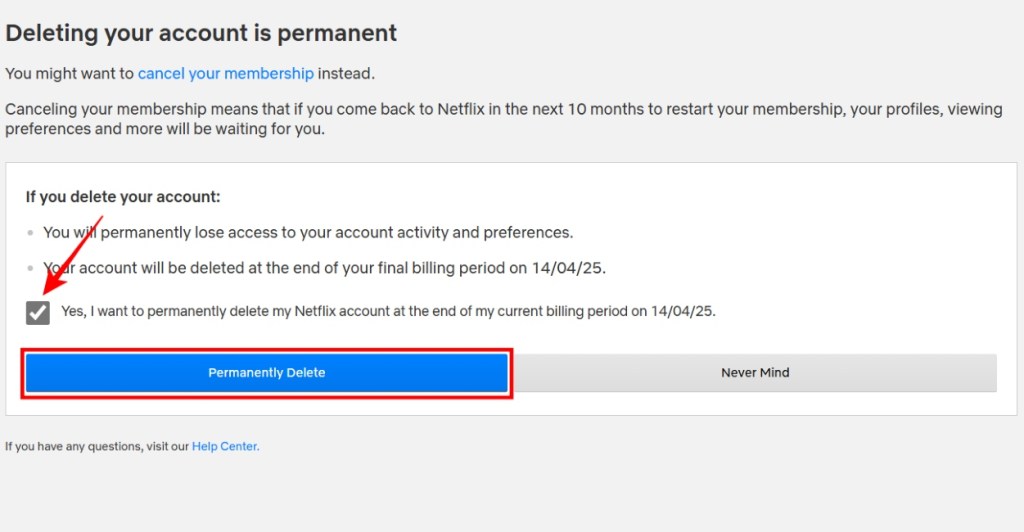
Method 3: Delete Account Through Email
If you want to delete your account immediately, you must send the company an account deletion email to privacy@netflix.com using your registered email. To make things easier, we have already drafted a sample email for you.
Sample Email to Delete Account
Dear Netflix team,I have canceled my Netflix subscription on <date> and have decided not to use Netflix anymore. Hence, I would like to request you to immediately delete my account from your database along with all the data associated with it ahead of the 10-month cooldown period. Thank you.Regards,<your name>
You don’t need to mention your email account linked to your Netflix in the subject, but instead, send the account deletion email using the same.
What Happens When You Delete Your Netflix Account?
Once you apply for account deletion, Netflix will purge your account and all its associated data along with it. Here’s what will happen after your Netflix account is deleted.
- Deleting your Netflix account will get rid of your recommendations, watch list, downloads, and other content.
- If you decide to re-subscribe to Netflix later, you won’t regain access to your account and profiles.
- If you request to delete the account before your billing cycle expires, then Netflix will delete the account immediately.
- Once the account is removed, there is no way to bring it back and its associated data.
Don’t Want to Delete Netflix? Cancel Subscription Instead
If you don’t want to delete your account, you can choose to cancel your membership instead. This way you won’t be charged every month, giving you time to explore other services.
In a 10-month period, your account to eventually get deleted. To cancel your Netflix subscription, navigate to Account > Cancel Membership > Finish Cancellation . For more detailed instructions to cancel your Netflix membership , check out our linked guide.
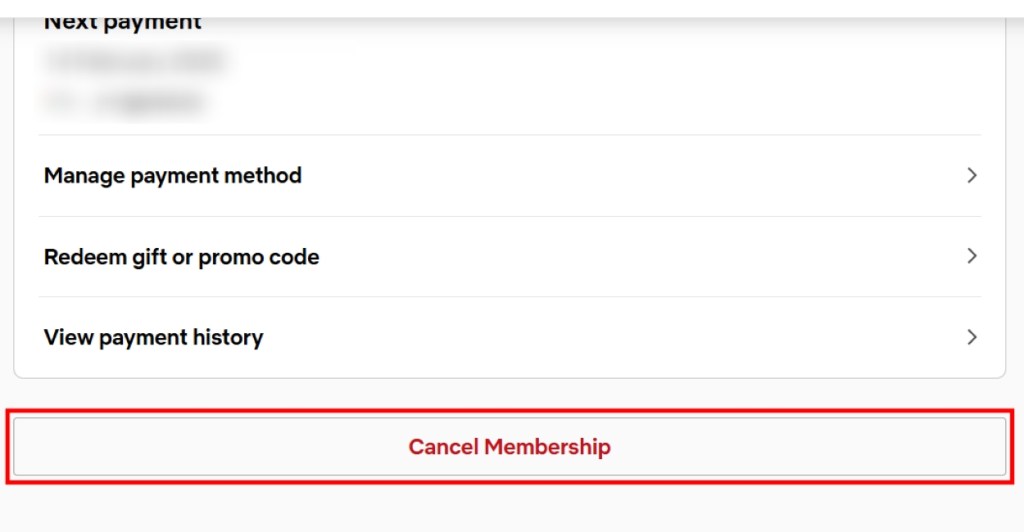
To delete your Netflix account, you need to first cancel your subscription. Once done, you can either wait for 10 months for them to automatically delete your account or email them at: privacy@netflix.com .
Once you have canceled your Netflix, the company takes 10 months to automatically purge your account and all its associated details.
When you cancel your Netflix subscription, you can still watch content till the end of the billing cycle. But if you send an email to delete your account, then you can no longer access it anymore.

With over 4 year of experience under the belt, I cover all facets of consumer tech, from smartphones to other consumer electronics, our favorite social media apps, as well as the growing realm of AI and LLMs. As an Apps and AI writer app Beebom, I provide my expertise in all these areas, weaving stories that help you get familiar with the tech around you. But you will find me playing NYT daily puzzles in my free time.
Add new comment
Name
Email ID
Δ


- A live-action Gundam movie will be released on Netflix.
- As of now, the cast includes Sydney Sweeney and Noah Centineo.
- The filming of the Gundam movie will begin sometime in March 2026.
Japan has had a massive impact on the world with its animes but one work of fiction that has created a generational fandom is the introduction of Gundam. Now being this popular, it goes unsaid that there have been multiple adpatations but now, the upcoming live-action Gundam movie is confirmed to be coming out on Netflix, and here, find out all you need to know about the upcoming project.
What Do We Know About the Upcoming Gundam Movie?

Image Credit: Tinseltown / Shutterstock
This new live-action adaptation of Gundam was announced all the way back in 2018, and Legendary Pictures was brought in as a co-producer. However, back then, details about the project were quite limited. Following this reveal, in 2021, Netflix confirmed that Jordan Vogt-Roberts will direct the movie. The filming was set to begin in 2023, but due to unforeseen circumstances, it never began, and later, we heard that the movie will not be made forward.
However, in 2025, it came to light that Sydney Sweeney and Noah Centineo were in talks with Legendary to star in the movie. Now, in 2026, a report by Deadline confirms that Sydney Sweeney and Noah Centineo will be starring in the live-action Gundam movie , and Netflix is on board to be the main distributor.
The filming of this project will begin in March 2026 and will be shot in multiple locations across Australia and the United Kingdom. So, let’s wait and see what Netflix and Legendary bring us with this live-action adaptation.

Shashank Shakya is an entertainment writer at Beebom. He has completed his Bachelors (Honors) in English Literature and is a published author. Shashank boasts incomparable knowledge about the Marvel and DC universe, along with other branches of entertainment with substantial experience in the field of writing.
Add new comment
Name
Email ID
Δ
