- When you cancel your Netflix subscription, it comes into effect after the current billing cycle.
- On the mobile app, head over to profile icon > hamburger menu > Account, and tap on Cancel Membership.
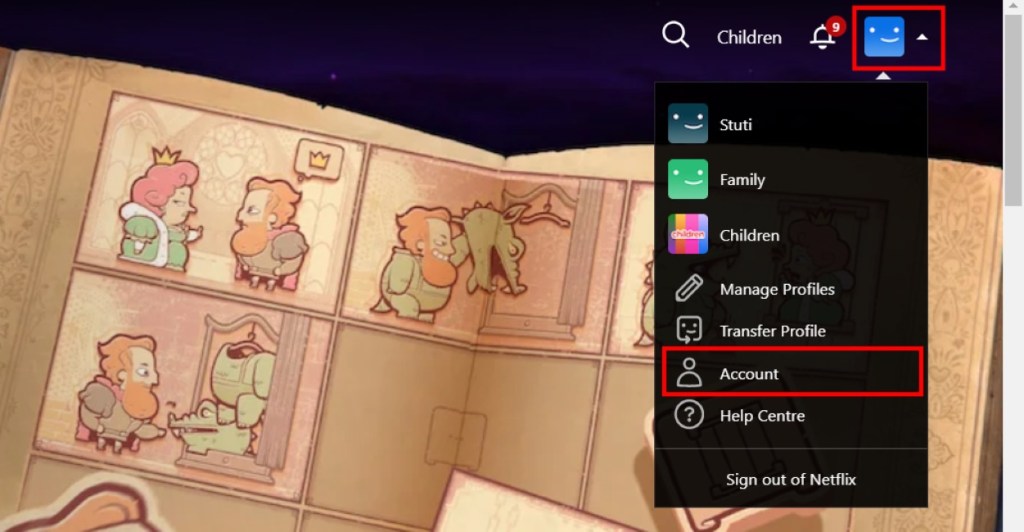
- To cancel your subscription from Netflix website, hover over Netflix profile icon > Account > Manage Membership, and click on Cancel Membership.
Are you trying to limit your subscription budget? Well, we all know that Netflix is one of the priciest OTT services in many countries, so I won’t blame you for thinking it’s the one burning a hole in your pocket. This article will explain how to cancel your Netflix subscription and other things you should consider while doing it. So, if you are ready to save some bucks, let’s begin.
Things to Remember Before Cancelling Netflix Subscription
If you are taking this decision in the heat of the moment, here are a few things you should remember before canceling your Netflix subscription:
- The cancellation comes into effect after the end of your current billing cycle.
- Uninstalling or not using Netflix will not cancel the subscription or membership.
- You will lose your personalized recommendations upon removing your membership.
- You must pay for the upcoming month in advance if you choose to resume the membership.
- If you don’t have an automatic payment setup, you can skip further payments without canceling the plan. It won’t cost you extra when you rejoin or renew your membership. The same applies if you have used a gift card or promotional offer to access Netflix.
- If your account is on hold, the cancellation will be effective immediately .
How to Cancel Netflix Subscription on Android and iPhone
The process of canceling your Netflix subscription on the two platforms is pretty much the same. Hence, we used an Android device to outline the steps. Take a look:
- Head over to the Netflix app on your Android or iOS phone.
- Tap on the profile icon at the bottom right.
- Then, tap on the hamburger menu at the top right and select Account .
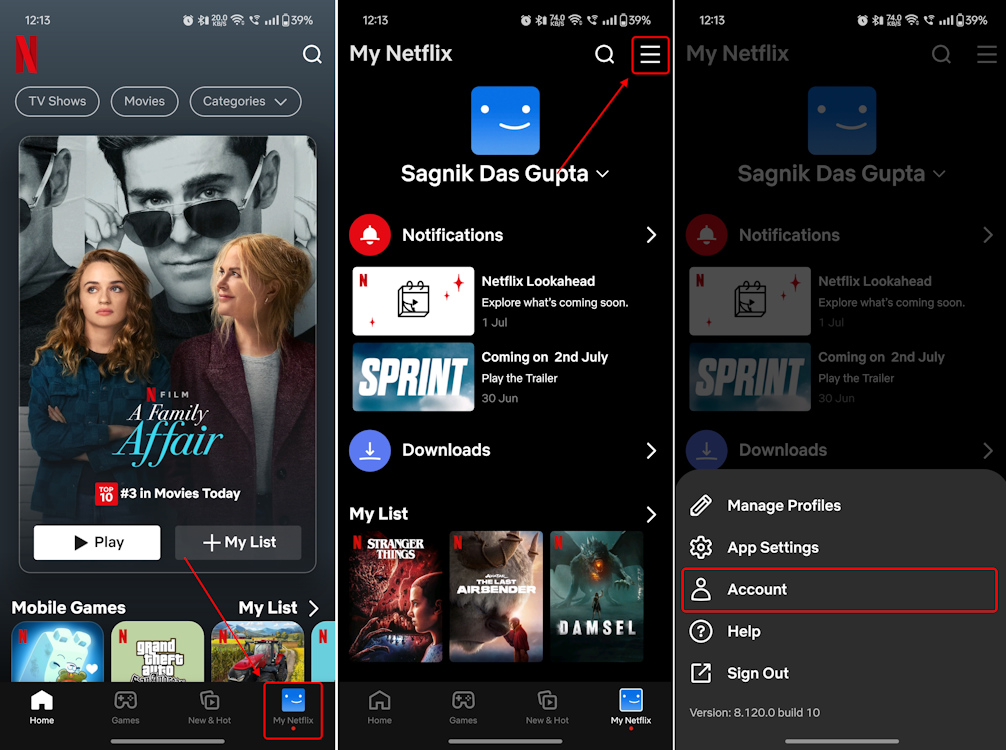
- This redirects you to the Account page. Here, scroll down and tap on Cancel Membership under “Billing details”.
- That will take you to a Manage your membership screen. From here, tap on Cancel .
- Now, tap on Finish Cancellation to complete the process.
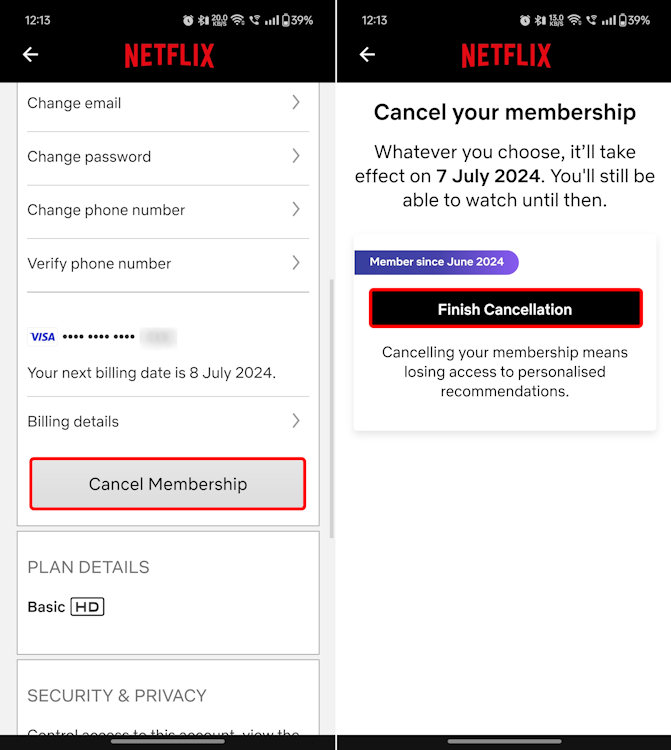
With that, you will have successfully canceled your Netflix subscription. On the confirmation page, you can see when the cancellation comes into effect.
How to Cancel Your Subscription from Netflix Website
Simply by using your desired web browser, you can cancel your Netflix subscription. So, once you’ve visited the Netflix web version, here’s how to go about it:
- Hover the cursor over your Netflix profile icon .
- From the list of options that appears, click on Account .
- You will be redirected to your Netflix Account page. Here, select Manage membership .
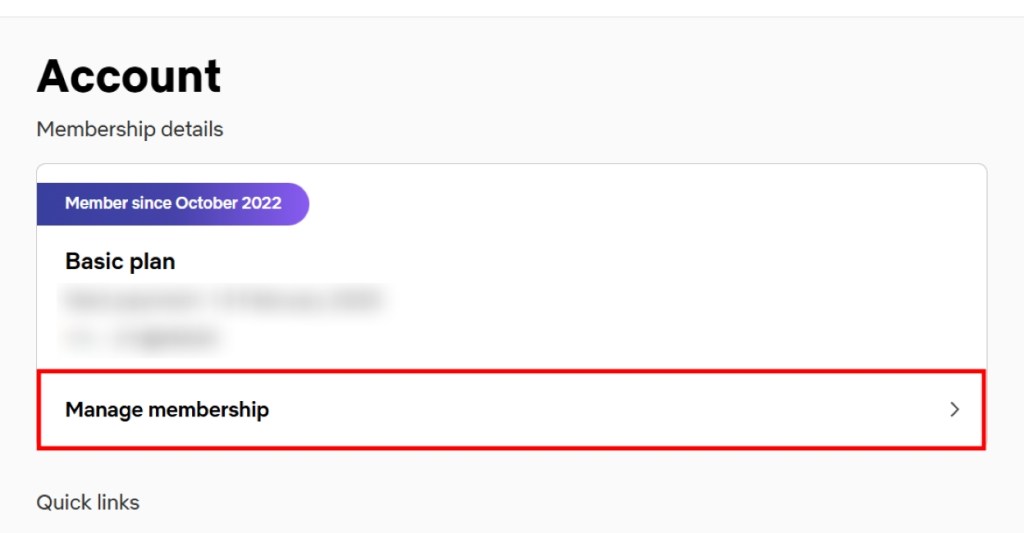
- Scroll down this page and click on Cancel Membership at the bottom.
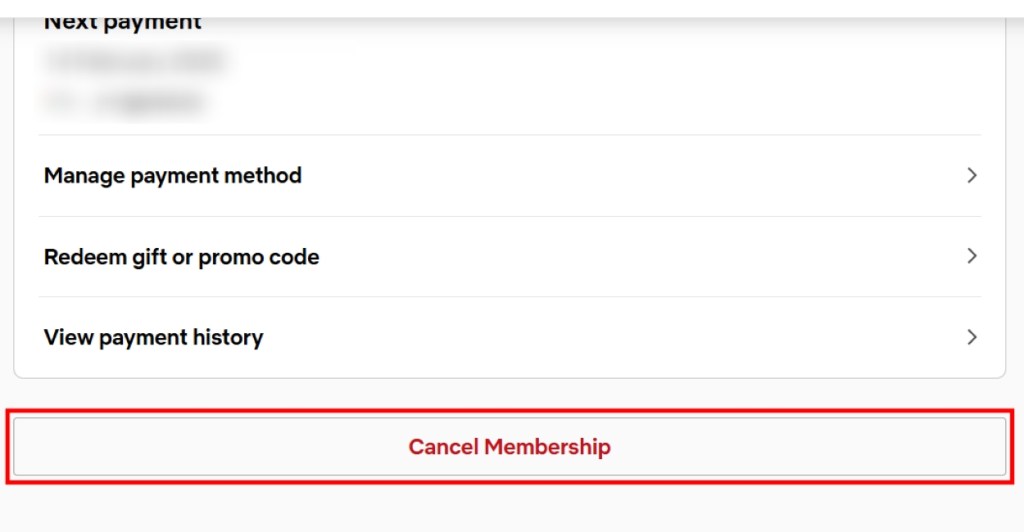
- Now, click on Finish Cancellation to complete the process.
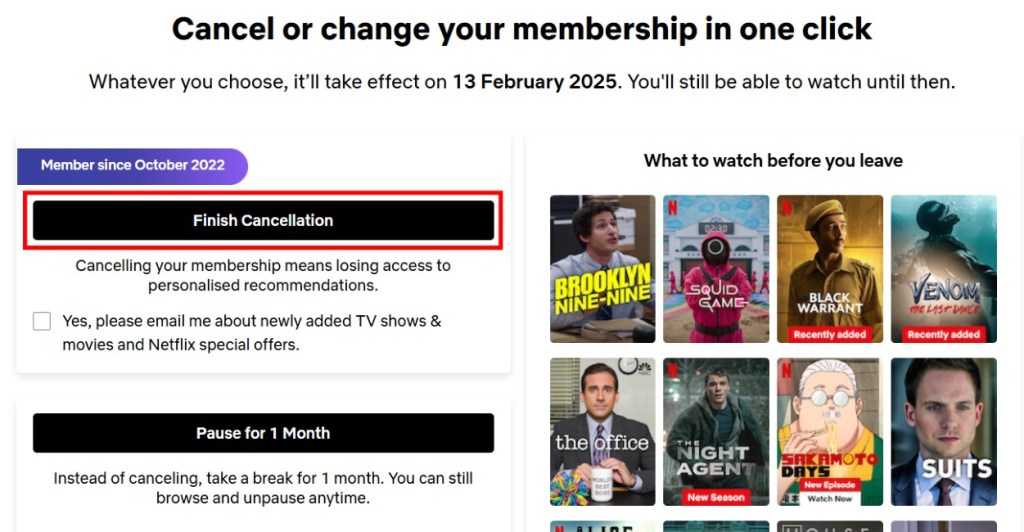
On both versions, you can also choose to Pause for 1 Month instead of canceling your Netflix account completely. “You can still browse and unpause anytime,” Netflix says. This is a better option since it prevents you from losing the platform’s personalized recommendations.
Note: If you don’t see the “Cancel Membership” option, it means your subscription is handled by a third-party client like your smart TV company or internet service provider (ISP). In such cases, contact the service provider to cancel subscription.
No, you don’t get a refund but rather, continue to enjoy the platform’s services until the next billing date. You just won’t be billed again.
You can use a payment method that requires authentication for every payment, like a debit card. Otherwise, you can cancel the “standing instruction” for Netflix payments via internet banking or will have to ask your bank provider to cancel the payments for Netflix.
Yes, you can cancel your Netflix account at any time. However, signing out of Netflix or uninstalling the app won’t cancel your subscription.
There is no extra charge to cancel a Netflix subscription. However, you can use your plan until the last date of the billing cycle, since there is no refund for your existing subscription.
Sagnik is a tech aficionado who can never say “no” to dipping his toes into unknown waters of tech or reviewing the latest gadgets. He is also a hardcore gamer, having played everything from Snake Xenzia to Dead Space Remake.
Add new comment
Name
Email ID
Δ



- A live-action Gundam movie will be released on Netflix.
- As of now, the cast includes Sydney Sweeney and Noah Centineo.
- The filming of the Gundam movie will begin sometime in March 2026.
Japan has had a massive impact on the world with its animes but one work of fiction that has created a generational fandom is the introduction of Gundam. Now being this popular, it goes unsaid that there have been multiple adpatations but now, the upcoming live-action Gundam movie is confirmed to be coming out on Netflix, and here, find out all you need to know about the upcoming project.
What Do We Know About the Upcoming Gundam Movie?
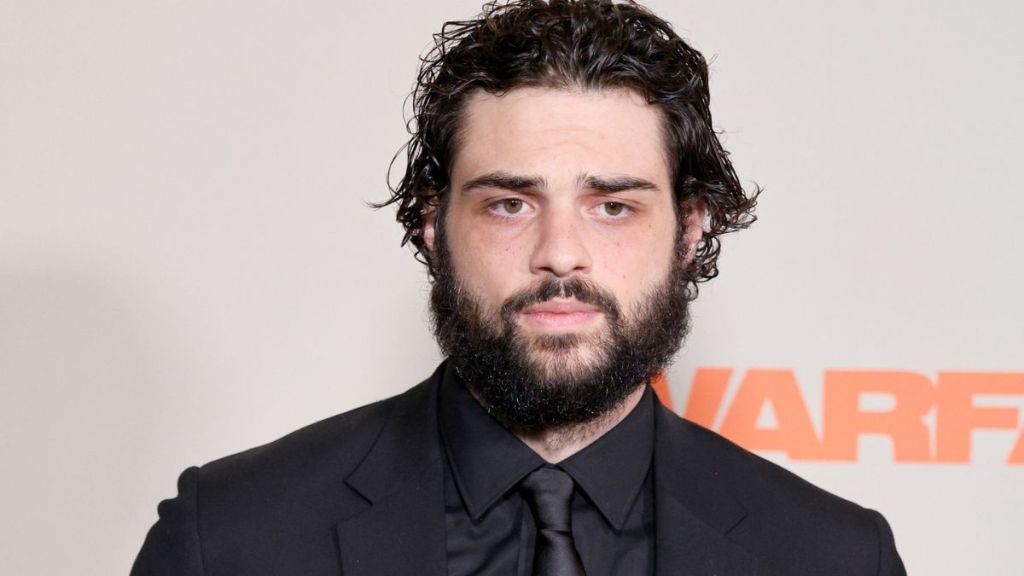
Image Credit: Tinseltown / Shutterstock
This new live-action adaptation of Gundam was announced all the way back in 2018, and Legendary Pictures was brought in as a co-producer. However, back then, details about the project were quite limited. Following this reveal, in 2021, Netflix confirmed that Jordan Vogt-Roberts will direct the movie. The filming was set to begin in 2023, but due to unforeseen circumstances, it never began, and later, we heard that the movie will not be made forward.
However, in 2025, it came to light that Sydney Sweeney and Noah Centineo were in talks with Legendary to star in the movie. Now, in 2026, a report by Deadline confirms that Sydney Sweeney and Noah Centineo will be starring in the live-action Gundam movie , and Netflix is on board to be the main distributor.
The filming of this project will begin in March 2026 and will be shot in multiple locations across Australia and the United Kingdom. So, let’s wait and see what Netflix and Legendary bring us with this live-action adaptation.

Shashank Shakya is an entertainment writer at Beebom. He has completed his Bachelors (Honors) in English Literature and is a published author. Shashank boasts incomparable knowledge about the Marvel and DC universe, along with other branches of entertainment with substantial experience in the field of writing.
Add new comment
Name
Email ID
Δ
