- You can cancel your Spotify Premium subscription if you’re switching to a different streaming service.
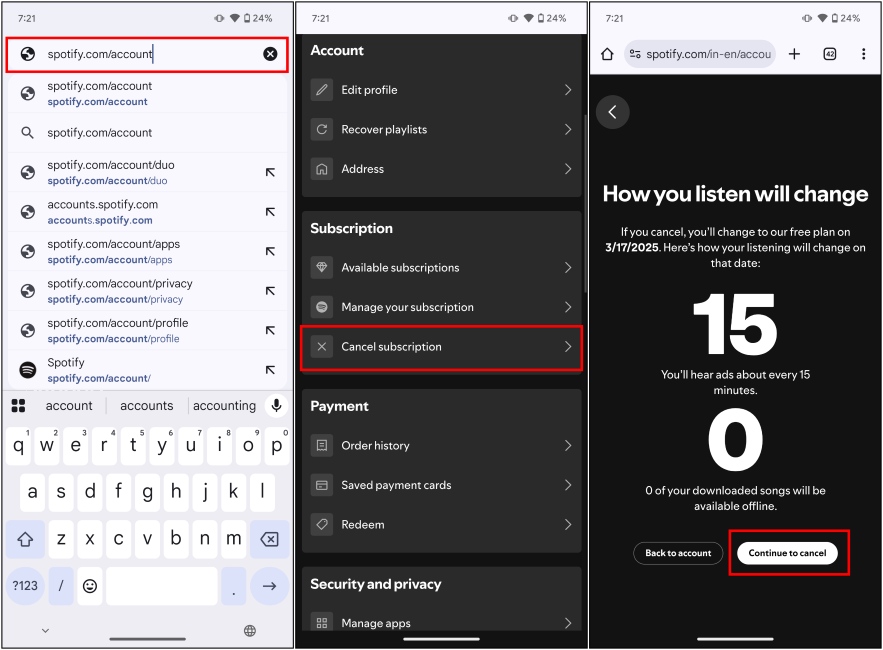
- To do it, visit spotify.com/account from your web browser, and scroll down to Cancel subscription.
- Cancelling Spotify Premium downgrades you to Spotify’s free tier which includes ads and no offline downloads.</li>
We all love Spotify, whether it is for its ease of use, or its large music library. But the streaming giant is charging ever more than ever for their premium tier. The individual Spotify Premium now costs $11.99, higher than a standalone Apple Music subscription. So if you have finally decided to give up on Spotify and need help canceling the subscription, then keep reading to learn how to cancel Spotify Premium in a few easy steps.
How to Cancel Spotify Premium Subscription
If you are unable to find the Cancel Subscription option in the Spotify app, then don’t worry because you’re not alone. In a devious move, Spotify removed this option from their Android and iPhone app, so the only way for you to cancel the subscription is through the account page on their website. Let’s take a look at it.
- Open a web browser on mobile or desktop, then go to spotify.com/account .
- Here, sign in with your Spotify account credentials, if required.
- Scroll down to “Subscription”, and select Cancel subscription .
- Hit the Continue to cancel button. Your Spotify Premium should now be canceled.
What Happens When You Cancel Spotify Premium?
Canceling your Spotify Premium subscription doesn’t delete your account. It just puts you back on the Spotify Free plan . You will still be able to listen to your favorite songs and access your playlists, but you won’t be able to access all the Premium features . All your downloaded Spotify songs will be unavailable, and you will be bombarded with ads every 15 minutes. Besides, here are a few other things you won’t be able to enjoy anymore.
- No Ads
- Offline Listening
- “Very high” quality music playback
- Spotify Jam
- Skip music infinitely
- Peek into the next song
- Listening insights
- Use the seek bar to skip to parts of music
- Select a particular song to play from a library
- Seamless switching between devices
Why Can’t I Cancel My Spotify Premium Subscription?
To stop your Spotify Premium from auto-renewal, you need to either cancel the subscription or change the plan before the billing cycle. This way, you won’t be charged for the complete plan in case you are thinking about switching to a cheaper plan or canceling it.
Yes, you can cancel your Spotify Premium plan anytime you want, but you will be able to use its benefits till the stop of the billing cycle. So if you have purchased an early plan, and decide to cancel it midway through, you will still be able to use the Premium features till the end of the year.
No. Spotify does not offer refunds if you decide to cancel your subscription mid-cycle. However, you can cancel the plan to make sure that your plan does not auto-renew, and you are not charged again for it.

With over 4 year of experience under the belt, I cover all facets of consumer tech, from smartphones to other consumer electronics, our favorite social media apps, as well as the growing realm of AI and LLMs. As an Apps and AI writer app Beebom, I provide my expertise in all these areas, weaving stories that help you get familiar with the tech around you. But you will find me playing NYT daily puzzles in my free time.
Add new comment
Name
Email ID
Δ

