- Prime Video is bundled service, so cancelling that will remove Amazon Prime benefits too.
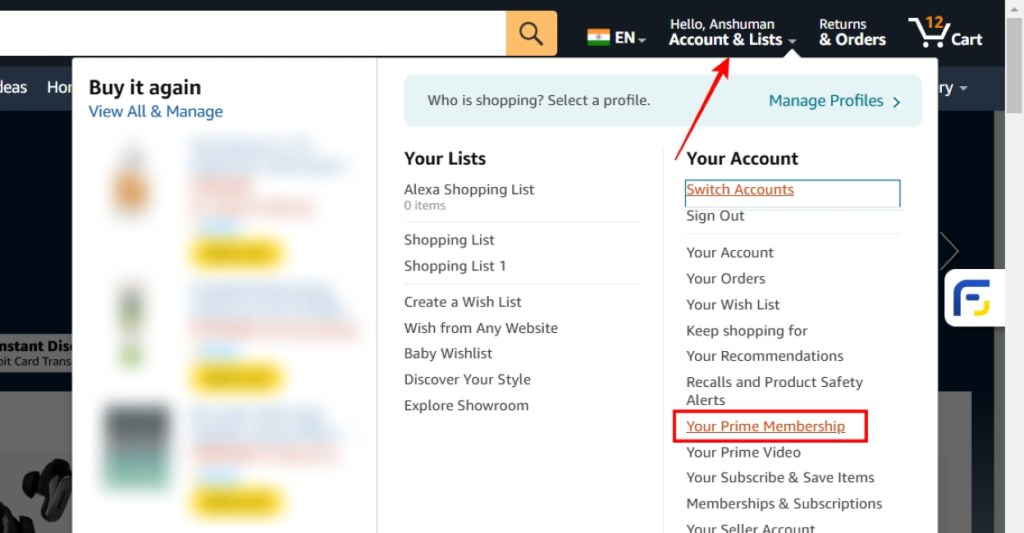
- To do this, go to the Accounts and Lists option in Amazon website, then go to Your Prime membership > Membership > End membership.
- On Amazon app, tap the profile icon, select Account and pick Your Prime membership, > Membership > End membership.
- Open Amazon ( website ) on a web browser. Then, hover over the Account and Lists option at the top right and click on the Sign-in button, in case you aren’t signed in.
- Then sign in to your Amazon account associated with the Prime Video you want to cancel.
- Now, hover again on Account and Lists and select Your Prime Membership .
- On this page, hover the cursor over the Manage Membership option at the top, and click on Update, cancel and more .

- Finally, select End Membership .

Method 2: Cancel Prime Video Subscription on Android and iPhone
- Open the Amazon app on your phone.
- Now, tap on the You tab from the bottom to open your account.
- Here, select the Account tab from the top.
- Now go to the Manage Prime membership option from the list.

- Tap on Manage membership to open a drop-down, then select Membership .
- Lastly, tap on the End Membership button.

What Happens When You Cancel Prime Video Subscription?
- If you are using a bundled package of Prime Services, canceling one subscription will also affect others. Consequently, you won’t be able to use any Prime service unless you resume your plan.
- Your Prime Subscription benefits won’t lapse until the last date of your current subscription plan.
- You can not cancel a subscription managed by a third-party service like a sim card company or a plan you got with a device. If you wish to cancel such a plan, please get in touch with the third-party company’s customer service.
- You can not end your membership if you don’t have recurring payments enabled. The service purchased with a one-time payment automatically ends when your current plan expires. So, there is no need to cancel it anyway.
- Some countries like Canada have removed the option to cancel the Prime Video membership via the methods described below. In such cases, please get in touch with Amazon’s customer care service for further assistance.
The end membership option is unavailable under certain circumstances. You won’t find the end membership button if you have used a single payment method and disabled auto-renewal. Similarly, you may also see cancel auto-renewal instead of end membership.
No. Unfortunately, you can’t directly cancel the plan if it is managed by a third-party service like a cellular data provider.

With over 4 year of experience under the belt, I cover all facets of consumer tech, from smartphones to other consumer electronics, our favorite social media apps, as well as the growing realm of AI and LLMs. As an Apps and AI writer app Beebom, I provide my expertise in all these areas, weaving stories that help you get familiar with the tech around you. But you will find me playing NYT daily puzzles in my free time.
Add new comment
Name
Email ID
Δ

