In 2023, Netflix started cracking down on password sharing so that only people living together can share an account. This is called Netflix Household. Anyone outside your home network who tries to access your account will get this error “Your device isn’t part of the Netflix Household for this account”. While it keeps out the others, it can also pop up for you while traveling or outside. That’s why we have listed some helpful ways to bypass the Netflix Household.
Method 1: Connect with Netflix Household Wi-Fi
Using the streaming platform anywhere outside your home Wi-Fi might result in the error popping up. But that doesn’t mean the company didn’t account for you going out to work, traveling, or temporarily staying outside your home.
You need to make sure that you connect your devices to your household Wi-Fi once a month and play thirty seconds of a show or a movie. This allows you to stream the content without coming across any errors.
Method 2: Update Your Netflix Household Location
If you are shifting to a new location, switching Wi-Fi, or staying at a friend’s or relative’s place over 30 days then you should update your Netflix Household location. This can only be done when you sign in to Netflix from a new smart TV, tablet, or laptop.
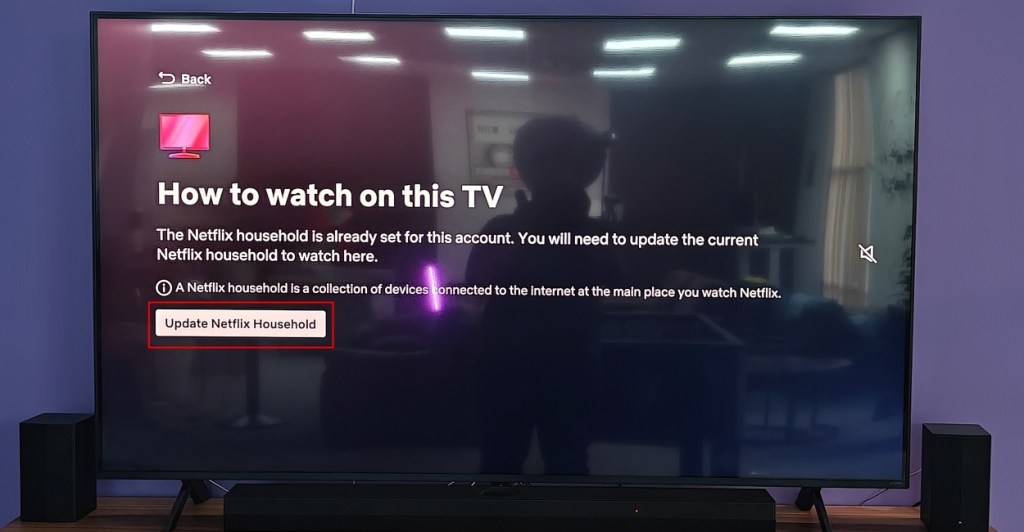
We’ve already prepared a dedicated Update Your Netflix Household guide that should help you set it up on your home’s Smart TV. Once done, you shouldn’t see the “Your TV isn’t part of the Netflix Household for this account” message. However, updating your location may sign you out of the devices from the original household location.
Method 3: Share Netflix Account Access Codes
Kids visiting a friend’s house for a few days, or going away for a trip might run into the “Your device isn’t part of the Netflix Household for this account” when trying to access their account. Here there is no point in updating their Netflix Household, instead, they can choose to confirm that they are traveling.
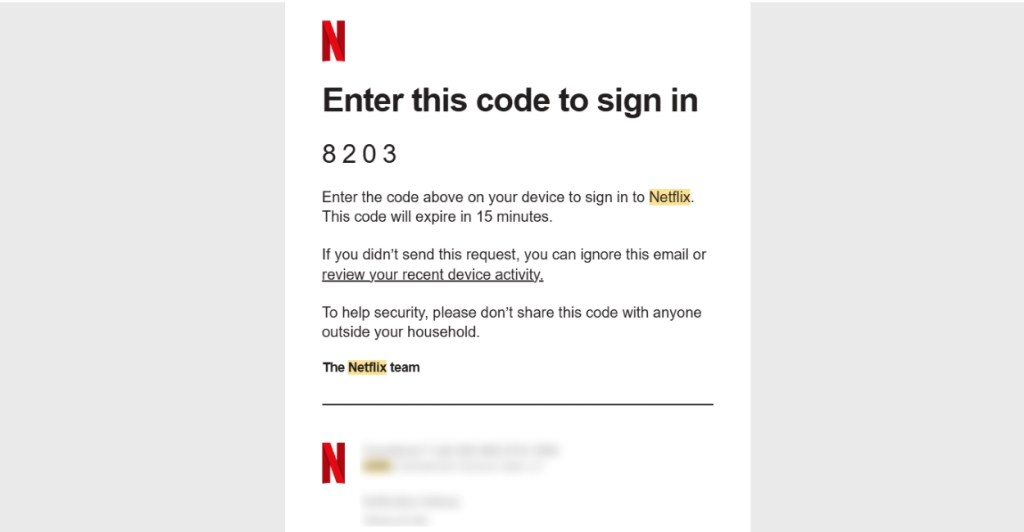
Netflix will then share a numerical code with the account holder that they can share with their kids or close ones to grant them access to the subscription service. If this is not a one time, thing then they can even set up email forwarding so they can directly enter the digits and use the account.
Method 4: Download Offline Before Heading Out
The Netflix Household error comes up when it notices that your device isn’t connected to the home Wi-Fi network. But if you are heading out temporarily and plan to return pretty soon, it is best to download and carry your entertainment with you. We’ve already prepared a dedicated Download Movies on Netflix guide here but here’s a quick rundown.
- Open the Netflix app on your phone or tablet and select the content that you want to watch.
- Tap on the Download button below the Play button.
- The app will begin downloading your selected content. Once done, tap on the download icon at the top right. Here you will find all the content you’ve downloaded on the app.
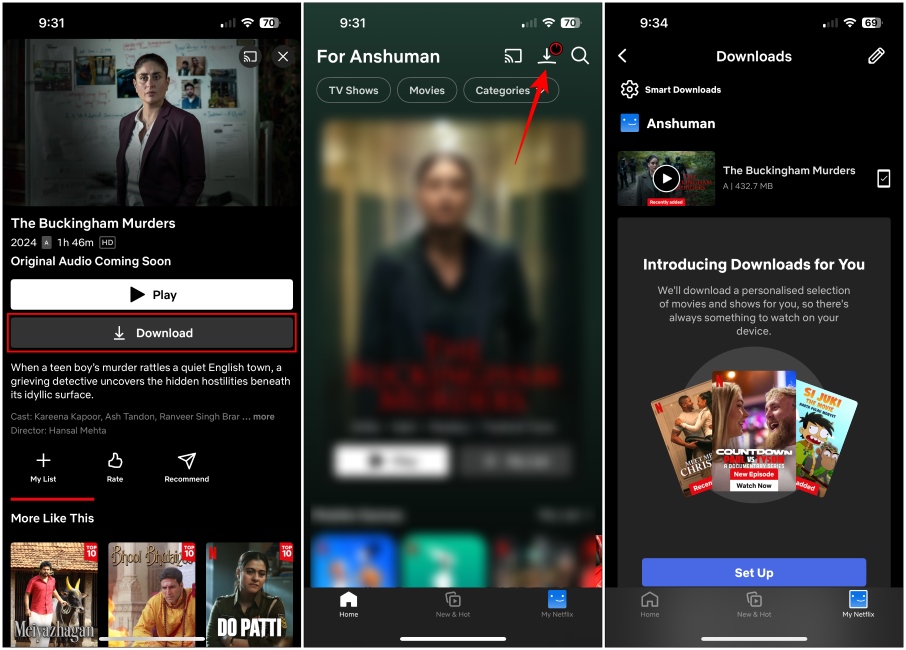
However, the number of devices and things you can download will depend entirely on your plan.The standard plan lets you download it on up to two devices, while the premium plan lets you do it for six devices. You need to ensure your device stays offline until you are done watching.
Method 5: Don’t Login from Smart TVs
When you log into your Netflix account on a smart TV, the service assigns it as your household device and limits password sharing. However, as long as you avoid signing into a smart TV, you can bypass the Netflix Household restriction. This way, you can continue sharing passwords on multiple devices outside your home network as the app can’t determine your household. Just make sure that you stick to smartphones.
Image Credit via Vantage_DS / Shutterstock.com
If you’ve already signed in, I recommend not to do it on any TVs outside your Netflix Household. It can cause the message to appear again, and you will have to configure it as your new household TV, which is a whole mess in and of itself.
Method 6: Cast To Your Screen
The above method might sound like a bummer, as any content is most enjoyable on a large screen. One workaround to bypass Netflix Household is to cast your phone’s screen on your TV. You can do this using a USB-C to HDMI adapter. But your phone needs to support USB video output which is found on high-end flagship devices.

Image Credit via pixinoo / Shutterstock.com
Another way to cast using an older Chromecast device. If you have a Chromecast 3 or older, you might be able to cast Netflix running on the Chrome browser to your TV. This method won’t work with new devices which is its only limitation.
Method 7: Add an Extra Member to Your Plan
Netflix also lets you add an additional member to your account for a low price of $7.99 per month. This is the only official method to let someone use your Netflix account outside of your Household. It gives access to your account with a separate password but is paid by the main account holder. The streaming quality depends upon the main account holder’s plan.
So if they have a $15.49 plan the quality will be capped at 1080p, while the $22.99 gives you 4K resolution. You can head over to Netflix’s Add Extra Member page, and buy one to include a new account to the mix.
So these sum up mostly all the workarounds that you can use to bypass the annoying Netflix Household rules. I understand how password sharing can hamper a company’s revenue, but the implementation of the Household system itself could have been better. How about a hard device limitation depending on the plan one has?

With over 4 year of experience under the belt, I cover all facets of consumer tech, from smartphones to other consumer electronics, our favorite social media apps, as well as the growing realm of AI and LLMs. As an Apps and AI writer app Beebom, I provide my expertise in all these areas, weaving stories that help you get familiar with the tech around you. But you will find me playing NYT daily puzzles in my free time.
Add new comment
Name
Email ID
Δ


- A live-action Gundam movie will be released on Netflix.
- As of now, the cast includes Sydney Sweeney and Noah Centineo.
- The filming of the Gundam movie will begin sometime in March 2026.
Japan has had a massive impact on the world with its animes but one work of fiction that has created a generational fandom is the introduction of Gundam. Now being this popular, it goes unsaid that there have been multiple adpatations but now, the upcoming live-action Gundam movie is confirmed to be coming out on Netflix, and here, find out all you need to know about the upcoming project.
What Do We Know About the Upcoming Gundam Movie?

Image Credit: Tinseltown / Shutterstock
This new live-action adaptation of Gundam was announced all the way back in 2018, and Legendary Pictures was brought in as a co-producer. However, back then, details about the project were quite limited. Following this reveal, in 2021, Netflix confirmed that Jordan Vogt-Roberts will direct the movie. The filming was set to begin in 2023, but due to unforeseen circumstances, it never began, and later, we heard that the movie will not be made forward.
However, in 2025, it came to light that Sydney Sweeney and Noah Centineo were in talks with Legendary to star in the movie. Now, in 2026, a report by Deadline confirms that Sydney Sweeney and Noah Centineo will be starring in the live-action Gundam movie , and Netflix is on board to be the main distributor.
The filming of this project will begin in March 2026 and will be shot in multiple locations across Australia and the United Kingdom. So, let’s wait and see what Netflix and Legendary bring us with this live-action adaptation.

Shashank Shakya is an entertainment writer at Beebom. He has completed his Bachelors (Honors) in English Literature and is a published author. Shashank boasts incomparable knowledge about the Marvel and DC universe, along with other branches of entertainment with substantial experience in the field of writing.
Add new comment
Name
Email ID
Δ
