- You can appear offline on Steam Desktop by going to Friends and selecting Invisible or Offline.
- On the Steam Deck, go to your profile and use the Your Status dropdown menu to select Invisible.
- You can also use the Steam Chat app on Android and iPhone and set your status to Invisible.
If Steam has been your go-to gaming platform for years, you may have accommodated a lot of friends. In that case, if you’re trying to sneak in a game or two of your favorite online multiplayer, you may get bombarded with messages that may ruin your flow. However, there is a way to avoid this, by changing your Steam account’s online status. The platform lets you control your online status, and you can set it to offline to hide your status. Here’s how to appear offline on Steam on a desktop, iPhone, Android device, or a Steam Deck.
All Steam Statuses Meanings
As mentioned, Steam comes with a built-in options that lets you go offline or invisible. Once you do, your friends won’t be able to see the game you’re playing or if you are, at all. If you’re curious, here’s what every Steam status option means.
- Offline – Appears offline on Steam. You won’t get new messages and notifications, and you cannot send any messages.
- Invisible – Invisible mode gives you access to all chat features while appearing offline to your friends.
- Online – You are online on Steam, and your friends will see your online status. Your name will appear in blue if you are online and green if you are in-game.
- Away (orange) – Marks your status as away. Typically, used when you’re stepping away from your keyboard. You can still access the chats when you’re in away mode.
How to Appear Offline on Steam Desktop App
To appear offline on Steam Desktop but still use all the chat features, you will have to change your Steam status to Invisible. Here’s how to do it:
- Launch Steam and click on Friends from the top bar.
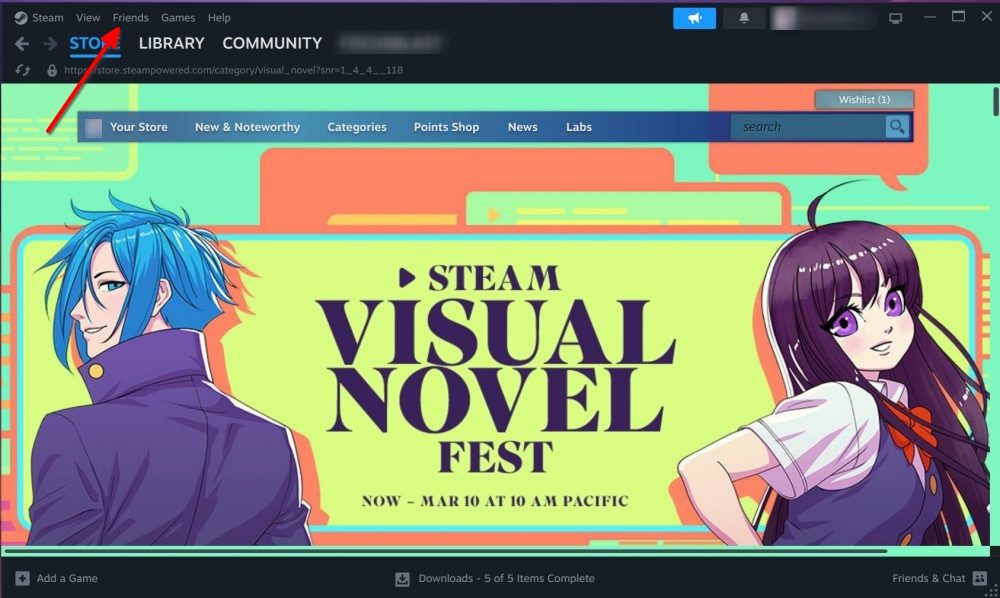
- In the dropdown menu, click on Invisible to turn your status to offline.

- Once selected, you will now appear offline to your friends but can still text them.
- If you want to go completely offline, click on Offline from the dropdown menu.
How to Appear Offline on Steam Chat App on Android & iPhone
The Steam app got a neat refreshed UI not too long ago. While the app looks great now, the ability to change status has branched off to a separate app called Steam Chat . Here’s how to appear offline using the Steam Chat app.
- Install the Steam Chat app for Android or iPhone and log in via your Steam credentials.
- Tap on the hamburger icon at the top left for more options.
- Select Invisible to turn yourself invisible and appear offline on Steam Chat.

How to Appear Offline on Steam Deck
If you own a Steam Deck, changing your status is a bit different compared to on Steam Desktop because it runs on SteamOS.
- On your Steam Deck, tap on your Steam profile at the top right.

- In the Your Status section, tap on the dropdown menu on the right to get more options.

- From the options, select Invisible if you want to appear offline or signed out if you want to sign out of friends chat.

If your device is connected to the internet, you should now appear offline to your friends.
Steam’s offline status logs you out of the chat, and you won’t get notifications for new messages. On the other hand, using invisible status on Steam lets you chat with your gaming buddies while appearing offline.
No, your friends won’t see you on the online list or see what you’re playing when you’re invisible on Steam.
You can indefinitely stay in offline mode on Steam. However, you will have to sign in to check your new messages unless you use invisible mode.
You can hide the game you’re playing by going to Profile > Edit Profile > Privacy Settings, and setting game details to “Private”.
Abubakar covers Tech at Beebom, with his passion for technology tracing back to 2011 when he received a Dell Inspiron 5100 as a gift. He’s also a passionate advocate for the right-to-repair movement, believing in empowering users to maintain and extend the life of their devices. Outside the tech world, he enjoys watching anime and exploring his newfound enthusiasm for Japanese cars. In his free time, you’ll often find him immersed in Genshin Impact or researching his next gadget purchase. Before joining Beebom, he contributed to leading publications like Android Police, How-To Geek, and Fossbytes.
Add new comment
Name
Email ID
Δ



There’s no better time to pick up games on a discount than during Steam sales. Valve’s storefront is known for hosting sales quite regularly, most of which offer mouth-watering discounts on the biggest AAA and indie games. While its most popular promotions are tied to seasonal sales, Steam also features more thematic discounts throughout the year. So, if you’re looking to keep up with its schedule in 2026, we’ve put together a list of the next Steam sales and their dates in this guide.
Current Steam Sale
The current Steam sale is the Typing Fest . It celebrates titles that challenge your speed and dexterity on the keyboard. The promotion kicked off on February 5 and will end on February 9 .

Image Credit: Valve/Steam
While it’s live, you can look forward to discounts on excellent typing games such as Bongo Cat, Final Sentence , and many others – some of which are among the best games on Steam .
Next Steam Sale Date and Time
The next Steam sale is the PvP Fest . As the name suggests, the sale will be all about multiplayer titles that pit you against other players in a competitive environment. The upcoming promotion will kick off on February 9 and end on February 16 .
While it’s live, you can look forward to discounts on excellent games such as Rust, For Honor and many others. To help you keep track of its arrival, we’ve put together a handy timer to count down the release of the next Steam sale:
The Steam PvP Fest is now live!
Upcoming Steam Sale Dates in 2026
The Steam sale calendar mixes genre-focused events with larger seasonal sales throughout the year. Each type of sale has its own advantages. So, while the seasonal sales offer the widest selection and often the deepest discounts, genre festivals help you discover new games in specific categories. With that said, here are all the upcoming Steam Sales in 2026:
- Typing Fest : February 5 – February 9 ( ONGOING )
- PvP Fest : February 9 – February 16
- Horse Fest : February 19 – February 23
- Steam Next Fest (February) : February 23 – March 2
- Tower Defense Fest : March 9 – March 16
- 2026 Steam Spring Sale : March 19 – March 26
- House & Home Fest : March 30 – April 6
- Hidden Object Fest : April 9 – April 13
- Medieval Fest : April 20 – April 27
- Deckbuilders Fest : May 4 – May 11
- Ocean Fest : May 18 – May 25
- Bullet Fest : June 8 – June 15
- Steam Next Fest (June) : June 15 – June 22
- 2026 Steam Summer Sale : June 25 – July 9
- Social Deduction Fest : July 13 – July 16
- Train Fest : July 20 – July 27
- Cyberpunk Fest : August 3 – August 10
- Pins & Pegs Fest : August 17 – August 20
- PvE Survival Fest : August 31 – September 7
- Programming Fest : September 10 – September 14
- Party-Based RPG Fest : September 14 – September 21
- 2026 Steam Autumn Sale : October 1 – October 8
- Cooking Fest : October 12 – October 19
- Steam Next Fest (October) : October 19 – October 26
- Steam Scream V Fest : October 26 – November 2
- Auto-Battler RPG Fest : November 16 – November 23
- 2026 Steam Winter Sale : December 17 – January 4, 2027
As you can see, the list covers all upcoming Steam sales throughout the year. We’ll be sure to update this article in case any new promotions are announced.
When is the Next Major Steam Sale?

Image Credit: Valve
The next major Steam sale will be the 2026 Spring sale event. Scheduled to kick off on March 19 , it is expected to bring fresh discounts on some of the biggest 2025 games, including the likes of Clair Obscur: Expedition 33, Hollow Knight: Silksong, Blue Prince, Doom: The Dark Ages, and many others. Besides this, you can look forward to deep price cuts on games from 2024 and before.
How Often Are Steam Sales?
New Steam sales pop up almost every month – a majority of which are more genre-focused “fests.” These shine the spotlight on a particular niche and offer discounts on a range of games belonging to that category. Of course, what fans eagerly await are the quarterly seasonal sales, which occur four times a year: Spring, Summer, Autumn, and Winter. These provide the widest selection of deals and the sweetest discounts.
Among the four, the Summer and Winter Steam sales are particularly noteworthy. During the former, you’ll find deep price cuts on games released in 2025, while the latter will bring some tempting price cuts on titles released this year.
The Best Steam Sale Tips
The sheer volume of games on sale, paired with eye-catching discount percentages, is enough to send our consumer brains into a frenzy. But this is far from the ideal approach to get the best value from these events. So, if you want to make the next Steam sale a shopping success, keep the following tips in mind:
Stick to Your Wishlist
I know firsthand just how tempting it is to deviate from your wish list and pick up a newly-discounted game that you’re semi-interested in. But take it from me, it’s a waste. The title in your wishlist is there for a reason. You saw its trailers, you read about it online – you’ve already put in the legwork. Trust your initial instincts and keep your wallet shut if it isn’t on sale. There’s no harm in occasionally trying out something new, but your wishlist should dictate your purchasing decisions during most sales.
Use SteamDB
SteamDB is a free-to-use database that tracks the current prices and price histories of almost every game listed on the platform. During a sale, we recommend checking out the website and using filters such as discount percentages and reviews to uncover the best deals on offer. If you’re deciding whether it’s the right time to pull the trigger on a purchase you’ve been eyeing up for a while, take a look at its price history to see if it could receive an even better discount in the future.
Keep an Eye Out for Publisher Sales

Image Credit: Valve, Ubisoft
On seemingly random weekends, publishers can take over the Steam homepage and announce beefy discounts on their games. These announcements are impossible to miss if you fire up Steam every weekend, so make sure to take full advantage. In particular, we recommend picking up publisher bundles – which usually offer two or three games for the price of one – especially if it’s a franchise you’re interested in.
Steam sales typically last for about a week, although the bigger seasonal sales can run for over two weeks.
Steam Next Fest is actually coming up quite soon. The next edition will run from February 23 to March 2.
Yes. Steam’s refund policy is always in place. If you haven’t played the game for over two hours, and it isn’t 14 days old, you can refund it.

A massive gaming nerd who’s been writing stuff on the internet since 2021, Aryan covers single-player games, RPGs, and live-service titles such as Marvel Rivals and Call of Duty: Warzone. When he isn’t clacking away at his keyboard, you’ll find him firing up another playthrough of Fallout: New Vegas.
Add new comment
Name
Email ID
Δ



