Apple’s Face ID is the best biometric method for unlocking your phone. While the security measure does ensure that only you can unlock your iPhone, there might be cases where you want to allow someone else to be able to unlock your phone as well, maybe your partner. Fortunately, you can add a second person to your Face ID. Here’s how to add another Face ID.
Add Another Face ID Using Alternative Appearance Option
Technically, the method we will use to add a second Face ID to iPhone is meant to be used by people who often find themselves carrying a drastically different look — think sunglasses with hats, or other things that can confuse your iPhone when you try to unlock it. However, you can use this feature to allow a different person to unlock your phone as well.
- Go to Settings -> Face ID & Passcode . Enter your passcode to access the Face ID settings.
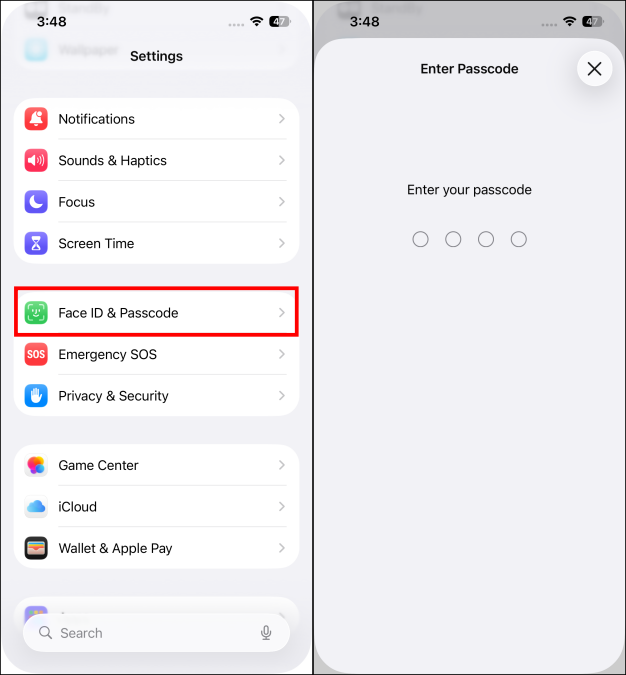
- Tap on Set Up an Alternate Appearance and then tap on the Get Started button.
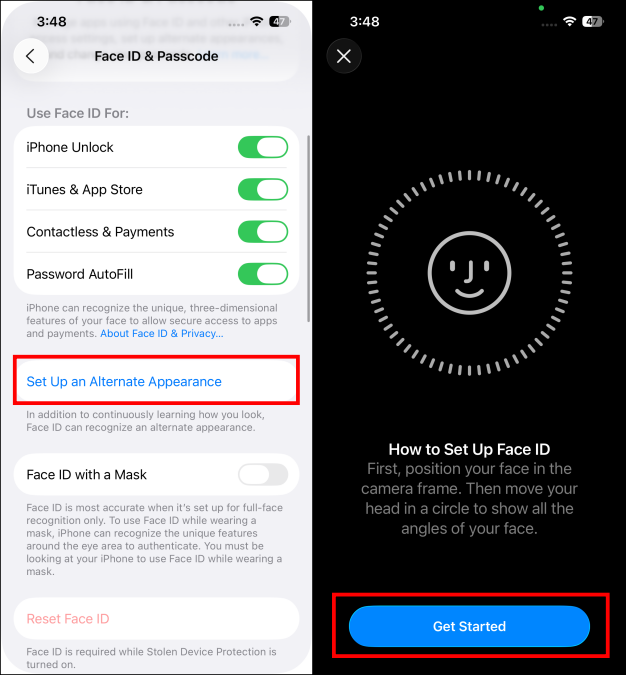
- Hand over your iPhone to the second person, and let them add their appearance to the Face ID.
That’s basically it. Once the second person has added their face to the alternative appearance feature, they will be able to unlock your iPhone as well.
Important Note: When you add a second Face ID, note that person will have complete control over your iPhone. They can unlock your iPhone, make purchases using Face ID, pay using Apple Pay, and do basically everything else. So, be careful when enabling this feature.
Don’t See the Alternate Appearance Option?
In case you don’t see the option to add an alternate appearance, it means that you’ve already added an alternative appearance to your iPhone. In this case, you will first have to reset your Face ID and then add both your and the second person’s appearance to unlock the iPhone easily. Here’s how you can reset Face ID:
- Go to Settings -> Face ID & Passcode .
- Enter your iPhone passcode to access the settings.
- Here, tap on Reset Face ID to start again.
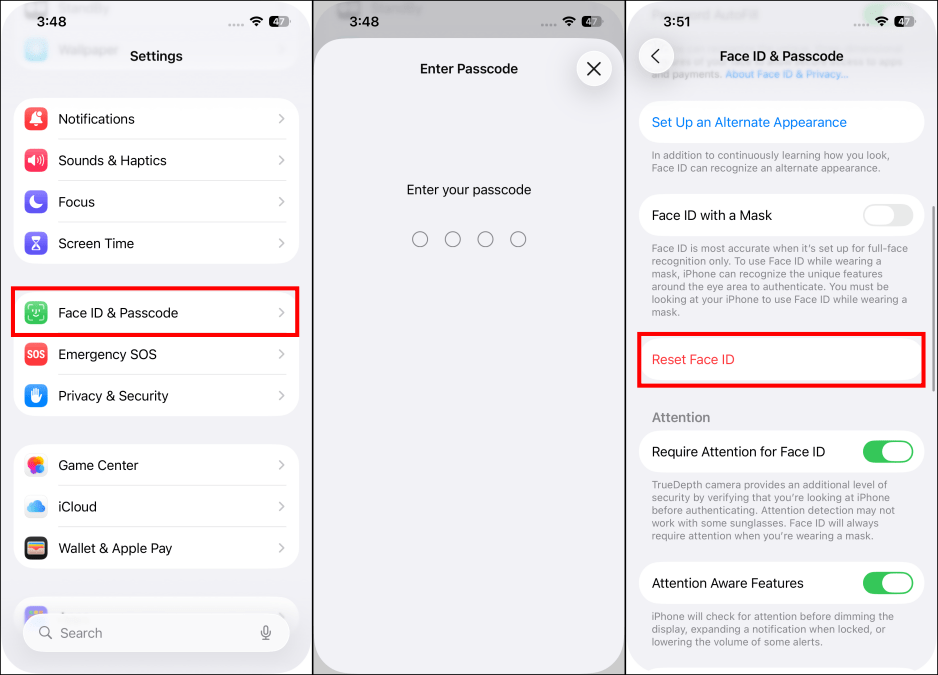
Important Note: You cannot Reset Face ID if you have Stolen Device Protection turned on. You need to disable it first by going to Face ID & Passcode > Stolen Devie Protection > turn off the toggle for Stolen Device Protection.
Once Face ID has been reset, you can add new appearances to your iPhone to be unlocked easily by both of you. If Face ID is still not working for you, and if you feel you need additional help, then we have discussed different ways to fix the issue with Face ID not working .
Yes, you can add a second Face ID using the Set Up an Alternate Appearance option in iPhone Settings.
You can set up two Face IDs on an iPhone. The first one is with the Set Up Face ID option, and another one is using the Set Up an Alternate Appearance. In case you already have two profile appearances for yourself, you’ll have to use the Reset Face ID option to erase both profiles and then set the Face IDs again.
Kanika has been a loyal iPhone user since 2014 and loves everything Apple. With a Master’s in Computer Applications, passion for technology, and over five years of experience in writing, she landed at Beebom as an Apple Ecosystem Writer. She specializes in writing How To’s, troubleshooting guides, App features, and roundups for Apple users to help them make the best use of their gadgets. When not writing, she loves to try out new recipes and enjoy some family time.
Add new comment
Name
Email ID
Δ



- Apple is reportedly planning to launch the iPhone 17e early next year.
- The affordable iPhone may feature the same design as the current iPhone 16e.
- It could include Apple’s A19 processor with a reduced CPU or GPU core count.
Earlier this year, Apple surprised us by launching the iPhone 16e when everyone (including me) was expecting the SE4. It seems like the Cupertino giant wants to continue this rebranded budget series, as a new report says that the company plans to launch the iPhone 17e early next year.
According to Gurman’s report on Bloomberg , Apple will be coming out with the successor to the iPhone 16e early next year. So we can expect it to probably launch around late February or early March. As per the report, the 17e will share the same design as the current iPhone 16e .
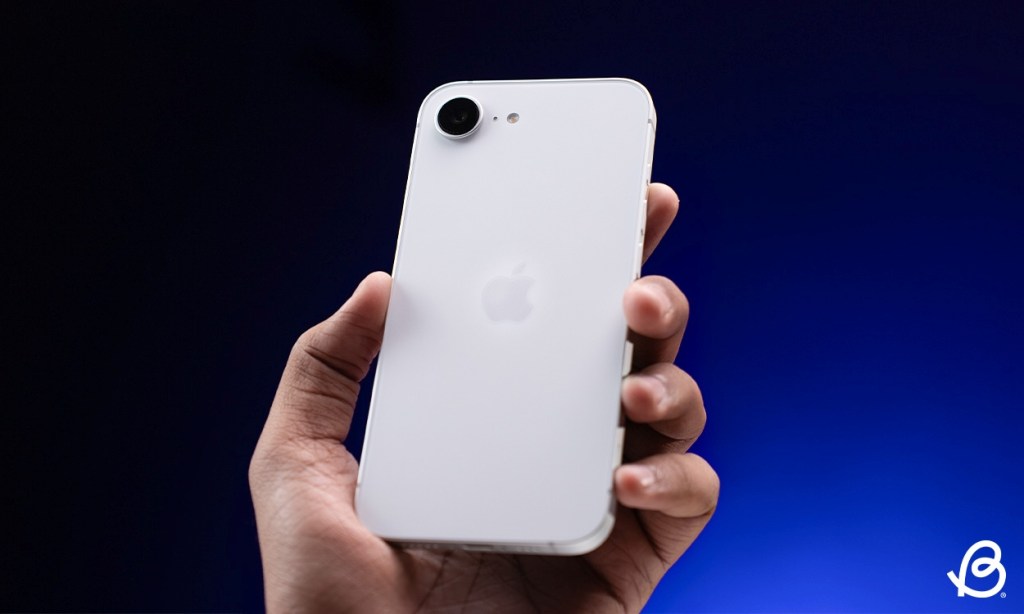
This isn’t the first time we’ve heard about an upcoming budget iPhone. Korean news outlet The Elec also reported that the device will feature the exact OLED panel as the current device. This could mean that the iPhone 17e might keep the notch, to help it differentiate from the rest of the iPhone 17 lineup.
It could also feature Apple’s upcoming A19 chipset, perhaps with a lower CPU or GPU core count. The current iPhone 16e features a 6.1-inch OLED panel, a notch for the Face ID camera, a single camera on the back, and uses a USB-C port, all for the cost of $599. This could also be the case with the iPhone 17e, bringing only a modest spec bump.
But that is mostly speculation, at this point. Mark Gurman also reported that Apple’s launch schedule includes an entry-level iPad, a new iPad Air, as well as a Mac external display. For now, all eyes are on the upcoming iPhone 17 series that is coming with a new design and the introduction of a new iPhone Air model to the lineup.
With over 4 year of experience under the belt, I cover all facets of consumer tech, from smartphones to other consumer electronics, our favorite social media apps, as well as the growing realm of AI and LLMs. As an Apps and AI writer app Beebom, I provide my expertise in all these areas, weaving stories that help you get familiar with the tech around you. But you will find me playing NYT daily puzzles in my free time.
Add new comment
Name
Email ID
Δ

- The next version of the Apple Vision Pro is expected to feature the latest M4 chipset.
- It will not come with any design changes, but it will feature a new, and hopefully more comfortable, strap.
- The new Vision Pro is slated to launch later this year, but Apple has not confirmed exact dates yet.
Apple’s first mixed reality headset hasn’t been the success the company was hoping for, but the company has not given up yet. Apple is planning to ship a new version of the Vision Pro as early as this year. And it is set to feature an M4 chipset and a brand new strap.
Going by the recent Bloomberg report by Mark Gurman, Apple is working on the next iteration of the Vision Pro headset, aiming to deliver better performance with the help of its latest M4 chipset . The company is also focusing on improving comfort while wearing the headgear.

Image Credit: Beebom
Gurman said in his report, “The updated Vision Pro will include a faster processor and components that can better run artificial intelligence, according to people with knowledge of the matter. There also will be a new strap to make it easier to wear the headset for long periods of time, said the people, who asked not to be identified because the plans haven’t been announced.”
There are no reports of any design changes, so it is likely going to be the same hardware with minor internal improvements. This aligns perfectly with Apple analyst Ming-Chi Kuo’s roadmap of Apple’s upcoming head-mounted devices. The Cupertino giant also has plans to develop its own smart glasses , similar to Meta’s, in the coming years.
Apple Vision Series and Smart Glasses Roadmap (2025–2028): Smart Glasses Set to Drive the Next Wave in Consumer Electronics Full story: https://t.co/41Moxlj1Ai pic.twitter.com/U2nQhBmEYg — 郭明錤 (Ming-Chi Kuo) (@mingchikuo) June 29, 2025
With over 4 year of experience under the belt, I cover all facets of consumer tech, from smartphones to other consumer electronics, our favorite social media apps, as well as the growing realm of AI and LLMs. As an Apps and AI writer app Beebom, I provide my expertise in all these areas, weaving stories that help you get familiar with the tech around you. But you will find me playing NYT daily puzzles in my free time.
Add new comment
Name
Email ID
Δ
