
- Google has launched the NotebookLM app on the Google Play Store and Apple App Store.
- You can suggest sources to the app, where it will summarize the topic and let you ask follow-up questions for easy understanding.
- It even lets you generate AI-hosted podcasts right from your smartphone.
Ever since the story broke out about NotebookLM and its incredibly real-sounding podcasts, people have been demanding that Google bring the service as an app on mobile devices. We reported that the app is in the works and might come out soon at the start of the month. Now, it is finally here. The NotebookLM app is now out on the Android and iPhone, so you can download it right away.
As you would expect, the app works quite similarly to the desktop version but makes things a little simpler. You can upload from various sources, like PDF, Website, YouTube, or any other copied text. Once you’ve added the sources, NotebookLM will perform its AI magic to break down the topic for you.

Image Credit: Google via Play Store
You’ll also see an option for Audio overviews, which essentially turns the notes into a mildly engaging podcast hosted by two AI hosts. A feature that has become a hot-button issue in various AI debates lately. But if you don’t care about that and just want to listen to a podcast on your history lesson, then you’ll love this feature.
Hands-On with Google’s NotebookLM App
Having the app available for my iPhone, I decided to give it a shot, since I loved using NotebookLM when it first came out. I was curious how Google would manage to transition the experience from desktop to mobile, and to my surprise, they have done a pretty good job.

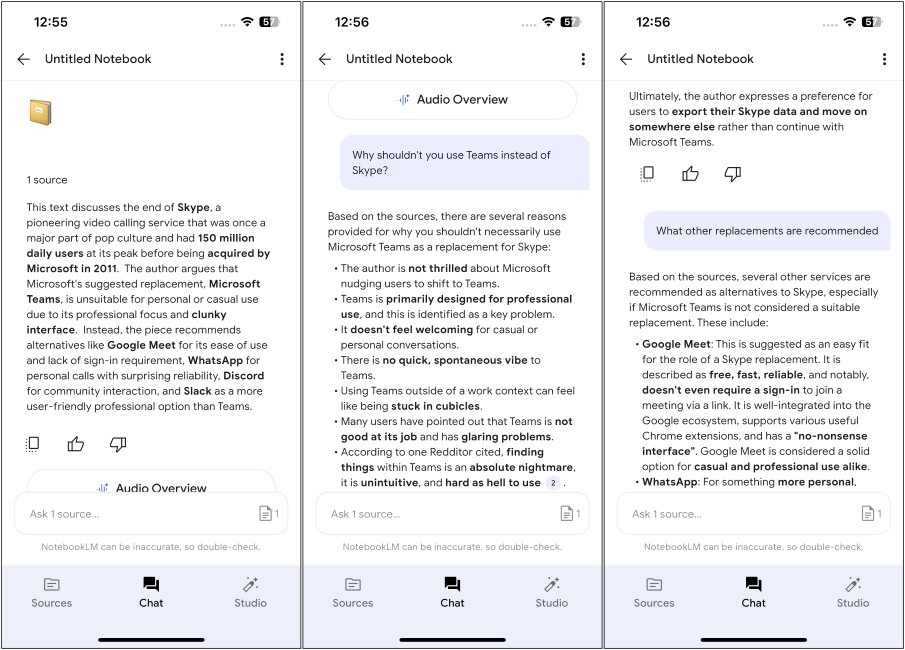
The app is simple, divided into three categories: Summarize, Chat, and Studio. The first tab is where you can add a new source and see a list of everything you have added so far. As a narcissist, I shared a link to one of my own articles on Skype’s short but sad demise . The app processed the article, showing its summary in the chat tab where I can ask follow-up questions.
If you are more of an auditory learner, then you’ll love the Studio section. Here’s where you can turn the source into the notorious podcast I’ve been raving about . It is a mildly engaging program hosted by two AI voice models who sound very uncanny valley. It’s weird every time I listen to these two because they sound so real, but I know they aren’t.

If you opt for the Interactive option, you can chime in as a guest caller to ask follow-up questions. After trying it out for myself, I’d say it is a hit or a miss thing. Sometimes, it works flawlessly without a hitch. While in some instances, the app crashed on me, or the audio overview just wouldn’t play at all.
That said, it is still a great way to learn and explore new topics during your commute or while relaxing. I wish it were a thing back in my student days. But now that it is here, I highly recommend that you try out the NotebookLM app on your phone and let us know what you think about it.

With over 4 year of experience under the belt, I cover all facets of consumer tech, from smartphones to other consumer electronics, our favorite social media apps, as well as the growing realm of AI and LLMs. As an Apps and AI writer app Beebom, I provide my expertise in all these areas, weaving stories that help you get familiar with the tech around you. But you will find me playing NYT daily puzzles in my free time.
Add new comment
Name
Email ID
Δ
