- When copyrighted music is detected in Twitch VOD, you may get copyright strikes.
- While you cannot play copyrighted music, you could play your own or by purchasing a license from platforms such as Uppbeat and Epidemic Sound.
- OBS can let you play music by not sending the audio from the streaming platform to VODs.
Twitch is one of the most popular streaming platforms with tons of creators streaming live in different categories. If you’re someone who’s thinking of streaming on Twitch, one of the questions that you may have in mind is whether you can play music on Twitch. The answer to that is a bit complicated. Here’s what you need to know.
Can You Play Music on Twitch?
Yes, you can play music on Twitch if it’s not copyrighted or if you have permission from its creators. According to Twitch’s terms and conditions, if you play copyrighted music on your stream, it will then be available as VOD (Video on Demand).
So, your channel may receive copyright strikes, and Twitch may cut parts of your video to remove the music. In some cases, your channel could also get banned. Twitch says that if its audio recognition system detects three or more cases of copyrighted music in a day, it will send an email notifying you about it.
Play Music on Twitch: The Easy Way
There are a few ways you can play music on Twitch so that your channel won’t get copyright issues. The first and obvious route is to use your own music, which not everyone can. Hence, you can rely on subscription-based music providers like Uppbeat and Epidemic Sound . You can also try creating music using AI with tools like Google MusicFX or Musicfy .
How to Stream Copyrighted Music on Twitch
You’ve probably seen a lot of creators play popular music on Twitch when streaming; they use a trick to get away. You can exclude music from Twitch VODs using OBS . The software gives you an easy way to separate music on your stream.
As a result, the music won’t be recorded during your stream, and won’t appear as VOD. This is all thanks to Twitch defining two audio routes – one that goes to VOD and one that’s live during the stream.
- Open OBS Studio and go to File > Settings > Output .
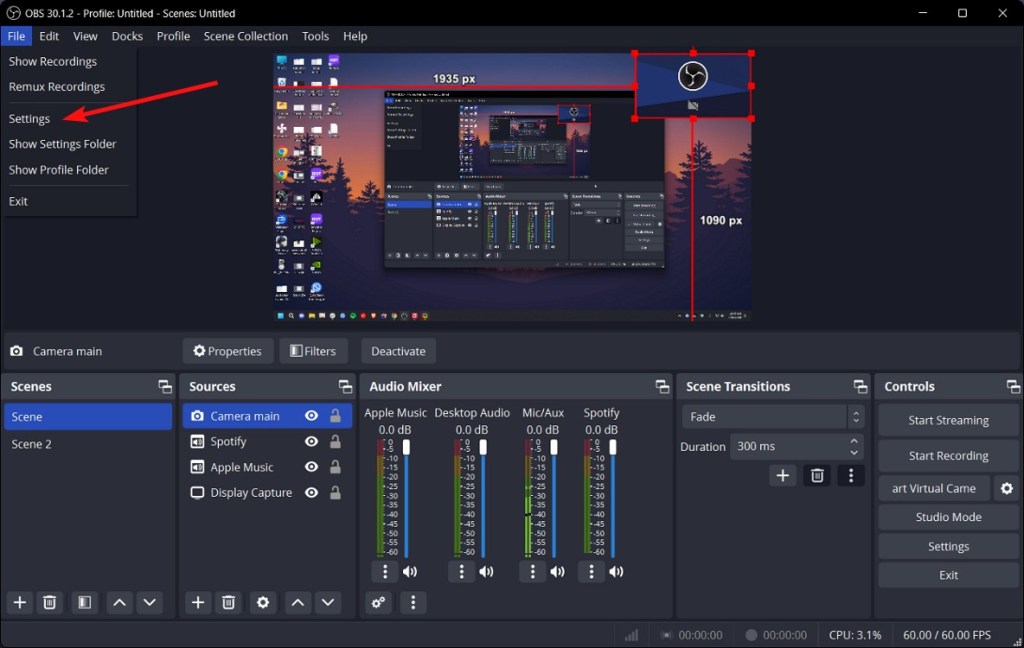
- Check the Enable Custom Encoder Settings (Advanced) and Twitch VOD Track (Uses Track 2) boxes under “Streaming”.

- Go to your sources, click on the + icon and select Application Audio Capture (BETA) .

- Name your source and select the music streaming platform you currently have opened on your computer (Spotify, Apple Music, etc).

- Once done, click on OK and the source should show up in the Audio Mixer.
- Click the cogwheels icon below the Audio Mixer to open the Advanced Audio Properties window.
- Here, uncheck the Track 2 box under “Tracks” for the music source you just added.

- And voilà! The music you stream when streaming on Twitch will no longer be recorded and added to Twitch VODs.
While this technically means you can stream copyrighted music during your Twitch stream, there’s no guarantee that your channel won’t get in trouble ever.
Abubakar covers Tech at Beebom, with his passion for technology tracing back to 2011 when he received a Dell Inspiron 5100 as a gift. He’s also a passionate advocate for the right-to-repair movement, believing in empowering users to maintain and extend the life of their devices. Outside the tech world, he enjoys watching anime and exploring his newfound enthusiasm for Japanese cars. In his free time, you’ll often find him immersed in Genshin Impact or researching his next gadget purchase. Before joining Beebom, he contributed to leading publications like Android Police, How-To Geek, and Fossbytes.
Add new comment
Name
Email ID
Δ


