Skype was one of the first apps to offer VoIP calls back in 2012, and remained the app to beat for many years. However, it has now been discontinued, forcing many of you to look for a new platform. While there are many options out there, not everyone is as reliable as you need them to be. That is why we have found some of the best Skype alternative apps for an enjoyable VoIP, video calls, and video conferencing experience.
Best Skype Alternatives for Everyone
I’ve used Skype for both personal and professional needs, so finding anything that can fulfill both roles is difficult. Having said that, I was able to create this list of apps that I have subsequently begun to use or have previously tried and found to be a competent alternative to Skype. Some apps are mostly used for personal purposes, although they can also be relied on by small teams.
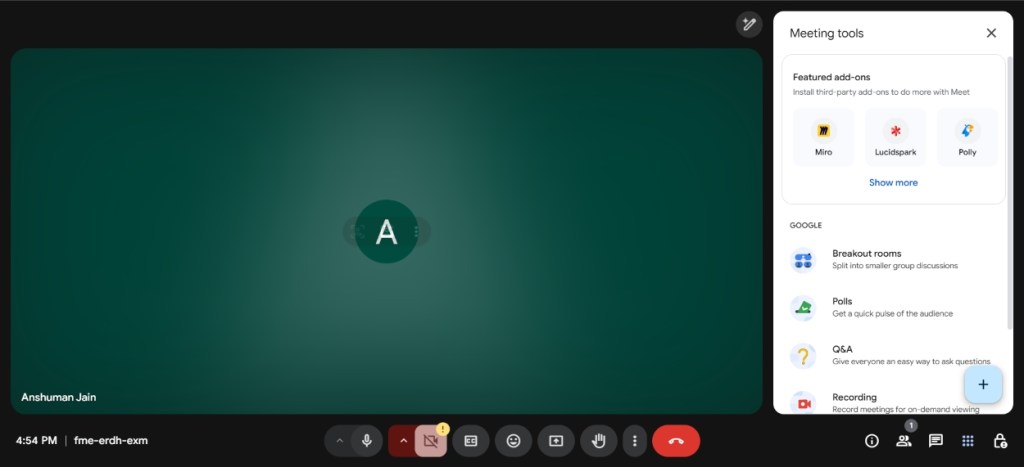
1. Google Meet – Best Overall Skype Alternative
- Supported Platforms: iPhone, Android, Web
- Pricing: Free, starts at $6/month/user (part of G Suite)
2. Zoom – Most Features in a Free Skype Alternative

If there was any app making the buzz during the pandemic, it was Zoom. It became the go-to service for any professional team or business that is looking for video conferencing software. And it has only improved since then. It offers high-quality video calls, and similar to Meet, it lets you host up to 100 participants in the free plan. However, the time limit is reduced to 40 minutes per session only.
Why I love Zoom as a Skype alternative has to do with the fact that Zoom is easy to set up and use, and is available across devices. You can use it on mobile, web, or using its desktop apps. The free version is very generous and enough for most small businesses. The service has a lot of tricks up its sleeves, and they have also added Zoom Mail, which lets you connect the app with any third-party email provider like Gmail, and a built-in Calendar tool as well.
- Supported Platforms: iPhone, Android, macOS, Windows, Web
- Pricing: Free, Pro starts at $14.99/month
3. WhatsApp – Best Skype Alternative for Personal Use

Outside of the U.S., I think it would be a no-brainer not to recommend WhatsApp. With billions of daily active users across the globe already using the app for regular voice and video calls. It covers the personal aspect of Skype conversations. The service supports up to 32 participants on a group video call, which is great whether you are catching up with your extended family or hosting a session with a small team.
Plus, there’s no limit to the duration here either. They have slowly started to add more professional features into the mix as well, like speaker identification, screen sharing with audio, and more. And I can stand by the quality of its voice and video calls. Even on unreliable networks, it offers a decent experience, and chances are you have the app installed already. Not to forget, you can now enjoy these features on its official Windows and macOS app too.
- Supported Platforms: Android, iPhone, Windows, macOS
- Pricing: Free
4. Slack – Best Skype Alternative for Office

Slack is something that I use daily in my office, and I must say that it is one of the best lighthearted professional tools out there. It is easy to get used to, and features several professional tools which are great for any young startup or a company with about 50 employees. The service offers its version of video calls called Huddle that you can initiate right from a chat and invite others.
The free version lets you host a one-on-one huddle for free, but you will need to get the paid plan, which lets you add up to 50 participants. It is still comparatively less than what you get with the free version of both Google Meet and Zoom. However, it also serves as a collaboration tool where you can create multiple channels and even connect third-party services too.
- Supported Platforms: iPhone , Android, macOS, Windows, Web
- Pricing: Free, starts at $10/month/user
5. Microsoft Teams – Best for Office 365 Users

Microsoft Teams is the actual successor to Skype, as the company itself prompts you to move over all your data to Teams. If you want to preserve your Skype chats and contacts, then Teams is the last resort for you. Talking about the service, it offers video calls, online conferences, access to the Office 365 suite of apps, real-time collaborations, and file sharing via OneDrive.
One thing I love about Teams is that it allows you to instantly convert a group chat into a conference call. Depending on your plan, you can host up to 10,000 people in a conference, so bandwidth is no concern here. Plus, there’s no need to create a new account as you can continue using your Skype credentials here.
- Supported Platforms: iPhone , Android, macOS, Windows, Linux, Web
- Pricing: Free, starts at $10/month/user
6. Webex – Best Web-Based Solution

After Skype, many of you might be looking for a long-term solution with a highly customizable environment on the administrative end. Enter Webex by Cisco. This video conferencing app offers granular controls for onboarding features like setting a minimum character limit for passwords or restricting anyone else from joining an ongoing session.
The service lets you add up to 100 members on a video call in the free version, with a duration limit of 40 minutes. This can be extended to 24 hours with the upgraded plan. It features most of the collaborative tools like virtual whiteboard, screen sharing, recordings, pin videos, and other media. However, it doesn’t offer international phone numbers, and you need to send an email with a link to invite others, which can be a hassle.
- Supported Platforms: iPhone , Android, macOS, Windows, Linux, Web
- Pricing: Free, starts at $13.50/month
7. Discord – Best for Close Communities

While Discord is mostly used by the gaming community, it’s one of the best online chat services to replace Skype. The thing I like most about Discord is that it gives you a fun environment. You can create multiple channels that act as groups or sessions for friends and family. These channels allow you to quickly chat, make voice and video calls where you can add up to 25 participants.
It even lets you share your screen, useful for presentations. Plus, you can switch between the screen sharing mode and video chat mode in an instant. And if you are somewhat familiar with Discord, then you can further enhance your experience with Discord bots . They let you to do things like play music using Spotify, add support for Wikipedia, YouTube, and other websites, and more. Overall, I find Discord to be a fun and powerful alternative that you are going to enjoy using more than Skype.
- Supported Platforms: iPhone , Android, macOS, Windows, Web
- Pricing: Free, $9.99/month
8. FaceTime – Best for Apple Users

Image Credit: Akshay Gangwar/ Beebom
Those of you part of the exclusive circle of family, friends and coworkers with only iPhones can even resort to FaceTime as a Skype alternative. FaceTime works phenomenally well and is available on all three major Apple platforms including iOS, iPadOS, and macOS. And when Apple introduced FaceTime group calling with iOS 12 and macOS Mojave , it instantly solved the only problem that users had with this voice and video calling service.
It supports 32 people on the same call and has a nice feature where the speaker’s window comes to the front. In addition, there’s SharePlay to cast your screen during the call or enjoy movies and TV shows together. Moreover, you can even share a FaceTime link to your Android buddies, and they can join in on the fun. It’s surely not intended for professional use, but it serves as a good option nonetheless. Especially because it is completely free.
- Supported Platforms: iPhone, iPad, Mac
- Pricing: Free
Comes Pre-installed
9. Telegram – Best Free Alternative

If you are looking for something like WhatsApp but more versatile, then I would go with Telegram. It brings the best of both WhatsApp and Discord. It offers personal chats, channels, and even bots to automate certain tasks for business accounts. However, its biggest highlight is the fact that it allows 200 participants on a group call at the same time in the free version.
This is more than what Google Meet and even Microsoft Teams have to offer. Plus, there is no time duration either, making it a very compelling option if a free solution is all you are looking for. Besides that, the text chat experience is also highly customisable, and I don’t feel you would find any need to upgrade to premium. While it isn’t rich in collaborative features, it is still a good option for personal use as well as large communities.
- Supported Platforms: Android, iPhone, Windows, Linux, macOS
- Pricing: Free , $4.99/month
10. Signal – Best for Privacy

Last but not least, I picked Signal, which is the most secure solution out there. It is pretty in line with other personal messaging apps we have talked about, like WhatsApp and Telegram. However, unlike those solutions, you can simply invite people via a link similar to Google Meet and Microsoft Teams. Plus, Signal can accommodate up to 50 participants at a time, which is already more than these messaging apps.
This immediately earned it as a contender on our list, and I felt it was something Skype users may want to migrate over to. It end-to-end encrypts all calls, and your number won’t even show up for the other person. There is also no data collection of any sort. Proving it as the best option if you are part of a secret society. All of it is free to use, and of course, you can do private texts, send media and docs as well as voice messages.
- Supported Platforms: Android, iPhone, Windows, Linux, Mac
- Pricing: Free , accepts optional donations
I hope you were able to find a suitable replacement for Skype in this article. We have included options for both personal and professional use. Whether you want to have an online get-together with friends or conduct a video conference with your team, you will find an app here. I have also included paid and free options to make it easier for people with a low budget. So, check them out and let us know which app fulfilled your quarantine needs.

With over 4 year of experience under the belt, I cover all facets of consumer tech, from smartphones to other consumer electronics, our favorite social media apps, as well as the growing realm of AI and LLMs. As an Apps and AI writer app Beebom, I provide my expertise in all these areas, weaving stories that help you get familiar with the tech around you. But you will find me playing NYT daily puzzles in my free time.
Add new comment
Name
Email ID
Δ

Microsoft is celebrating its 50th anniversary at a time when technology is about to reshape the world. Founded by Bill Gates and Paul Allen in a small rented office in Albuquerque, Microsoft is now the world’s second most valuable company. Over the past 50 years, the software giant has faced many challenges, antitrust lawsuits, and fierce competition, but can it stay ahead in the next five decades? To understand what the next 50 years hold for Microsoft, read on.
What Microsoft’s History Tells Us About the Next 50 Years
Microsoft started as a small company in 1975, developing software for the Altair 8800 — an early personal computer. By 1980, Microsoft needed an operating system to power the IBM PC. So, it acquired 86-DOS and modified it to MS-DOS. MS-DOS became massively popular and by 1985, Microsoft launched its first graphical operating system called Windows 1.0.

Paul Allen and Bill Gates in 1981 | Image Credit: Microsoft
10 years later, in 1995, Microsoft released Windows 95 which was a huge commercial success. For the first time, Microsoft introduced the Start menu, Taskbar, and Windows Explorer. They are still part of the latest Windows 11 OS, even after 30 years.
Following that, Microsoft launched Windows XP, Xbox, and the Office suite, which expanded its footprint in the PC space. Now, 50 years later, Windows has a desktop market share of over 70% , maintaining its position as the dominant OS. In these last 50 years, Microsoft has diversified its business to cloud computing (Azure), gaming (Xbox), productivity (Microsoft 365), and its next big thing – Copilot AI.
Beyond being a consumer-centric company, Microsoft has become a massive corporation that provides its services to enterprise customers as well. In fact, today, Microsoft’s revenue mostly comes from Azure’s cloud infrastructure and AI services. Meanwhile, the remaining revenue comes from Microsoft 365, Windows, and Xbox.
The only major space where Microsoft doesn’t have a footprint is mobile. Windows Phone exited the smartphone OS market in 2020. Bill Gates recently admitted that losing the phone market to Android was his “greatest mistake”. Besides that, Microsoft in 2025 announced that it’s quitting the HoloLens hardware business completely, ending its Mixed Reality vision.
Microsoft’s Role in AGI Development
When Satya Nadella took over Microsoft as the CEO in 2014, the Redmond giant was not in good shape. Nadella ended several struggling projects like the Windows Phone. And focused on its server businesses like Azure cloud, AI, enterprise solutions, and developer relations. As a result, Microsoft has become the world’s second most valuable company by market cap, joining the $3 trillion club in market valuation recently.
The credit largely goes to Satya Nadella for transforming Microsoft in the last decade. Many credit Nadella’s leadership for striking a deal with OpenAI back in 2019. Microsoft invested $1 billion in OpenAI to support the development of AGI (Artificial General Intelligence) — an AI system capable of matching human capabilities.

Image Credit: OpenAI via YouTube
So far, Microsoft has invested close to $14 billion in OpenAI and has a 49% ownership stake in the company. This has put Microsoft at the forefront of AI development. The partnership allows Microsoft to exclusively access OpenAI’s latest breakthroughs and AI models. It can also commercialize OpenAI’s models. Thus, allowing the company to integrate the latest AI models into its products. Like Copilot, Microsoft 365, and Azure AI for enterprise offerings.
Not only that, the terms of the partnership say that OpenAI must use Microsoft Azure for all cloud infrastructure needs. Only recently, Microsoft relented and allowed OpenAI to purchase cloud resources from Oracle. Some reports also say that OpenAI has to share 75% of its revenue with Microsoft until the investment is recovered.

Image Credit: Beebom
It means that Microsoft has a huge financial influence over OpenAI’s operations. And in the future, Microsoft will gradually recover its investment while having access to the latest AI technologies. Having said that, the partnership also says that once OpenAI achieves AGI internally, Microsoft will lose access to OpenAI’s technologies.
To keep its lead in the AI race, Microsoft is putting its AI division in order. Microsoft is reportedly developing internal reasoning models to reduce its over-reliance on OpenAI. The company has already trained smaller models such as Phi for everyday use and Muse AI for generating gaming visuals.
Microsoft is also focusing on open-source models including China’s DeepSeek which shocked the world with its efficient training methods. Overall, Microsoft is currently a key player in AI development, leveraging its partnership with OpenAI and developing in-house AI models as well. Until AGI is achieved, expect Microsoft to continue its lead in the AI race.
Microsoft’s Next 50 Years: Future of Windows
While Windows doesn’t directly contribute major revenue for Microsoft through licensing, the platform serves as the foundational bedrock, powering its software, cloud, and enterprise services. On the consumer side, Windows 11 is the latest desktop OS by Microsoft, and it’s evolving into a great operating system. Microsoft is slowly but gradually improving the design language of Windows 11 to offer a consistent PC experience.

Image Credit: Microsoft
Microsoft is putting effort into making Windows 11 a more modular OS . We have already seen that Windows 11’s various elements such as the desktop shell, Taskbar, Notification Center, etc. are being decoupled from explorer.exe to make each component modular and updatable. Microsoft has already showcased Windows 10X (now canceled) which was based on a highly-modular Windows Core OS .
In the future, we might see different flavors of Windows running on various form factors such as foldable devices, tablets, and more. It’s being said that Windows 12 should come with a floating Taskbar and a new modular desktop interface, optimized for touchscreen devices.
Apart from UI/UX improvements, Microsoft is also adding a lot of AI features to Windows 11. Besides current AI features on Windows 11 such as Recall, Semantic Search, Cocreator, etc., the future of Windows lies in Agentic AI -driven integration. Copilot on Windows will be able to perform actions in real-time using the vision capability. Users will be able to voice chat with Copilot and ask it to perform actions on their Windows PCs.
To enable this, Microsoft is already preparing agentic frameworks for Windows like OmniParser, Magentic-One, AutoGen, and Windows Agent Arena to handle complex tasks. While some companies are bringing AI agents to the web browser, Microsoft is taking it to the OS level so that it can perform both system-level and web-based actions . Basically, in the future, you can expect that Windows will become an AI-driven operating system.
To leverage AI for gaming, Microsoft has already showcased its Muse AI model that can generate game visuals and controller actions. It’s quite possible that Generative AI will be tightly integrated into Xbox to enable features such as AI-assisted gameplay, environment generation, personalized experiences, and more.
Microsoft’s In-house Chips and Quantum Computing
Besides software, on the hardware side too, Microsoft is preparing for the future and reducing its reliance on Nvidia . In 2023, Microsoft announced its custom Azure Maia 100 chip for AI workloads. While Google has its own TPU for AI workloads, and Nvidia continues to sell GPUs for AI training and inference, Microsoft needed an in-house chip , hence, Maia 100 was born. It’s an AI accelerator that can run large-scale AI workloads on Azure’s cloud.
The company also announced an Arm-based Azure Cobalt CPU for general-purpose compute workloads, just like Google’s Axion CPU. Since Microsoft has a major cloud business, the chip is going to reduce datacenter costs for Microsoft and cut down dependency on external vendors like Nvidia and Intel.

Majorana 1 | Image Credit: Microsoft
Finally, in February 2025, Microsoft announced its first breakthrough in quantum computing . The company unveiled Majorana 1, a quantum computing chip for quantum computers. Unlike traditional qubits, Majorana 1 uses topological qubits which are said to be more stable and less prone to errors.
For this, Microsoft invented a new class of materials called “topoconductors”. Microsoft claims that Majorana 1 can scale up to 1 million qubits on a single chip. Overall, Microsoft is doing pioneering work in the field of quantum computing while also developing in-house chips to reduce reliance on external vendors.
And as a software-first company, Microsoft is entering the AI era with high expectations, which has the potential to transform its entire ecosystem including Windows, Xbox, Azure, and Microsoft 365. In the next 50 years, we expect Microsoft to lead the industry with fresh innovations, but can it outpace Google and Apple? Only time will tell.
Passionate about Windows, ChromeOS, Android, security and privacy issues. Have a penchant to solve everyday computing problems.
Add new comment
Name
Email ID
Δ
